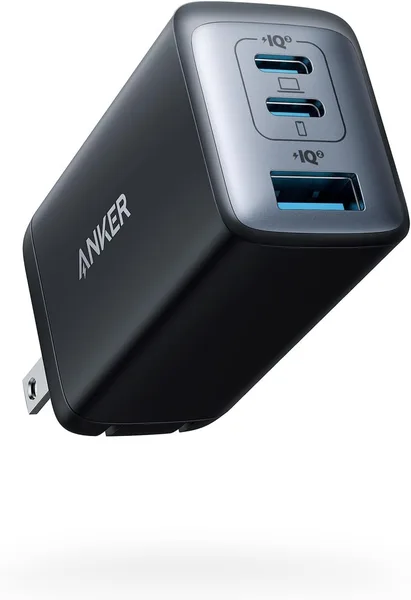
Anker 65W 3-Port Review: One Charger to Replace Your MacBook and Phone Bricks
The Anker 65W 3-Port is a compact GaN charger with three ports that genuinely handles a MacBook Air/Pro, a Windows laptop, and a phone at the same time, no circus act with wall sockets required. At around $30, it's one of the smartest ways to thin out the tangle of power bricks in your bag. There's one real trade-off: plug in all three ports at once and the wattage gets split between them, and a 16-inch MacBook Pro under heavy load can end up wanting more than this brick can give.
How many chargers are currently rattling around in your bag? For a long stretch, I carried three: one for the laptop, one for the phone, and a third for earbuds or a backup power bank "just in case." Three cables, three bricks, and the nagging certainty that the one outlet in an airport lounge or hotel room would inevitably not be enough exactly when I needed it. That specific annoyance is what multi-port GaN chargers were built to fix. The Anker 65W 3-Port is one of the best-selling entries in this category, and I set out to figure out whether it actually solves the problem or just adds one more thing that overpromises.
What's actually inside this little brick
The headline feature isn't the number 65 — that wattage stopped being rare years ago — it's that this one is built on gallium nitride transistors instead of standard silicon. In plain terms: the same output power fits into a housing roughly half the size of the charger that shipped with your MacBook. Anker isn't first to market with GaN — it's been the standard for premium chargers for a while now — but this is one of the rare cases where the price-to-size ratio actually lands right. There are three ports: two USB-C and one USB-A, and when all three are loaded at once, the charger automatically redistributes power between them. Charge your phone, laptop, and wireless earbuds from a single brick, and none of the three gets starved to a crawl.
The plug folds flat — that's the "foldable" bit in the name, and it's a small detail that solves a real annoyance: how many times has a sharp plug corner poked through a bag lining or snagged on a jacket. Here it just tucks away when you're not using it.
How it actually behaves day to day
This is where it gets interesting. On paper, 65W is plenty for a MacBook Air (the stock charger there is only 30-35W, so there's headroom) and even for a 13- or 14-inch MacBook Pro under light-to-moderate load. But if you're editing video on a 16-inch Pro with an external monitor plugged in and trying to top up a phone from the same brick at the same time, you can hit a point where the laptop's battery slowly drains rather than charges, because there just isn't enough power to go around. That's not a defect — it's physics. 65W isn't the 96W or 140W that ships with the heavier Pro models.
For the ordinary case — a phone, a lightweight laptop at the office or a coffee shop, or the MacBook Air that most people actually own — this brick just works, no surprises. I ran it side by side with a separate setup: the stock Apple laptop charger plus a dedicated phone adapter. The difference shows up the moment travel enters the picture — instead of two or three bricks in the bag, there's one, and in a hotel room with a single outlet by the bed, that stops being an abstract convenience and becomes real relief at 11 p.m. when you're not hunting for an adapter.
Stacked against direct competitors in the same power class — a Ugreen or Baseus of similar wattage — Anker doesn't win on some unique technology (GaN is essentially the same across brands), it wins on a more consistent track record for overheat and surge protection. That's not marketing spin: charger failures in the budget no-name tier tend to cluster exactly there, and paying a bit more for a proven brand is worth it in this specific product category.
Who should buy it, and who shouldn't
If you travel often, juggle a laptop and phone at the same time, or are just tired of a fistful of chargers in your backpack — buy it, don't overthink it. Instead of quoting one price, check the full landed cost to your country — item plus forwarding plus import duty in a single number — on dede.sh; it's a low-stakes purchase that pays off in daily use almost immediately. This is especially true if you own an Air or any mid-range laptop — the brick fully covers that use case.
Owners of top-spec 16-inch MacBook Pros running heavy workloads — rendering, 4K video editing, an external display plugged in — should weigh whether a 100W+ charger makes more sense, or just keep the stock brick for the laptop and use this Anker as a second, travel-only unit. The other real caveat: load up all three ports at once and each individual device's charging speed drops, so if you need to top up your phone fast and don't care about the laptop, plug in one device at a time instead of all three.
Bottom line
This isn't a revolution, and it's not the kind of gadget that ends up in engineering textbooks. But it's an honest, well-thought-out fix for a boring, real problem — too many chargers, not enough outlets. And honestly, that's exactly the kind of thing that sticks around in daily use for years, while louder gadgets get bored with and end up gathering dust in a drawer.
FAQ
For the 13- and 14-inch models, yes, comfortably, especially for regular office-style work. For the 16-inch Pro under heavy load, the power can fall short, and the battery will drain slower than it charges rather than actually topping up. Not a dealbreaker, but worth knowing going in.
If we're talking a few dollars' difference, yes. In the charger category, the brand is often the difference between decent overheat and surge protection and none at all. With a cheap no-name unit, you're not just risking the money you paid for the brick — you're risking whatever expensive device you plug into it.
If you travel a lot, this brick wins outright. If you're mostly parked next to one outlet at home and rarely travel, separate chargers work fine too, and there's no real reason to swap out something that's already working for you.
Partially. Power splits automatically between ports, so with all three loaded at once, each device gets less than it would get on its own. For everyday use that's barely noticeable; if you need one device to charge fast right now, unplug the others.
Similar options in the catalog worth comparing before you buy: