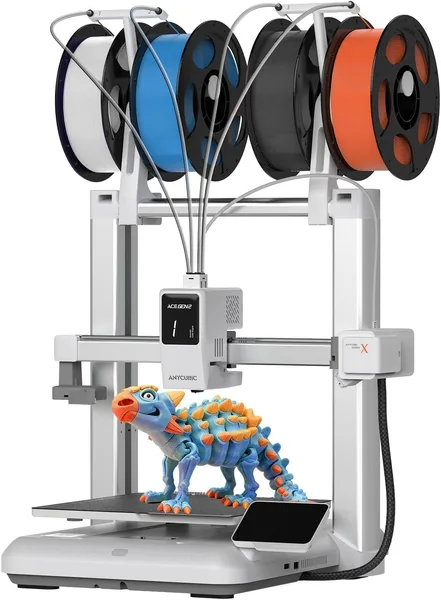
Anycubic Kobra X Multicolor Review: Native 4-Color Printing Without an AMS
The Anycubic Kobra X Multicolor tries to give people four-color printing without a separate module like an AMS, for roughly the price of an ordinary budget FDM printer. It prints fast, blends colors decently, but the automatic filament switching eats up both time and plastic. Worth buying if you want to see multicolor printing in action and don't mind wasting some material. If you print single-color functional parts, it's an upgrade you don't need.
There's one thing nobody mentions in the opening lines of multicolor printer reviews: the first time you watch a model repaint itself mid-print in the slicer, rather than get assembled from separate parts, it's genuinely a sight to see. Even if you're jaded and have watched a dozen Bambu Lab AMS videos already. The Anycubic Kobra X Multicolor is built around exactly that feeling, just at a fraction of the cost of a full automatic spool-swapping system.
Let's get one thing straight first: this isn't the same tier of multicolor as the flagship closed systems. The native 4-color unit feeds up to four filaments into a single hotend, and by mixing them on the fly you can get a claimed 19 shades — not 19 separate spools, but combinations of the base four. Worth knowing going in, because some buyers expect a rainbow out of the box and instead get a four-color palette plus its blends. For logos, multicolor figurines, or educational models, that's plenty. For photorealistic gradients, it isn't.
The printer really is fast. The claimed 600 mm/s isn't a marketing number for the spec sheet — the frame is genuinely built for high acceleration, and simple, low-detail parts fly off the plate in a fraction of the time older budget machines needed. But the moment multicolor enters the picture, forget about speed: every color change means purging the nozzle, retracting the old filament, and loading the new one, and on a complex model with frequent switches that can stretch a print to two or three times longer than a single-color equivalent. Add in the purge tower eating filament by the handful, and the real cost of a colorful figurine ends up higher than it looks at first glance.
The AI camera is a genuine bonus, not a box-ticking gimmick. It actually catches the usual failure modes: bed adhesion loss, spaghetti when a print goes sideways. If you're the type who starts a print and goes to bed or heads to work, that's real peace of mind. Compared to the old routine of monitoring a printer through a bare webcam and a pile of homemade scripts, this is just easier out of the box.
Assembly and setup live up to the marketing — it really is simpler than on the older Kobra models. Axes come pre-calibrated, auto bed leveling is included, so you can start your first print within an hour of unboxing instead of spending half a day fighting it. But feeding four filaments at once is its own story. The tubes are easy to cross up on first install, and if one of the four channels is clogged or poorly loaded, you won't find out until halfway through a print, when a color suddenly vanishes from the model. Careful loading really pays off here — don't skip checking each channel individually before a long print.
Compared to the classic approach — print in one color, or do multicolor manually by pausing the printer and swapping spools by hand — the Kobra X Multicolor is a clearly more convenient and faster way to get a colorful result without babysitting it. Compared to AMS-style systems from Bambu Lab, it's cheaper and simpler, but the palette is narrower and purge waste is higher. It's a trade-off, and everyone has to decide honestly which side matters more to them.
Marketplace pricing runs around $260, which is a solid deal for a native multicolor FDM printer — comparable systems with a dedicated feeder unit cost noticeably more. Once shipping and import duty to your country get added, the final number climbs, so check the full landed price — item, forwarding, and duty combined — on dede.sh before you decide. The printer itself, as a machine, stays firmly in "affordable multicolor" territory rather than the premium tier.
Who should buy it. Anyone who wants to try color printing for hobby projects, gifts, dioramas, or teaching models, and who's fine treating wasted plastic as part of the process. Anyone who already owns a printer for functional parts and wants a second one "for the fun stuff." Skip it if you mostly print technical parts in one color — the premium for the multicolor unit never pays for itself there, and you're better off looking at a standard single-color FDM printer from the same brand. Also skip it if you don't have basic conditions for 3D printing sorted — a ventilated space and a flat, vibration-free surface — because the four-channel feed is more sensitive to the smallest misalignment than a regular single-filament setup.
There are really two core trade-offs: a meaningful filament overhead from purging the nozzle on every color change, and the fact that "19 colors" means combinations, not separate spools, so complex gradient work will outgrow this unit fast.
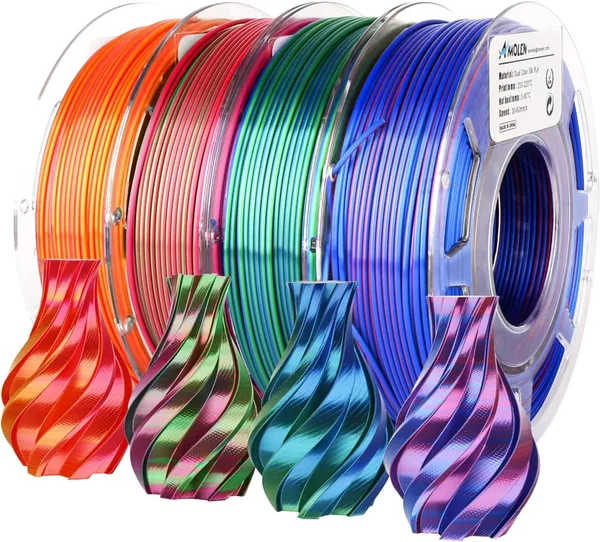
If the Anycubic Kobra X Multicolor sounds like your printer, check out the 3D printer catalog too — it has cheaper single-color models as well as consumables. And don't forget to line up filament and accessories ahead of time: even the best printer turns out mediocre results with bad plastic — take a look at the 3D printing consumables section.
FAQ
No, and that's the biggest misconception around this printer. The unit feeds four base filaments, and 19 is the number of possible combinations and shades from mixing them. That's enough for logos and simple multicolor figurines, but not enough for photorealistic gradients.
If entry price and simplicity matter most, the Kobra X wins. If you need a wider palette, less filament wasted on nozzle purging, and slightly faster color changes, AMS-style systems are still ahead — but they cost significantly more.
On simple single-color parts, the speed is real and noticeable. But the moment multicolor kicks in, effective print speed drops sharply from constant filament-change pauses — forget about record speeds at that point.
No. If 90% of your printing is brackets, holders, and technical prototypes in one color, the multicolor unit will just sit idle while the purge waste annoys you. A single-color printer at the same tier will be both cheaper and more practical for that use case.