Apple 20W USB-C: worth buying instead of overpaying at the store?
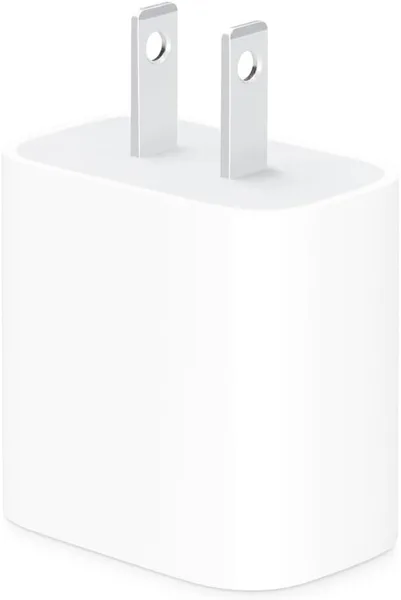
This is the very brick Apple stopped putting in the iPhone box — small, white, no fuss. It charges fast (0–50% in about half an hour on modern models), works flawlessly, but costs about a third of the price of the cable you still have to buy to go with it. Worth it if you specifically want the original and won't fiddle with third-party clones — but the premium for the logo is real here.
Remember the moment you open a new iPhone box and there's only a cable inside? No charger, not even an adapter. At first it was genuinely irritating. Then it turned out the whole "caring for the environment" circus simply forced millions of people to separately buy what used to sit in the box for free. And here it is, that very brick — now at its own price.
I've held a dozen similar adapters over the past year, and the Apple 20W is probably the most "nothing special" device of the lot. In a good way. It does exactly what it promises and no surprises.
What it actually is
It's a 20-watt power adapter with a USB-C port, made compact — about half a matchbox by eye. No extra indicators, no switches, no trendy percentage display — just a plug and a port. Push it into the socket, connect a USB-C — Lightning cable (or USB-C — USB-C if you have a newer C-port iPhone), and it charges.
The main feature here is Power Delivery support. For iPhones from roughly the 8th model on, that means the very "0 to 50% in 30 minutes" Apple wrote on presentation slides for years. And it's not a marketing trick — in practice the difference from a classic 5-watt charger is felt at once: instead of crawling slowly, the progress bar genuinely jumps.
But there's a catch few people write plainly: there's no cable included. None at all. You buy the brick — and if you don't have a spare USB-C cable, you'll have to buy that too, and an official Apple cable costs almost as much as the brick itself. So the real cost of "official fast charging" is two receipts, not one.
How it lives day to day
In daily use the brick behaves predictably boring — and that's a compliment. It doesn't get so hot you're afraid to touch it (slightly warm under load, like any GaN or even non-GaN brick, but no drama). It doesn't whine, squeak or blink. Plug it into the kitchen socket, leave it overnight — in the morning the phone's full, the socket's intact.
Compared with what most people buy now — some Anker Nano or Baseus GaN at 20–30 watts — there's no fundamental difference in charge speed for an iPhone. The Power Delivery protocol is the same, the physics identical. The difference is size (third-party GaN bricks are often even more compact thanks to newer internals), price (third-party is almost always cheaper) and, let's be honest, the logo. If it matters to you that everything is "like the App Store — original only," then no questions. But if the point is just to charge the phone without a dance, look at the alternatives too, because the premium here isn't for speed, it's for peace of mind and Apple's warranty.
Another thing that genuinely pleased me: this brick is universal not just for iPhones. It charges AirPods, an iPad — a MacBook Air it won't top up at max speed (that needs more watts), but some Android flagship or tablet is perfectly fine, because the USB-C PD standard isn't tied to a brand. So in a household with mixed gadgets this brick becomes the "shared charger" that sits on the nightstand and fits everyone.
A note on plugs: bricks ship in different socket standards depending on the region, so check that the version you're getting matches your outlets or comes with a suitable adapter — most travel-friendly variants have interchangeable heads, so you won't be hunting for a converter.
Who should buy, who shouldn't
If you own a recent iPhone and want the original charger with no experiments — take it, you won't regret it. It's a reliable, proven thing, simple enough for three generations of a family, and it definitely won't fry the phone's port through dodgy internals the way no-name market adapters can.
But if budget is tight, or you need to charge several devices at once (a laptop and phone together, say) — look toward GaN bricks at 65–100 watts with multiple ports. There's more power and often a better price per watt. The Apple 20W is a narrowly specialized tool for a single phone, and trying to squeeze more from it isn't worth it.
The main trade-off here is one: you pay for the brand and reliability, not for unique technology. Inside is the same working principle as clones at half the price. But if you ever have to claim warranty — the original is the original.
On marketplaces this Apple 20W USB-C brick sells for around $15 — cheap for a first-party item, though the cable, to repeat, is separate. Check the full landed price to your country on dede.sh.
It's also worth glancing at the neighbouring smartphone and accessory categories in our smartphone catalog — better still, compare a few charger models at once so you don't overpay for the first one you see. That approach saves money more often than you'd think.
FAQ
Yes, and the difference is felt physically, not just on paper. With 5W the phone crawls for hours; with 20W the first 50% comes in half an hour to an hour depending on the model. If you have an old brick from the iPhone 6–7 era, you'll definitely feel the upgrade.
Yes, almost always. The box holds only the brick. If you don't have a USB-C cable, look for one separately: for a classic Lightning connector, or USB-C — USB-C if the phone is newer.
Technically there's no difference in charge speed for an iPhone — the standard is the same. The original wins on reliability and warranty, the third-party on price and often smaller size. Personally I'd take the original only if warranty and service really matter.
A tablet — yes, no problem. A MacBook Air it will theoretically charge, but slowly and not at full speed — for a laptop it's better to take a brick of 30 watts and up.
![FNTCASE for Galaxy A17-5G Phone Case: for Samsung Galaxy A17 with [Built-in Screen Protector & Kickstand] [Military-Grade Dro](/img/products/fntcase-for-galaxy-a17-5g-phone-case-for-y9hrch/0-600.webp)