Creality Ender 3 V3 SE Review: Is It Worth Buying in 2026
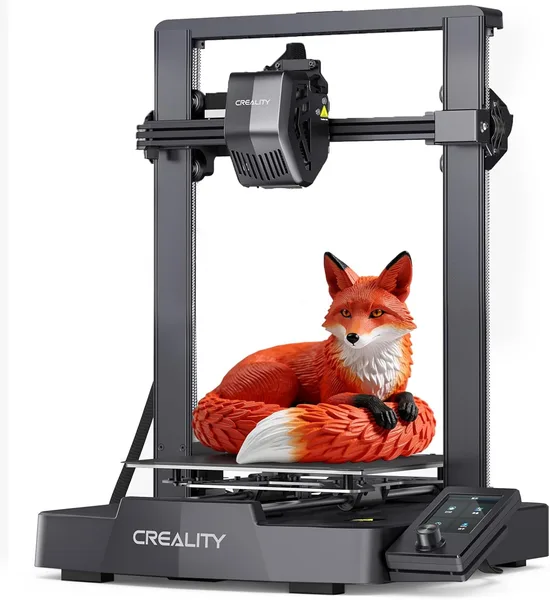
The Ender 3 V3 SE is the printer that finally removes the word "but" from the budget segment. Auto-leveled bed, direct-drive filament feed, speeds up to 250mm/s — and all of it works reliably straight out of the box, no tinkering marathon required. Get it if you want to print, not take up "fixing a printer" as a hobby. Skip it if you need large build volume or multicolor printing.
A familiar scene: a friend shows you a video of the headphone stand they printed in one evening, and you think "maybe I should get a printer too." You google it, and the first thing that comes up is a pile of 2019-era reviews about the Ender 3, where people spend months manually calibrating the bed with a sheet of paper and praying the first layer lands flat. Honestly, that's exactly why I put off buying one for so long. With the V3 SE, things are different, and that's not an exaggeration for the sake of the article.
What actually changed
The headline feature is automatic bed leveling via the CR Touch sensor. On first boot, the printer maps nine points on its own, builds an unevenness profile, and compensates for it during printing. What used to take an hour of nerves and twisting thumbscrews under the bed now takes three minutes, and you can go make tea. This isn't a minor detail — it's literally the difference between "I want to try 3D printing" and "threw the box in the closet after the third failed first layer."
The second thing that genuinely shows up in daily use is direct-drive filament feed. On the old Ender 3 with its Bowden tube, any flexible plastic like TPU turned into a jamming quest. Here the extruder sits right above the nozzle, so both TPU and even slightly damp PETG feed much more willingly. Not perfect — damp filament still needs drying, physics doesn't care about marketing — but the odds of "spaghetti instead of a part" have dropped noticeably.
The claimed print speed of up to 250mm/s is a marketing number worth raising an eyebrow at. On real models with default settings, I'd stick to a comfortable 100-150mm/s without losing surface quality; go higher and you start seeing artifacts on sharp corners and ringing, especially on tall thin parts. But even 150mm/s is twice as fast as older budget models, and for printing functional parts (brackets, holders, organizers), that's more than enough.
Where it actually falls short
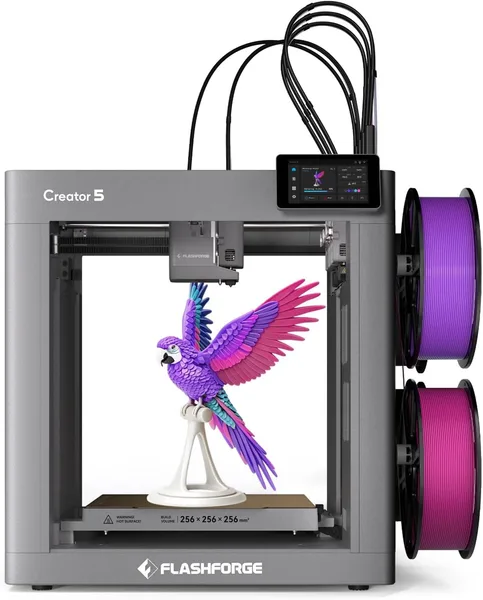
Build volume is 220×220×250mm. That's standard for this class, and if you need to print something bigger than a toiletry bag or a Raspberry Pi case, get ready to slice the model into pieces and glue them together. Multicolor and multi-material printing are simply not on the menu here — this is a one-color-at-a-time printer, full stop. If you're dreaming of multi-color figurines without manually swapping filament mid-print, look toward something like the Flashforge Creator 5 with four toolheads — though that's a completely different price conversation, aimed at people who make money printing, not weekend hobbyists.
There's noise too. Not deafening, but sitting right next to it at your desk for an eight-hour print isn't the best idea for an evening. The board doesn't use top-tier silent drivers, so the background whir of fans and motors is audible. Put the printer in the next room or a closet and the problem's solved — but it's worth knowing upfront rather than discovering it at one in the morning.
Who should be jumping for joy
If you're a physics teacher, a parent with a tech-obsessed kid, or just someone who wants to finally print replacement parts for household appliances instead of hunting for them on marketplaces for weeks — this is exactly the kind of entry point into 3D printing that won't kill your enthusiasm after the first bad experience. The Ender 3 V3 SE costs around $192 at the official listing — a genuinely accessible entry point, especially compared to what you'd pay a local maker for a one-off print job.
But if you need a serious workhorse for daily small-batch production for sale, look toward machines with a stiffer frame and an enclosed chamber instead (for ABS, an open Ender-class frame isn't the best friend — drafts ruin layer quality). And budget for more than just the printer itself — good filament matters too; the catalog of 3D printing consumables and accessories is worth a look, since plastic is where people most often cut corners they shouldn't.
Who should absolutely walk away: people who need a printer "to print something once a year and forget about it." Even the simplest FDM printer needs at least minimal upkeep — nozzle cleaning, belt tensioning, occasionally swapping the PTFE tube. If that's not your situation, it's cheaper and simpler to order individual parts from a print shop than to keep a machine around for two runs a year.
Are there alternatives in the same budget
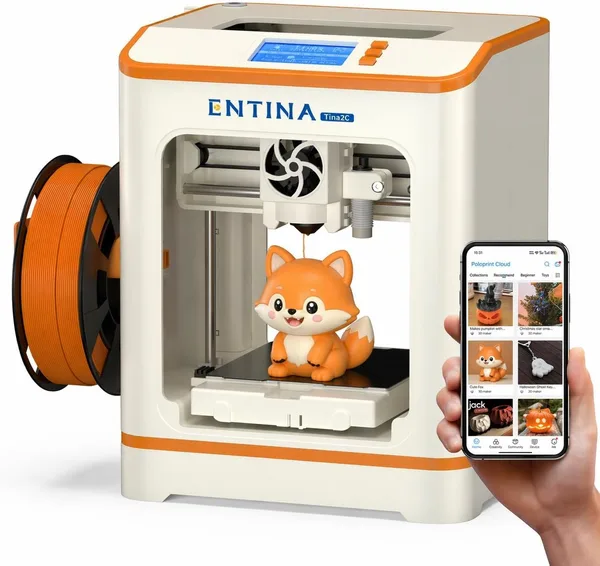
Yes, and the most obvious one is an entry-level printer like the Entina Tina2C, assembled out of the box and aimed specifically at kids and complete beginners. It's simpler, has a smaller build volume, and needs almost no configuration — a great option if your main goal is learning rather than serious projects. But for anyone planning to print regularly and wanting room to grow (nozzle swaps, firmware upgrades, higher speeds), the Ender 3 V3 SE stays the smarter pick for the same money.
FAQ
It works. CR Touch is a time-tested technology, not a raw experiment. I'd still recommend checking the first layer by eye for the first few prints — the printer compensates for unevenness, but it doesn't work miracles if the bed is physically warped from shipping.
For small brackets, clips, covers, and adapters — plenty. For large solid panels, you'll need to print in sections and glue them, which is standard practice even on pricier printers in this class.
If you're buying for a kid, or just to try it out without going deeper, the Tina2C is simpler and more compact. If there's even a bit of ambition to print regularly and try different materials, the V3 SE gives more room to grow for similar money.
Technically yes, but the open frame without an enclosure isn't ideal conditions for ABS, which is sensitive to drafts and loves to delaminate at the corners. For ABS, it's better to tape up the print area with cardboard or buy a separate tent enclosure. PLA and PETG print without any fuss.