ELEGOO Saturn 4 Ultra 16K Review: Is It Worth the Price?
The ELEGOO Saturn 4 Ultra 16K is a flagship resin printer with a 10-inch, 16K mono LCD that delivers an extremely fine pixel and clean detail across the entire build plate, not just in the middle. It earns its keep if you print miniatures, jewelry masters, or anything with fine surface texture on a regular basis and don't mind the resin workflow; for occasional hobby use it's overkill, and a smaller, cheaper model like the Mars 5 Ultra makes more sense. Check dede.sh for the full landed price to your country — item, forwarding, and import duty rolled into one number.
If you've already watched a dozen YouTube reviews and they all say the same thing — "insane detail, top of the line" — without actually telling you whether it's worth your money specifically, let's break it down honestly, no marketing gloss.
What this printer is and who it's for
The Saturn 4 Ultra sits at the top of ELEGOO's Saturn lineup — this isn't a budget entry point for someone dipping a toe into resin printing, it's a machine for people who already know what FEP film is, why you rinse with IPA, and why resin never, ever goes down the sink. The headline feature is a 10-inch monochrome LCD at 16K resolution. In practice that means an extremely fine pixel pitch across the whole plate, so detail doesn't drop off toward the edges the way it does on cheaper, lower-resolution panels. For D&D miniatures, dental models, jewelry masters, or anything with fine surface texture, that's a real, visible difference — crisper fine lines, fabric texture, and faces come out noticeably cleaner.
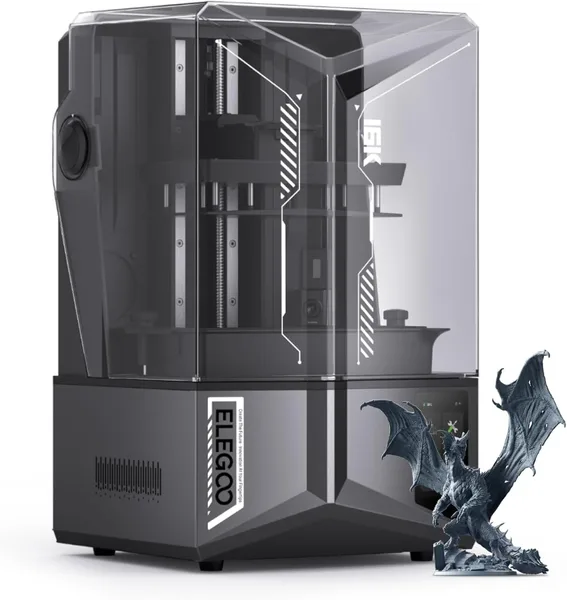
This model also has a heated resin vat (the thermostat holds it around 30°C) — handy in winter when resin thickens and flows poorly — plus a flip-up lid instead of a removable one. That sounds like a minor detail, but if the printer lives in a corner of your workshop rather than on a desk, not having to lift the lid off and find somewhere to set it down is something you appreciate every single day. ELEGOO claims print speeds up to 150mm/hour, which is realistic for a mono LCD with a strong UV array, though actual speed always depends on the specific resin and layer settings you're running.
Weight and footprint
This is not a compact desktop toy. It weighs around 16kg (the manufacturer lists 35.5 lbs), with dimensions of roughly 61 × 43 × 38cm (24 × 17 × 15 inches per spec). You'll need a sturdy dedicated table or shelf, ideally in a ventilated space — resin and IPA fumes don't just disappear, and a sealed room with no airflow is a bad idea no matter how good the printer's lid is.
Price: what it actually costs landed
On dede.sh this printer currently comes out to a specific landed total through the best available offer at the time of checking — item price plus forwarding plus your country's import duty, all converted into your local currency. That's noticeably more than an FDM printer in the same tier, and the premium is specifically for the 16K panel and the larger build area compared to junior models in the lineup. If you compare offers across different stores — Amazon US, AliExpress, Amazon DE, Allegro — the spread in dollar terms usually isn't dramatic; what matters is looking at the "all-in" number (item + shipping + duty), not the bare listing price, because after conversion the cheapest option often changes.
Pros and cons, no sugarcoating
Pros:
- Genuinely high detail thanks to 16K resolution across the entire 10-inch panel, not just in the center.
- Heated vat means fewer problems with thick resin in cold weather.
- Flagship status means solid ELEGOO Slicer/firmware support, a large community, and a ton of ready-made profiles for popular resins.
Cons:
- The price and weight say this isn't a first printer — it's an upgrade for people who already know what they want.
- Resin printing in general demands more consumables and ritual (washing, post-curing, cleanup) than FDM — if you're not ready for that routine every single time, the novelty of extra detail wears off fast.
- A bigger build plate means more wasted resin per print, even on small models, simply because of how much resin the platform lift consumes.
What to compare it against before buying
If your main goal is fine detail on miniatures rather than large batches across the whole plate, look at the smaller ELEGOO Mars 5 Ultra — same family, a 7-inch 9K display, noticeably cheaper and more compact, and it still has auto bed leveling. For most hobbyists printing standard 28-32mm miniatures, the detail difference between 9K and 16K at that scale isn't always visible to the naked eye — the Ultra premium pays off when you're either printing large batches across the whole plate at once or working with very fine surface texture (jewelry, dental work).
Also budget for a wash-and-cure station right away — hand-washing every print in IPA is doable, but it eats time and patience. The same lineup includes the ELEGOO Mercury Plus V3.0 Wash and Cure Station, a 7.5L unit compatible with both Saturn and Mars platforms, which takes a big chunk of the routine off your hands. It's not a day-one must-buy, but I wouldn't put it off for long.
Before you buy, it's worth a quick scroll through the whole 3D printer catalog on dede.sh — you'll see FDM options and other resin models with real landed prices side by side, which makes it a lot easier to judge whether you actually need the flagship 16K panel or a junior model will do.
FAQ
If you print small, detailed models regularly and don't mind the resin workflow — yes, a 16K panel across the full plate is a genuine upgrade. If this is your first resin printer or you only print occasionally, look at the smaller Mars 5 Ultra — it's substantially cheaper with comparable quality at typical miniature sizes.
Check dede.sh for the current best offer — the site shows the full landed total (item + forwarding + import duty) so you're comparing real, all-in numbers rather than bare store prices. The exact figure depends on exchange rates and which store is cheapest at the moment; the comparison on the product page updates automatically.
Both are flagship mono LCD printers from the same generation with similar resolution and print speed, so the difference usually comes down to details — slicer ecosystem, lid convenience, vat mechanics — rather than baseline print quality. If you already have experience with other ELEGOO printers, staying in the same ecosystem (slicer, resin profiles, consumables) is usually the more convenient choice.
Not strictly — you can hand-wash with IPA and cure under UV using basic tools. But with a build plate this large, the manual routine takes noticeably longer than on smaller printers, so a station like the Mercury Plus V3.0 saves real time and frustration after just a few prints.