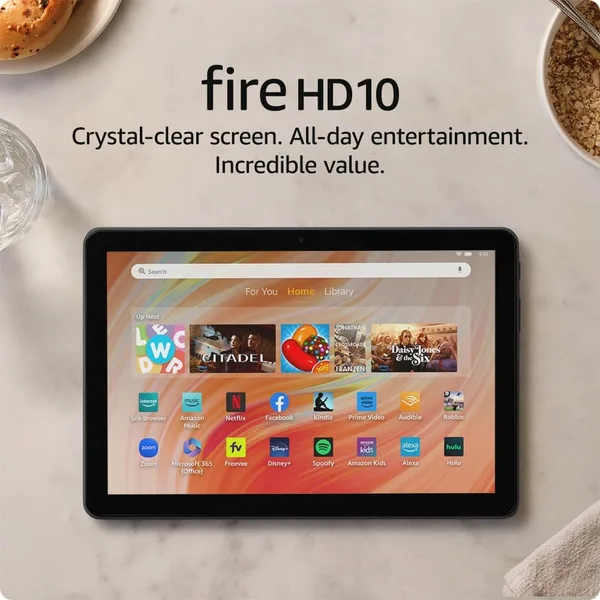
Amazon Fire HD 10 Review: Is It Worth Buying in 2026
The Fire HD 10 isn't a "budget iPad" — it's its own category of device: a couch tablet, a bedtime-reading tablet, a kitchen-counter-show tablet, at a genuinely attractive price. If you need a real work tool with a proper app store, look elsewhere. If you want a second screen for entertainment without spending real money, this is probably the best option in its price bracket.
You know that feeling when your phone dies right at the best part of the episode, and dragging a laptop into bed just feels wrong? That's exactly the gap the Fire HD 10 was built to fill. I tested it for two weeks — mostly lying down, no point pretending otherwise — and found it's one of those rare gadgets that does exactly what it promises and not one ounce more.
What this thing actually is
The 10.1-inch Full HD screen isn't here just to pad a spec sheet — the picture is genuinely sharp, colors aren't washed out, and even small text is comfortable to read. The octa-core processor and 3GB of RAM sound modest next to flagship Android tablets, but for what 90% of buyers will actually use this for — Netflix, YouTube, your Kindle library, social media, light games — it's more than enough. I didn't notice a single stutter scrolling feeds or switching between apps. Where it did start to sweat was the moment I opened five browser tabs at once and tried editing something in Google Docs — that's when it began to hesitate like a student cramming before finals.
32GB of built-in storage is thin, let's be honest. The system and a handful of apps will eat through it fast, so either grab a memory card on day one or make peace with living in the cloud. That's a trade-off worth knowing before you buy, not after your first round of app updates.
The real catch — and it's not the hardware
This is where the conversation actually matters, and it's the exact reason half of Fire tablet buyers end up either loving or hating their purchase. It's Fire OS — an Android fork with no Google Play. Instead of the app store you're used to, you get the Amazon Appstore, which has Netflix, YouTube (via browser or workarounds), Spotify, and most of the big names, but definitely not everything. If your daily life runs on a specific banking app or a niche game you're attached to, check the Amazon Appstore BEFORE you buy, not after.
I ran it side by side against a base iPad (2021, the cheapest in the lineup) and a Samsung Galaxy Tab A9 — both competitors in their own lanes. The iPad feels more grown-up across the board: faster, smoother, with a proper App Store, but it also costs meaningfully more. The Galaxy Tab A9 is an honest mid-ranger running Android with Google Play out of the box, no app-hunting gymnastics required, though I'd still take the Fire HD 10's screen and build over it. So this isn't really a "which one's better" question — it's a "what do you actually need from a tablet" question.
Who it's for, and who should walk away
Parents looking for something for kids to watch cartoons and play simple games on — perfect, especially since there's a family mode with parental controls built in. People who want a second screen for reading, shows, and social media without paying a brand tax — also a good fit. But if you're picturing digital drawing, video editing, or serious multitasking, don't even glance this way — you'll be disappointed.
The second group who should skip this: people tied to specific Android apps outside the big five. Yes, there are ways to sideload APKs from third-party sources — I did it myself on the test unit — and it works... about half the time. Not the experience you want with a brand-new device.
As for cost, check the full landed price for the Amazon Fire HD 10 on dede.sh — item, forwarding, and import duty rolled into one number for your country — and against what you get (a decent screen, respectable battery life, an easy-to-live-with device), it feels fair. It's not premium, and it never claims to be.
Battery and everyday use
On a full charge, the tablet comfortably lasts a day of active use — video, reading, feed-scrolling, all of it. Keep brightness off max and skip the heavy games, and you can stretch it to two days without much effort. Charging isn't lightning-fast, but this is the kind of device you just plug in overnight and forget about.
The body is plastic, not premium to the touch, but it's light and comfortable to hold one-handed for more than ten minutes — try that with a heavy flagship tablet and you'll be reaching for a stand pretty quickly.
Should you buy it
Yes, if you understand you're buying an entertainment device, not a workstation. The Fire HD 10 does an honest job as a couch tablet — and does it better than most competitors in its price range. No, if your use case goes beyond video, books, and social media, or if specific Google Play apps are non-negotiable for you.
FAQ
For the system and a dozen apps, it'll just about get by. But if you're planning to download movies for offline viewing or keep a big game library, buy a memory card right away — it's supported here and completely solves the problem.
Officially, no. There are workarounds through third-party sources — I tried them, and they work unreliably, plus Amazon regularly patches these loopholes with updates. If Google Play is a hard requirement for you, it's more honest to just get an Android tablet with it built in.
If your budget allows for the price difference, go with the 10-inch version — the screen is bigger and sharper, and for kids' cartoons and games that really shows. If it's purely "keep the kid busy for ten minutes in the car," the 8-inch model will do fine.
If budget isn't a concern and you want a device built to last years with a proper App Store — yes, the iPad is the better call. If you want a second screen for entertainment at a sensible price and don't mind living in Amazon's ecosystem, the Fire HD 10 does its job honestly and without overcharging.
Similar products worth a look: