Amazon Fire HD 8 Kids Tablet Review: Is It Worth Buying
The Fire HD 8 Kids isn't a "baby iPad" — it's its own category of gadget: chunky, slow, and basically indestructible, with parental controls that actually work. If your kid is 3–7 and you need a tablet you won't wince about handing over in the car or at grandma's, buy it without overthinking. If you're expecting smooth gaming performance, look elsewhere.
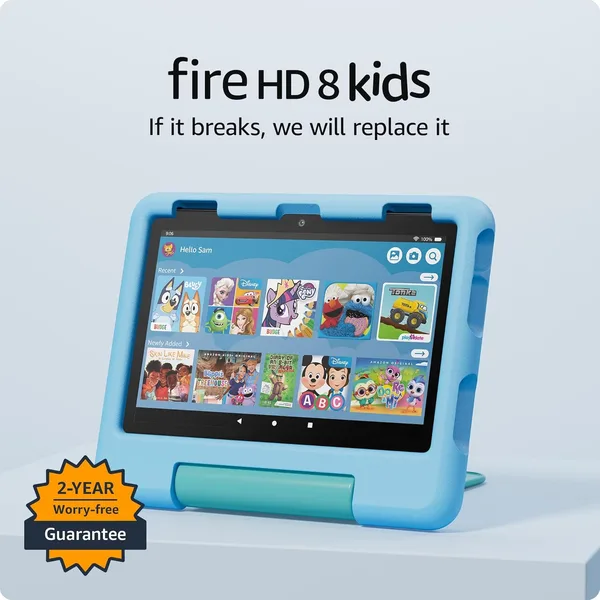

Picture this: your kid drops the tablet on the tile floor for the third time this hour, and you're already mentally pricing a replacement screen. Sound familiar? That's exactly the scenario the Fire HD 8 Kids was built for. Not to impress guests with a slim chassis, but to survive an actual childhood with an actual child.
What this thing really is
This isn't a flagship tablet with impressive spec-sheet numbers, and Amazon doesn't pretend otherwise. The hardware inside is modest, the 8-inch HD screen has no ambitions toward sharpness, and the overall speed feels like a mid-range Android phone from about five years ago. But none of that is really the point. The point is the thick rubber bumper case that comes in the box, and the fact that a parent can set up full control in about five minutes: which apps are allowed, how much screen time is granted, when the thing even turns on. For the parent of a three-year-old, that's not a nice bonus — it's reason number one to consider this tablet at all.
I've watched one of these get knocked off a table, kicked around a kitchen floor, and chewed on by a neighbor's dog (not exaggerating) — and it kept working. That's the actual value you're paying for here, not video rendering speed.
What it's actually like to live with
Picture a typical weekday morning: you need to get the kid ready for daycare, and she wants five more minutes of cartoons. Parents who've bought the Fire HD 8 Kids tend to say the same thing: you set a timer in the parental app, and ten minutes later the screen itself tells the kid time's up — you're not the one playing bad cop. That alone saves a mountain of nerves in households where meltdowns over "one more episode" are a daily ritual.
Here's where the trade-offs start, though. The tablet is slow. Not painfully so, but noticeably — if your kid is used to an older sibling's snappy iPad, switching to the Fire HD 8 Kids feels like trading an e-scooter for a bike with training wheels. Google Play apps aren't officially supported; everything revolves around Amazon's own store and its kids' content library, which is decent but is a closed garden, not open Android. If your household runs on Google Play habits and your kid's favorite games live there, you'll either need workarounds or you'll have to accept the limitation.
Compared to cheap no-name kids' tablets from marketplace sellers, the difference is obvious right away: real parental controls, an actual warranty, firmware updates, and a bumper case that genuinely protects rather than just looking protective. Compared to an iPad — even the cheapest one — it's a different weight class entirely: the iPad is faster and the screen is better, but its parental controls aren't nearly as tailored for small kids, and the price tag is a different story too. The Fire HD 8 Kids plays in its own league, and it doesn't have much competition there.
What it costs, landed in your country
The Fire HD 8 Kids is listed on Amazon as the Amazon Fire HD 8 Kids. The sticker price on Amazon isn't the whole story once you add forwarding and import duty for your country — check the product page on dede.sh for the actual landed cost, item plus shipping plus duty, in one number, since exchange rates and forwarding fees shift constantly.
The honest verdict
Buy it if: your child is 3 to 7, you need a device that genuinely survives drops, and you want parental controls without wrestling Android settings into submission. This is one of those rare cases where "for kids" doesn't mean "toy-grade" — the controls here are serious, adult-level tools.
Skip it if: your kid is already older and wants to play real mobile games (the closed ecosystem makes that painful), or if you have a firm stance against getting locked into Amazon's ecosystem. One more thing: if you're planning to hand this down from an older kid to a younger one two or three years from now, the sluggish hardware will start grating on the older one well before then.
The core trade-off here is honest and upfront: you're swapping speed and openness for durability and parental peace of mind. For the 3-7 age range, that's almost always the right trade.
FAQ
Within reason, yes. The included rubber bumper is built for the kind of falls that happen off a table or couch, not for being launched from a second-floor window. For typical toddler chaos at home, it holds up with room to spare.
For cartoons, e-books, and the simpler games in Amazon's kids' library — absolutely. For heavy 3D games or fast app-switching, no, it can't keep up and was never built to.
The Fire HD 8 Kids costs more, but it comes with real parental controls, a warranty, and software updates. Cheap no-name tablets often win on price but lose on service life — within a year they're typically either crawling or dead entirely.
Yes, if you're buying specifically for a 3-7-year-old: the price difference is small, and the parental controls, bumper case, and extended damage warranty are exactly what you're paying that extra bit for.