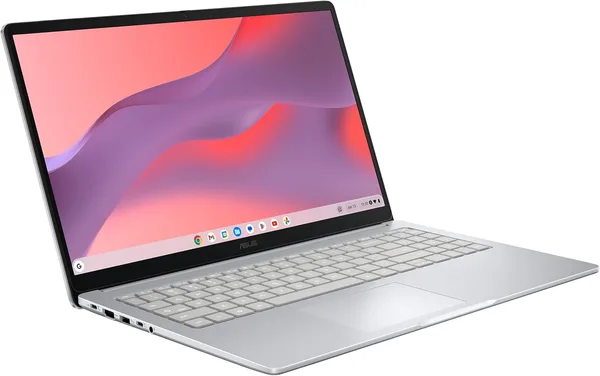
ASUS Chromebook CX15 Review: Is It Worth Buying
The ASUS Chromebook CX15 isn't the "cheap Chromebook for the kids" you're used to seeing. 8GB of RAM and a current-generation Intel N50 make it genuinely usable for real daily work in the browser, not just YouTube. Get it if you need a reliable everyday laptop for school, documents, video, and a dozen open tabs. Skip it if you touch desktop Photoshop, a heavy accounting package, or a 40-sheet Excel monster even once a week.
You know the scene: a student cramming before finals on an old laptop that takes twenty seconds just to open Word, fan screaming like it's about to lift off the desk. Or a parent who wants "something simple" for video calls with the grandkids, and ends up sold yet another bulky Windows machine that picks up antivirus bloat within a year and slows down even more. That's exactly the gap Chromebooks were built to fill — and the ASUS Chromebook CX15 isn't the cheapest one in the lineup, but it's one of the most grown-up under the hood.
Why this model, not just any bargain-bin Chromebook
The big difference between the CX15 and a typical budget Chromebook is 8GB of RAM. Sounds minor, but it's exactly why most cheap 4GB Chromebooks start choking by the fifth open tab. ChromeOS is memory-hungry: every Chrome tab is its own process, and when RAM runs short, the system quietly unloads background tabs and reloads them when you switch back — with that same one-second stutter and page flicker every time. With 8GB, you barely notice it. Gmail, Google Docs, a dozen research tabs for an essay, music playing in the background — it just works, without that nagging sense the laptop is "thinking" longer than it should.
The chip here is an Intel N50, a fairly fresh silicon for the 2026 budget segment. It's not built for video rendering speed — it's built so the interface never stutters: pages open instantly, tab switching is snappy, and Full HD video on YouTube or Google Meet plays without dropped frames. For comparison, this price bracket used to be Celeron N4020 or N4500 territory, chips that would already be gasping with eight tabs open. The N50 feels noticeably peppier.
128GB of storage is also unusual for a Chromebook, where 32GB or 64GB "just in case" is the norm, since ChromeOS is built around the cloud rather than local files. Here you can comfortably keep offline copies of documents, install a handful of Android apps from Google Play (yes, they run on Chromebooks, and it's a real lifesaver for messaging apps or lightweight photo editors), and not worry every other week about running out of space.
What it's actually like day to day
The screen is a 15.6-inch FHD panel with an anti-glare coating. That matters if you work by a window or under overhead kitchen lighting — the matte surface doesn't turn into a mirror the way glossy panels on cheaper models do. The picture is even and more than good enough for daily text and video work — don't expect color accuracy for photo editing, but for schoolwork, shows, and video calls, it's exactly the level of quality that quietly makes the day more pleasant.
The keyboard is full-size with a number pad — a nice bonus for a 15.6-inch form factor, since not every manufacturer bothers to include one even on bigger laptops. If you regularly crunch numbers or enter data into spreadsheets, it genuinely saves your sanity.
Battery life is the whole reason Chromebooks exist as a category. A light OS plus an efficient chip adds up to a full school day or work shift without hunting for an outlet. Grab it for the library or a coworking session, put in a few hours — there's still charge left, and that's not a marketing number off the box, it's how lightweight Chromebooks actually behave in practice.
One thing worth knowing upfront: ChromeOS isn't Windows with a different skin, it's a whole different philosophy. If work or school requires specific desktop software — accounting suites, specialized CAD tools, full Photoshop or Premiere — there's simply nowhere to install them. There are web versions of popular apps and Android apps, but that's a workaround, not a full replacement. Anyone who doesn't know this going in ends up disappointed by day two.
What to compare it against
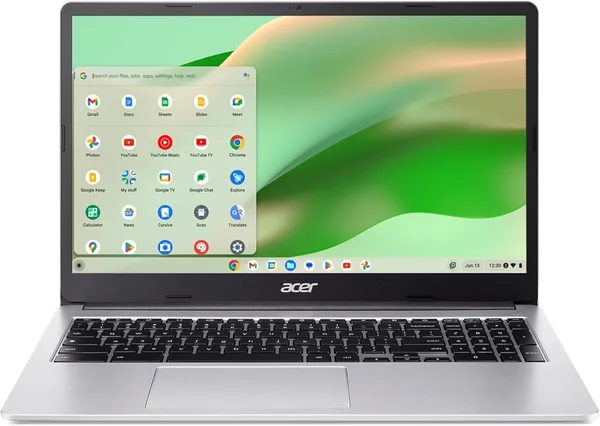
In the same niche, Acer is the manufacturer that traditionally goes head-to-head with ASUS in the budget-to-midrange Chromebook segment. The catalog has the Acer Chromebook 315 — also 15.6 inches, FHD IPS, but with only 4GB of RAM and the older Celeron N4500. Comparing them honestly: the Acer is cheaper, but that's exactly where the RAM gap discussed above starts to bite. If your budget allows for the jump to double the memory, the CX15 is noticeably more pleasant to live with day to day, especially if you're the type who keeps a lot of tabs open at once.
If you need a full Windows laptop with real performance headroom — for heavy files or gaming, say — look at something like the Acer Aspire 3 with an AMD Ryzen chip. That's a different weight class and a different price, but also different capabilities — there's not much point comparing a Chromebook to a full Windows laptop directly, since they're built for different jobs. Worth browsing the full laptop catalog too — it covers everything from budget picks to workstations for heavier tasks.
Who should buy it, who shouldn't
Get it if you need a primary laptop for school or browser-based office work: documents, email, video calls, streaming. Get it if you want something dependable for parents or older relatives — ChromeOS updates itself, viruses barely exist for it, and you won't be "cleaning" the system of junk every month. Get it if you value a full-size keyboard with a number pad and want 8GB of RAM to let you keep a dozen tabs open without the interface stuttering.
Skip it if even one piece of desktop software in your daily routine can't run on ChromeOS. Skip it if you need a laptop for heavy video editing or gaming — even 8GB and a fresh chip won't save you there, because the architecture simply isn't built for it. And be honest with yourself about the numbers: the sticker price on Amazon is only the start — shipping, forwarding, and import duties into your country stack on top, so check the full landed price on dede.sh before deciding, and weigh it against local offers in the same range. But if what you actually need is a Chromebook with generous RAM and storage, the CX15 earns its place honestly, without cutting corners where it counts.
FAQ
For ChromeOS, yes — that's the exact threshold where most of the stuttering disappears. On 4GB you feel tabs getting unloaded from memory pretty much daily; on 8GB that only starts happening with 25+ tabs open at once. For browsing, documents, and video, it's more than enough.
No, ChromeOS is a separate operating system, and full Windows software won't run on it. There are web versions of popular services and Android apps from Google Play, but that's a workaround with real limits, not a complete substitute.
If your budget allows it, the CX15 wins on double the RAM and a newer processor — the difference shows up in daily use from day one. The Acer 315 only makes sense if you need to cut costs as hard as possible and know for certain you won't be keeping many tabs open at once.
For a Chromebook, it's more than this segment usually offers. ChromeOS is still cloud-first, so locally you're mainly storing offline documents, a few Android apps, and cache — that's more than enough headroom for years of use.