Bambu Lab P1S Combo review: is it actually worth the upgrade
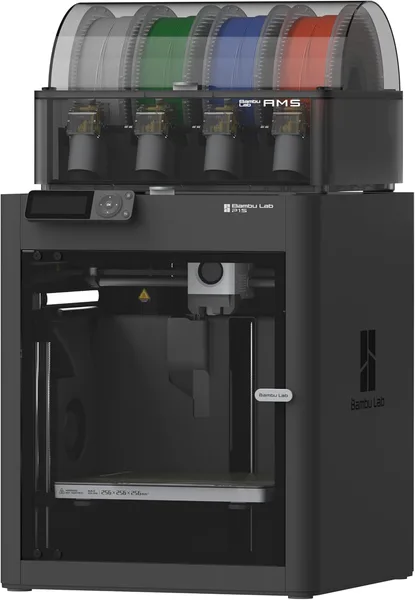
The Bambu Lab P1S Combo is an enclosed chassis, multicolor printing via AMS, and speed that felt like science fiction for a home printer just a couple of years ago. If you've already fought a budget open-frame machine and just want a printer that works, buy it. If you care about open firmware, or you print once a month, the premium isn't worth it.
You know the story: you buy a budget FDM printer, week one is euphoria, week two is bed-leveling at 1 a.m., week three is a clogged nozzle and a forum thread where everyone tells you to "just reflash the firmware." I've lived that loop. That's exactly why the P1S isn't just "another printer" — it's a different philosophy entirely: everything sealed inside one enclosure, everything controlled by a single ecosystem, and the real question isn't "how do I fix this" but "am I willing to pay so I don't have to."
What it actually is
The P1S is the enclosed version of the P1P, with the same 500 mm/s top print speed on paper — in practice you'll run closer to 300, because past that the printer starts shaking and quality drops, something the marketing copy conveniently skips. The Combo version adds the AMS: an automatic material-switching unit for four spools, giving you up to 16 colors or materials through combinations. That's the actual reason to pay extra for "Combo" instead of the bare P1S.
The enclosure isn't cosmetic. For PETG or PLA you won't notice much difference, but ABS and ASA — which hate drafts and a cooling chamber — behave themselves here without edge warping. On my old open-frame Ender, ABS would peel off the bed within 20 minutes; here that's a rare event.
The Klipper-style firmware (proprietary, closed, built on open-source foundations but locked down itself — and here's the first catch) delivers the speed and smoothness Bambu shows off in its promo videos. It really does work: a part that would take six hours on an Ender prints in 2 to 2.5 hours here. But precision on small parts with sharp corners dips a bit at high speed — you either slow the profile down or live with faint ringing on the walls.
How it actually lives, not how it markets
The AMS is the main reason to buy the Combo specifically. Print a part with dissolvable supports, or a figurine in three colors without manually swapping filament — and it just happens while you're busy doing something else. Spool changes are automatic, there's a filament-runout sensor, jams do happen but less often than Reddit reviews had led me to expect.
Against the Prusa MK4 (still the gold standard for repairability and openness), the P1S wins on speed and on "just works out of the box" — bed calibration is automatic, and you can start your first print 20 minutes after unboxing. Prusa wins for anyone who wants to take it apart, modify it, fix it themselves, and not depend on a single parts vendor. Against the Creality K1, the P1S is quieter, more accurate, and has a far better slicer — Bambu Studio is genuinely pleasant to use, not the applesauce that Cura with default profiles can be. But it's also pricier, especially with AMS attached.
The mobile app and the in-chamber camera are a small luxury you'll miss the moment you go back to a printer without them. Start a print overnight and check at 3 a.m. whether it's turned into spaghetti.
The honest verdict
Two real trade-offs here. First, ecosystem lock-in: proprietary firmware, branded spools for best results (third-party filament works, but you'll be doing manual flow calibration more often), and if Bambu Lab ever decides to tighten the screws with a subscription or cloud-gated features, you're already committed. Second, service and parts availability outside Bambu's core markets — there's often no official local presence, everything is imported, and if something specific like the hotend fails, expect a wait.
Rather than quote one price that won't mean much across different currencies and customs rules, check the full landed cost for your country — unit price, forwarding, and import duty combined into one number — on the dede.sh product page.
Who should buy it: people who print regularly (not once a month), who value speed and hassle-free multicolor, and who are fine trading some openness for stability. Who shouldn't: anyone who wants open firmware and full control, prints rarely and won't recoup the price gap over a simpler printer, or is counting on fast local service. For more detail on the printer itself and current listings, see the Bambu Lab P1S Combo product page.
Curious what else is out there in 3D printing — filament, accessories, alternative printers — browse the 3D printers and consumables catalog on dede.sh, where prices and full landed costs are updated regularly.
FAQ
Technically you can buy the AMS separately later, but the bundled Combo price is usually better than buying the pieces apart. If you're planning multicolor prints or dissolvable supports, get the Combo up front — don't deal with a bolt-on install afterward.
The X1C is the same printer plus a lidar unit for automatic first-layer quality checks and a slightly higher max nozzle temperature for engineering plastics. If you're mostly printing PLA/PETG/ABS, the X1C premium isn't worth it. For carbon-fiber blends or PA, the X1C earns its price.
The enclosure genuinely helps here — ABS parts don't peel the way they do on open frame printers. It won't be flawless on large flat parts, but compared to an Ender or a Prusa Mini, the difference is obvious immediately.
For your first prints, yes — the slicer profiles are perfectly tuned for it and the AMS reads the spool via an RFID tag. Once you're comfortable with the machine, third-party filament works fine too; just budget a few extra minutes for your own flow calibration.