Creality Otter Handheld 3D Scanner: Is It Worth the Price?
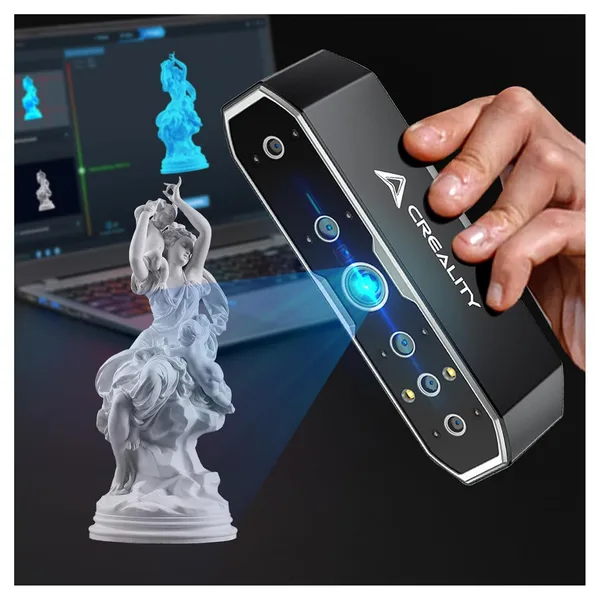
The Creality Otter is a handheld 3D scanner priced around $787 that genuinely captures parts to within 0.02mm without markers and without a darkroom setup. This isn't a toy and it isn't a $15 photogrammetry replacement — it's a tool for people doing reverse engineering, prototyping parts for 3D printing, or custom orthotics and clothing. If you just want to "scan a toy for fun," the premium is obvious and not worth it.
Picture this: a plastic part breaks on an old washing machine, no replacement has been sold in ten years, and naturally nobody kept the blueprints. The old fix was calipers, half a day in CAD, and a pile of eyeballed guesses. Now there's another option: trace the part with a handheld scanner in a few minutes and get a ready 3D model you just need to finish up for printing. That's exactly the scenario the Creality Otter is built for — not the pretty promo videos of a rotating bust on a table.
What this device actually is
The Otter is a structured-light scanner you hold in your hand and move around an object while the software stitches the point cloud into a model on the fly. The claimed 0.02mm accuracy isn't a marketing number based on "best-case sample conditions": on small mechanical parts — gears, mounts, connectors — the difference from photogrammetry is genuinely felt when the part is printed and slots into place on the first try. The scanner has anti-shake tracking, meaning it doesn't lose its lock on the object even if your hand trembles or you're not scanning with the steadiest motion — critical for a handheld tool, since lost tracking always means a seam and warped patches in the model that you'll later have to stitch by hand in software.
The 24-bit color sensor isn't just a checkbox on the spec sheet either. When scanning a figurine, a prop, or a product with complex texture patterns, the color map lays directly onto the geometry — and later, if needed, you can reproduce the model in color printing, or at least figure out where logos and text were on the object, details that would otherwise get lost in a gray point cloud.
What it's like in practice, not in the promo reel
The first impression with any handheld scanner is ten minutes of frustration until you get used to the motion. This isn't a phone you can wave around however you want — the Otter likes a steady, slow pass with overlapping frames, and if you rush it, tracking breaks and the model comes out full of holes. But once your hand adjusts, the process is genuinely fast: a small part like a housing or a bracket can be scanned in a couple of minutes, several times faster than manual caliper measurements plus modeling from scratch.
The main difference from the obvious "scan something at home" alternative — photogrammetry via a regular phone and free software — is worth spelling out. Photogrammetry is free (aside from your time), but it demands a pile of photos, glare-free lighting, and hours of processing on a powerful PC, and the result still often "drifts" in dimensions — unacceptable for printing functional parts. The Otter instead gives you metric accuracy right away, without post-processing on a supercomputer, and without the pain of photogrammetry refusing to stitch a plain white plastic object due to lack of texture — that's exactly where structured light has the advantage.
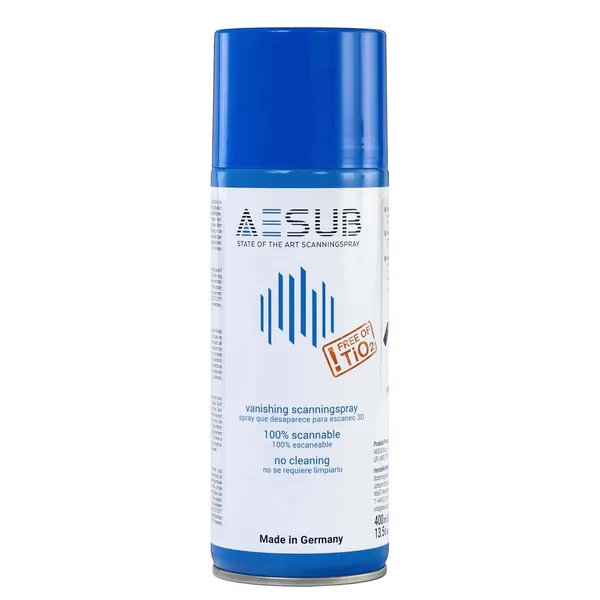
There's a flip side too. On very glossy or matte-black surfaces, the scanner, like any laser or light-based scanner, loses its grip — you'll either need to matte the surface with a spray or live with holes in the model. And honestly, for completely stationary tiny objects (like jewelry), a desktop scanner with a turntable is still more accurate and stable, since there's no human-hand-shake factor there.
Who actually needs this
If you run a fab lab, a prototyping shop, do parts restoration, or seriously work on custom orthotics and body-fitted parts, the Otter pays for itself fast — it'll save an hour of a technician's time by the second or third scan alone. But if the goal is "digitize a Yoda figurine to print," I'll say it honestly: that's a job for free photogrammetry or a cheaper scanner, not a nearly-$800 tool. Paying extra for 0.02mm accuracy when you just need a "roughly similar" model makes no sense.
The second important point is the learning curve. The Otter isn't the kind of gadget that works flawlessly out of the box with zero software tweaking. Your first few scans will almost certainly end up in the trash until you find the right movement speed and distance. Anyone expecting instant results might find that disappointing.
Honest verdict
The Creality Otter isn't a universal gadget for everyone — it's a specialized tool that does one thing brilliantly: accurately and quickly transferring a physical object into CAD space without markers, without a special room, and without hours of processing. Get it if you're genuinely working on reverse engineering, prototypes, or custom parts for printing. Skip it if you just want to play with a scanner over the weekend — both the free alternative and a cheaper scanner will do the job well enough for fun. The main trade-offs are the hand-motion learning curve and issues with very glossy or black surfaces, which you'll either need to matte or accept as holes in the model.
FAQ
If the part is functional and needs to fit precisely, yes — that accuracy is genuinely felt and saves you from redoing the print. If you just need a rough shape, the premium isn't justified, and a cheaper solution will do.
Photogrammetry is free but requires perfect lighting, a pile of photos, and hours of processing, and the accuracy tends to drift. The Otter delivers metric accuracy immediately and works even on plain, textureless surfaces where photogrammetry often simply fails to stitch a model together.
Not without extra tricks. Like any light-based scanner, it loses its grip on very glossy and dark matte surfaces — a matting spray before scanning saves the day; otherwise you'll get holes in the model.
Your first few attempts will almost certainly end up in the trash until your hand gets used to a steady, slow motion with overlapping frames. This isn't a device that works perfectly on your very first scan.
The price is around $787, so this is an investment for people who scan regularly and professionally. For one-off hobby use, it makes more sense to look at budget scanners or just stick with photogrammetry.