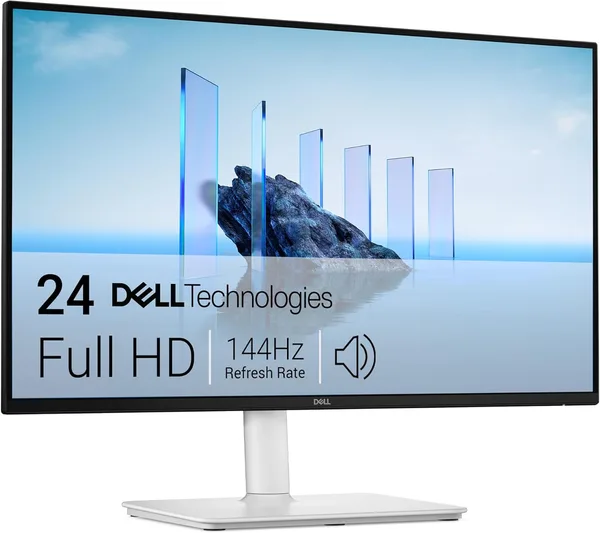
Dell 24 Plus S2425HSM Review: A 144Hz Monitor That Costs Like Headphones
The Dell S2425HSM is a 24-inch FHD monitor running at 144Hz and 1ms, priced where 60Hz panels used to sell just a year ago. The picture is pleasant, motion is smooth, but this isn't about color accuracy for designers or 4K for photo work. If you need a second (or first) screen for work, shows, and not-too-hardcore gaming, it's a confident buy. If you need precise color reproduction or a big workspace, look at a different size and panel.
Picture this: you have an old 60Hz monitor, your mouse cursor jerks like it's caught on something, and everything smears during camera turns in games. A familiar scene for anyone still using a monitor that came "bundled with the PC" five years ago. And then it turns out a 144Hz monitor now costs about the same as a decent pair of headphones. That's the story behind the Dell 24 Plus S2425HSM.
First impression: coming from an old monitor, the difference is immediate, even before you've had a chance to check the spec sheet. The cursor no longer "jumps" between frames, page scrolling gets smooth, and in shooters the picture stops smearing during quick turns. That's the 144Hz-versus-60Hz effect at work — a genuinely different refresh rate, and your brain registers it almost instantly, even if you're not a gamer and just scroll through the news.
The panel here is FHD, 1920x1080 on 23.8 inches — pixel density is perfectly fine for this size, text doesn't look blurry, and small fonts are readable without eye strain. But let's be upfront: this isn't 4K, and it isn't even QHD. If you're used to sharpness on a big screen, coming from a 27-inch QHD panel this one will feel "simpler." For text work, spreadsheets, browsing, watching video, or gaming at medium settings, it's more than enough. For photo or video editing, where pixel density and workspace matter, no — look for something bigger.
The 1ms response time already puts this in "gaming" territory, even though the monitor isn't marketed strictly as a gaming display. In practice that means no ghosting trails behind fast-moving objects, the kind that's so annoying in dynamic scenes. Combined with 144Hz, that's a genuinely noticeable difference for anyone who games even occasionally — even something as undemanding as CS or Dota. Compared to something like the ASUS VA24EHE, which is still stuck at 75Hz for similar money, the S2425HSM wins by a wide margin specifically on motion — where it's not about color, it's about smoothness.
The built-in 2x3W speakers — honestly, no illusions here. They exist, they work, you can watch a video in the kitchen while cooking without dragging speakers in from another room. But they're no substitute for even a budget external speaker set — no bass, limited volume, and a slight ringing at max output. If music or movies aren't just background noise for you, you'll still need speakers or headphones.
Who really benefits from a monitor like this? Someone working with two windows at once — a spreadsheet on the left, email on the right — who wants scrolling that doesn't stutter. A student who needs a second screen for lectures and notes. Someone who games in the evening on something not too demanding and got tired of their old monitor's jitter. A freelancer who needs a screen for work, not to show off color accuracy to clients. For all these scenarios, the S2425HSM is close to the ideal price-to-real-world-feel ratio.
But here's who shouldn't even look this way: designers, photographers, anyone working professionally with color — there's no wide color-gamut spec here, and this panel isn't about that. Likewise, don't expect anything remarkable if you're used to big ultrawides or 32-inch 4K monitors — after those, a 23.8" FHD will feel like a step down, even with the smooth motion.
The listing price at the time of review is around $120. For the full cost with shipping and import duty to your own country, check the landed price on dede.sh — even with the markup, it still tends to come out ahead of comparable models in local stores, where 144Hz and 1ms usually cost noticeably more. There's really one main trade-off here, and it's an honest one: you're paying for smoothness and speed, not sharpness or color. The second is the speakers — fine for background use, nothing more.
Overall, this is that rare case where "budget" doesn't mean "compromised across the board." Dell clearly bet everything on one strength here — refresh rate — and didn't try to stretch the budget to cover everything at once. An honest approach, and that's exactly why it works.
FAQ
Not marketing. The difference from 60Hz is immediate, especially in dynamic genres like shooters and racing games. For top-tier esports, pros will go for something at 240Hz+, but for a regular gamer, 144Hz is already an entirely different league of comfort.
Depends on what matters more. If you need speed and smoothness, get the S2425HSM. If sharpness for detail work or a bigger workspace matters, pay extra for QHD. You don't get both at this budget at once.
Yes, if sound isn't secondary for you. The built-in 2x3W speakers work for background video or calls, but for music or movies with real bass, add at least a budget external speaker set or headphones.
Not the best choice. FHD resolution on 23.8" is fine for text and browsing, but for precise editing or retouching, look for a monitor with a bigger screen and higher resolution.
Similar products worth checking out before you buy: