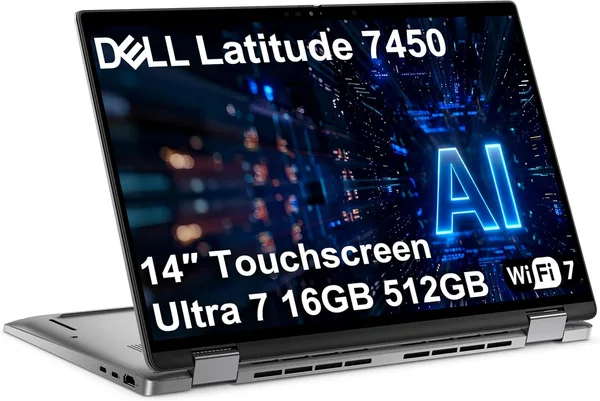
Dell Latitude 7450 2-in-1 review: a business laptop with Intel Ultra 7
The Dell Latitude 7450 is that rare case where "business laptop" doesn't mean boring. The Ultra 7 165U handles regular office routine and even Windows' local AI features without breaking a sweat, the display folds into a tablet, and the chassis can survive a fall off a desk. But you pay for that transformation and MIL-STD build — and pay noticeably — so anyone on a tight budget should look elsewhere.
Picture yourself in a meeting: your laptop is sitting closed on the table, and you need to quickly show a client something across the desk — turn the screen around, fold it flat, hand it over. With a classic clamshell, that's an awkward dance of cables and angles. With the Dell Latitude 7450, you just fold the screen 360 degrees flat and hand it over tablet-first. A small thing, but it feels completely different.
That's the model's headline feature — a 2-in-1 convertible in a chassis Dell usually makes as gray and serious as possible. The approach here is the same: a gray magnesium body, zero flashy accents, but hinges rated for hundreds of thousands of fold cycles, and the machine itself has passed military-grade tests for shock, humidity, and dust. That's not a marketing number for the spec sheet — Latitudes genuinely survive things that would send a consumer laptop in for repair.
What's inside, and does it handle real work
The heart is the Intel Core Ultra 7 165U, the Meteor Lake-generation chip with an NPU for local AI tasks. In practice that means: Copilot features in Windows 11 don't drag the system down, noise cancellation on video calls doesn't tank the battery, and Outlook's background indexing doesn't eat half your performance. 16GB of DDR5 is exactly the minimum needed to keep Teams, a heavy Excel spreadsheet, and a dozen Chrome tabs open without swapping to disk. I'll be honest: for heavy video editing or working with large Docker containers, look at models with 32GB instead — RAM upgrades aren't always possible here.
512GB of SSD storage is comfortable for most office scenarios, but if you're used to keeping local project backups or large databases, the drive will fill up faster than you'd like. Wi-Fi 7 and Bluetooth 5.4 aren't here just for the spec sheet — it's genuinely noticeable on a busy corporate Wi-Fi network, where older standards start to choke with dozens of devices connected at once.
The 14-inch FHD+ touchscreen is a compromise that works. Not the brightest on the market, but touch response is instant, and the panel size lets you carry the laptop in a regular backpack without feeling the extra weight — a bit over a kilogram and a half thanks to the convertible hinge, noticeably lighter than plenty of 15-inch business models.
What to weigh it against
The most obvious rival in the catalog is the HP EliteBook 840 G6, also a business line, also 14 inches. But that's an older generation on an i5 without the convertible design — essentially a classic clamshell for anyone who doesn't need a 2-in-1 at all and wants to save money. If your work involves client presentations, trade-show booths, or you simply love tablet mode for stylus notes, the difference is immediately noticeable.
For anyone who isn't ready to pay a premium for the business segment at all, the catalog has the Acer Aspire 3 — a simple slim laptop on AMD Ryzen for basic tasks like browsing and documents. That's an entirely different weight class: no MIL-STD chassis, no convertible design, no comparable build quality. But the price matches accordingly.
The real rival to the Latitude 7450 isn't another brand — it's habit. Plenty of people still buy "just a nice-looking laptop" on a modest budget and then wonder why the keyboard rattles loose after a year of frequent travel. The Latitude has a higher entry price, but it saves you nerves and repair money down the line — this is a case where durability genuinely pays for itself, if you're taking the laptop on the road rather than keeping it on a desk at home.
The honest bottom line
Who should buy it: people constantly on the move — consultants, managers, anyone giving presentations in the field who cares more about chassis survivability than the last pixel of screen brightness. Anyone who genuinely uses tablet mode, rather than buying a 2-in-1 "just in case" — because if you don't need tablet mode, you're simply overpaying for the hinge.
Who shouldn't: students and gamers — there's no discrete graphics here, and it's not a tool for demanding games or rendering. Also, if your budget is tight and mobility isn't critical, you're overpaying for MIL-STD toughness and the convertible design, which will just sit as dead weight in the spec sheet.
The marketplace price was $1199.99. For the full landed cost with shipping and import duty to your own country factored in, it's worth checking the total price calculated for your country on dede.sh rather than guessing at a number. This isn't a budget pick, or even a mid-range one — it's a deliberate investment in reliability. The main trade-off: for the convertible design and chassis, you give up potential RAM upgrades and pay a premium that hits you upfront at purchase, rather than being spread out over time.
FAQ
Honestly — no. If you've never once flipped a laptop into a tablet in your life, you're unlikely to start now. Look at a regular business laptop in the same class without the convertible hinge instead, and it'll come out cheaper.
If you need the convertible design and newer hardware with an NPU, the Latitude 7450 wins, no contest. If your budget is tight and you don't need a convertible, the EliteBook 840 G6 covers basic office work more cheaply, even if it's on an older chip.
Yes, plenty for typical office multitasking. Problems start if you add heavy virtual machines or large databases into the mix — that's when you'll feel that RAM upgrades aren't an option here.
If you're taking the hardware on trips and business travel — yes, the chassis genuinely survives drops and jolts a regular laptop wouldn't. If the laptop just sits on a desk at home, you're paying extra without any real benefit.