EINSTAR Rockit Wireless Review: Is the Cordless Laser 3D Scanner Worth It
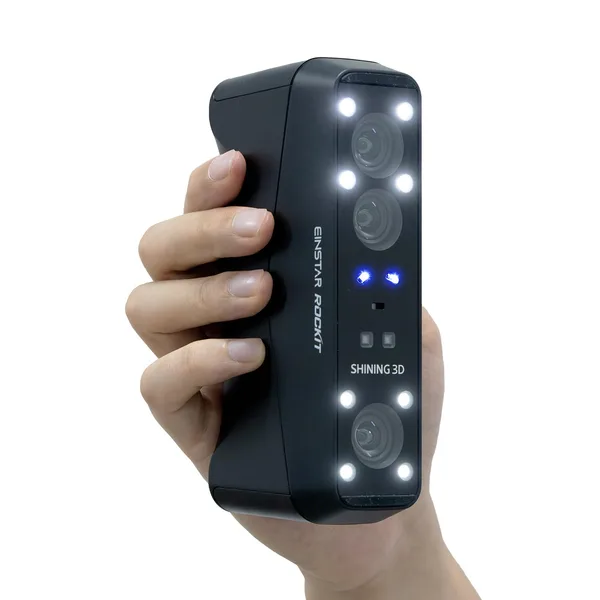
The EINSTAR Rockit is a wireless laser 3D scanner from Shining3D (the same company behind EinScan) with a blue laser running 19+19 crossed lines plus 7 parallel lines, and no need to stick tracking markers all over your object. The real win isn't the spec sheet accuracy — it's that a cable no longer gets in your way while you're circling a car, a life-size sculpture, or a bulky assembly. This is a tool for people who already scan confidently and have been genuinely annoyed by a cord — not a first purchase for a beginner with a $300 budget.
Try scanning a car hood or a human-sized sculpture while holding the scanner in one hand and constantly feeding a USB cable with the other so it doesn't snag a wheel or pull taut while you crouch on the far side. That exact moment — not some frustration with accuracy or software, but the plain physical hassle of the cord — is precisely what the EINSTAR Rockit removes. It's wireless. Sounds small. In practice it's the first thing you notice in the first five minutes of use, and the last thing you think about once you've gotten used to it.
What's actually new here
Shining3D isn't a newcomer to this space — their EinScan line has been the standard in reverse-engineering shops for close to a decade. The Rockit is their attempt at a handheld laser scanner that isn't tethered to a laptop by a cable and doesn't require plastering markers across your object to track position. Both matter, and they work in different ways.
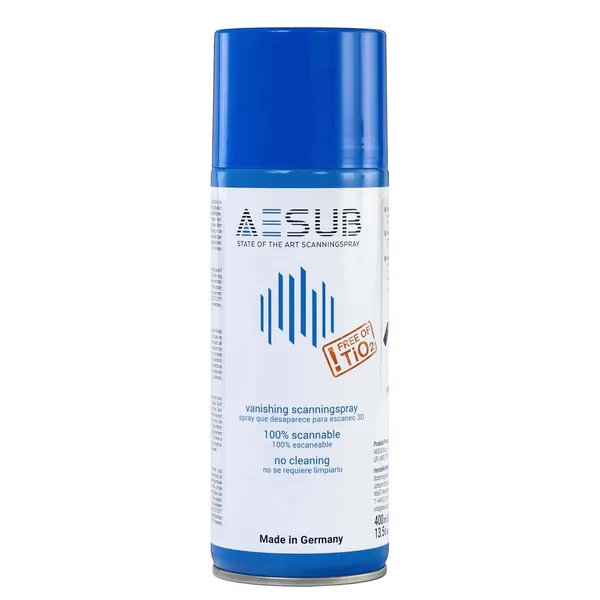
The laser is blue, two sets of 19 crossed lines plus 7 parallel lines — and that's not just a number for the spec sheet. Blue laser genuinely handles dark, glossy, and semi-translucent surfaces better than the structured white light cheaper competitors use. Black plastic housings, polished metal, a motorcycle exhaust system — all the stuff that makes structured light "swim" and drop points, the laser reads decently, though not perfectly: true glossy black surfaces still benefit from a dusting of scanning spray, which is just a universal rule for any scanner, not something unique to this one.
The second piece is marker-free tracking. Classic laser scanners built for large objects — cars, furniture, human figures — traditionally required sticking dozens of small round decals across the surface so the software could figure out where the scanner was relative to the model. The Rockit does this without markers, relying on the object's own geometry instead. Sounds like magic, works like a trade-off: on objects with strong surface detail, it's excellent; on a smooth symmetrical pipe or a uniform wall, the software sometimes loses its lock, and you end up going back to rescan a section. In those cases, good old markers are still more reliable — they're just no longer mandatory by default.
Who actually needs this
Picture a shop restoring old cars or motorcycles: half the parts haven't been manufactured in decades, originals are cracked or missing, and the only way to rebuild a body panel is to scan a mirror copy from the other side of the car, walking all the way around it without unspooling a cable every few steps. Or a shop making custom prosthetics or orthotic inserts, where you also need to move around a standing person, and being tethered to a laptop on a table is a genuine physical nuisance when the client is standing in the middle of the room. Or a sculptor digitizing large pieces to print scaled-down copies — same scenario again: walking around the object, not around the object and a cable at the same time.
But if you just want to scan one small figurine on a desk to print a copy at home, the Rockit is cracking a walnut with a sledgehammer. For tabletop scanning, wireless gives you nothing: the object is small, you're already sitting at a desk, and the cable was never in your way. Here it's honestly cheaper and more sensible to get something like a Revopoint or even a simpler structured-light scanner — the result for small parts will be nearly identical, while the premium for the laser and the wireless feature is very real.
Where it disappoints
First, the price. This sits well past hobby "let's try it" territory — check dede.sh for the full landed cost to your country, item plus forwarding plus import duty rolled into one number, before you commit. At that price you expect flawless performance out of the box, but you'll still be fiddling with calibration, room lighting (direct sunlight and laser scanners still don't get along), and learning the logic of marker-free tracking through your own mistakes on the first few scans.
Second, the flip side of the very wirelessness you're paying for: the battery runs down, and on a long scan of a large object — a whole car, say — you'll either need to carry a spare battery or interrupt the session to recharge. So freedom from the cable comes with a new dependency: on charge level.
Buy it or skip it
Buy it if you've already used scanners and know for certain that the cable has been your actual problem — big objects, walking around them, restoration work, sculpture, large custom parts. Then the Rockit solves a specific, real pain point, and the blue laser gives you a genuine edge on tricky surfaces that trip up cheaper structured-light scanners.
Skip it if this would be your first 3D scanner, or if your main work is small parts on a desk. There, the premium for wireless and laser buys you nothing but a line on a spec sheet. Before deciding, it's worth browsing what's already in the 3D printing and scanning catalog, comparing it against simpler options, and being honest with yourself about whether the cable is really the problem — or whether you just want the most expensive toy in the room.
FAQ
Depends on what you're scanning. For large objects you need to walk around — cars, furniture, sculptures, people — it's worth it, because a cable genuinely gets in the way and limits your movement. For tabletop scanning of small parts, it's just an extra line item in the price that you'll never notice in practice.
The blue laser here is objectively stronger than structured white light on dark, glossy materials — it's just different physics. But even with a laser, truly glossy black surfaces still do better with a dusting of scanning spray; that's an improvement, not a complete fix.
On objects with strong surface detail, yes, and that's the main convenience. On smooth symmetrical shapes — pipes, uniform walls, simple cylinders — the software sometimes loses its lock on the model, and old-fashioned markers are still more reliable there. It's a trade-off, not an outright win for the technology.
For most practical restoration and custom-part work, yes — that's exactly the niche the Rockit is built for. But if you need micron-level precision for critical engineering assemblies, that's the territory of industrial structured-light scanners in a different price class, not a handheld laser scanner.