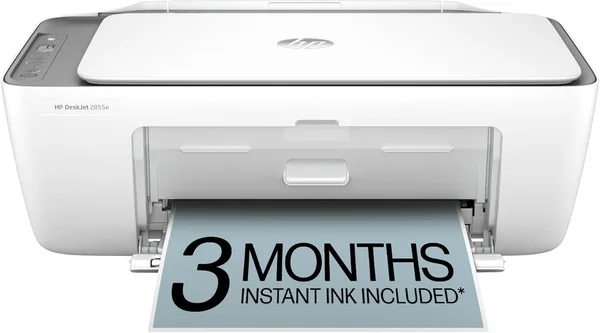
HP DeskJet 2855e review: is this cheap Wi-Fi printer worth it?
The HP DeskJet 2855e isn't built for people who print every day. It's built for people who print once every couple of weeks — a form, a boarding pass, a kid's homework — and don't want the machine sulking in a corner, ink drying up between jobs. It does its one job honestly, but stick with it long enough on the stock cartridges and you'll spend more on ink than you did on the printer itself.
Sound familiar? You need a printer maybe once a month, and the one time you actually need it, the cartridges have dried out, the USB cable has vanished into a drawer somewhere, and you end up scanning a document by taking a crooked photo of it with your phone. The DeskJet 2855e exists precisely for that scenario. It's not aimed at an office, and it's not for a freelancer juggling layout files — it's for an apartment where the printer lives in a closet and comes out occasionally.
What this machine actually is
It's a small Wi-Fi all-in-one: print, scan, copy. No fax, no automatic document feeder, no duplex printing — and that's the first thing to understand, because those three missing features are exactly where people get burned buying "the cheapest one with HP on the box." Need to scan a 20-page stack of documents? You'll be placing each sheet on the glass by hand. It takes time, and yes, it's annoying — no point pretending otherwise.
Setup, on the other hand, is genuinely painless: the HP Smart app finds the printer over Wi-Fi in about a minute, and after that you barely need to go near the machine — drop a photo into the app, hit print, walk over and grab the page. For the classic home scenario — someone shouting "can you print my train ticket?" from the other room — that convenience matters more than any spec sheet number.
Where it earns its keep, and where it doesn't
Text quality is solid for letters, receipts, school essays. Photos are where it struggles — colors come out flatter than what you'd get from a proper photo lab, and if you're expecting magazine-glossy output, you'll be let down. This is an entry-level inkjet, and no amount of marketing changes the physics.
The real weak point of budget inkjets in general isn't the hardware — it's the ink economics. HP offers its Instant Ink subscription here: pay a flat monthly fee based on page volume, and cartridges show up in the mail before you even run out. Smart setup if you print small batches regularly. But if the printer sits idle for months at a stretch, that's exactly where inkjets bite you — the nozzles dry out, and a machine you kept "just in case" suddenly needs a head cleaning cycle or refuses to print cleanly at all. Laser printers simply don't have this problem. If your actual usage pattern is "once a quarter," it's worth honestly comparing this against a cheap black-and-white laser rather than defaulting to an inkjet.
Compared to earlier DeskJet models, there's no real revolution here — more a tidy refresh of the familiar, proven "cheap, simple, for the home" formula. Anyone who's used an older DeskJet will have this one figured out in five minutes.
The honest verdict
Get it if: you live alone or with a small household, print infrequently and in small batches, don't mind running the printer every couple of weeks just to keep the ink from drying, and don't plan on scanning thick stacks of paper. The unit itself runs around $49.99 on eBay — for the full landed price including forwarding and import duty to your country, check the number on dede.sh. It's a manageable outlay for a home gadget that covers a basic need.
Skip it if: you print often and in volume — ink costs will eat any savings from the low sticker price within a few months. Also skip it if you need serious scanning capability: without an automatic feeder, digitizing a 15-page contract turns into a chore instead of a five-minute task. In those cases, look at laser all-in-ones or models with a document feeder — they cost more upfront, but that's exactly where the extra money pays for itself.
There's really one core trade-off here: you pay less upfront but lock yourself into inkjet cartridge economics. The second one is the missing document feeder — worth remembering if scanning for you isn't a one-off task but a regular routine.
FAQ
If you print regularly and predictably, the subscription works out cheaper and spares you the classic "of course the ink runs out right now" headache. If your printing is sporadic — once a month or two — standalone cartridges are often the better deal, since you're not paying for pages you never use.
For occasional printing, sure, no problem. But if both people are regularly printing multi-page documents or reports, the machine will start to show its limits — both in speed and in ink cost. For that scenario, look at a step-up model or a laser all-in-one instead.
Laser wins if the printer will sit unused for weeks at a time — no dried-nozzle problem to worry about. The DeskJet wins if you occasionally need color photos or greeting cards — color laser models at this price point generally print color noticeably worse.
Yes — the HP Smart app on your phone can handle a scan without a computer at all, as long as you've got Wi-Fi. For a single document, that's actually more convenient than firing up a laptop for one page.
If you're eyeing the HP DeskJet 2855e, it's worth glancing at other small household essentials too — sometimes the real savings aren't in the big-ticket item but in the small things around it.