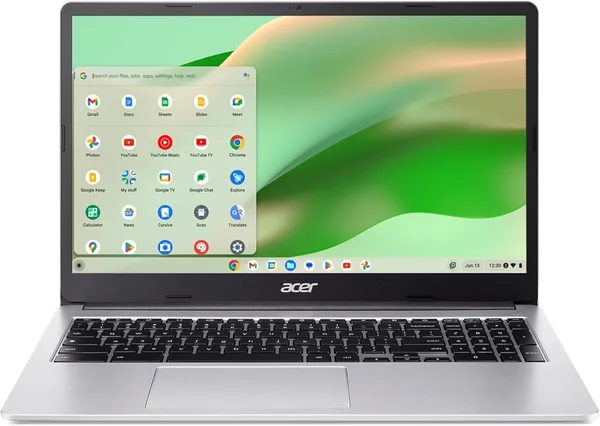
Lenovo 300e Chromebook Gen 2: Should You Buy This 11.6-inch Touchscreen 2-in-1?
The Lenovo 300e Chromebook Gen 2 isn't a laptop for adults—it's a tool for a kid or teenager who throws gear in a backpack daily. Touchscreen, drop-resistant chassis, Chrome OS that can't really break—it all works. But this isn't a second computer for complex tasks, and definitely not something you "grow into"—kids outgrow Chromebooks faster than regular laptops.
Picture this: your kid's moving to middle school, the teacher asks for "any laptop for Google Classroom," and you walk into a store planning to buy them something like you'd use yourself. By the end of the week, that laptop comes home with a scratch on the lid, a coffee stain on the keyboard, and a slightly bent corner—because it fell off a chair. Sound familiar? The Lenovo 300e series exists exactly for that—and the 300e Chromebook Gen 2 is the textbook example.
What This Actually Is
This is an 11.6-inch 2-in-1 on an Intel N-series processor (no fancy marketing here—the chip is weak, and that's normal for the price), which folds 360 degrees into tablet mode. The screen is touch-enabled, because younger students instinctively tap the display before learning trackpad discipline. The chassis—this is where Lenovo actually tried: reinforced corners, rubberized pads, hinges engineered for thousands of open-close cycles. It's not beautiful, it's built like a tool, the way it should be.
Chrome OS here is not a limitation, but the whole point. No confusing settings, no viruses in the classical sense, updates land silently in the background. For parents who don't want to troubleshoot "why is the laptop slow" every evening, this is basically a plan for a quiet life.
Where It Actually Shines
In class or at home with homework: Google Docs, Zoom lessons, YouTube educational channels, light web games on breaks—exactly what it's built for. Battery cruises through a full school day without needing a charger hunt between classes. And here's the truth about Chrome OS that nobody says loud enough: if a kid breaks something in the system, rebooting or factory reset takes five minutes, and it's brand new again. Try that with Windows—you'll spend an evening untangling mess.
Compared to a Windows budget laptop at the same price—an imaginary Dell or Lenovo on Celeron with 4-8GB and cheap SSD—the Chromebook wins on interface snappiness. Windows on weak hardware grinds and stutters; Chrome OS on that same hardware flies because it's lightweight and engineered from the ground up for underpowered chips. It's the rare case where "fewer features" practically means "better experience."
And the Compromises
The main limit: 32GB base storage (check exact SKU before purchase, the 300e line has variants). That's not about stashing movies—it's Chrome OS philosophy: docs live on Google Drive, photos sync automatically. If your family hoards gigabytes of files locally on laptops, you need to break that habit or have cloud subscriptions ready.
Second: this isn't a tool for adult Zoom work, video editing, or demanding Android apps via Google Play. Intel N-chip struggles there. If you need this as a second work laptop, look at something with more grunt.
And third, small but real: 11.6 inches is snug. A kid in fifth grade finds it roomy; by high school, when papers get longer and multitasking more intense, it starts feeling cramped. You don't "buy for growth" with Chromebooks—they age out faster than traditional notebooks.
Price and Who Should Buy
The device runs about $69 on the marketplace, and with shipping and import to your country, even then it's one of the most accessible "real laptop for a kid" options, cheaper than anything new in a local store.
Get it if: your kid is starting school and needs a tool for class; budget is tight; durability against drops matters more than power. Skip it if: you need a universal laptop for "everything"—light games, heavy apps, offline work on big files. Then look at Windows options, even if they're more fragile and need adult maintenance.
Honestly: I wouldn't buy this for myself. But for a child who drops things weekly? It's exactly right, no second thoughts.
FAQ
For Chrome OS with cloud-first workflow, yes. Documents live in Google Drive, photos auto-sync. Problems start when trying to store big files locally or run offline apps—then storage runs out fast.
For kids in lower and middle grades, yes. They naturally tap the screen, especially using touch-optimized apps. For adults, the touchscreen is a nice bonus but not critical.
If stability, simplicity, and "kids can't really break the system" are priorities, grab the Chromebook. If the kid already needs specific Windows apps for school, Windows laptop it is—even with more setup headaches and slower performance on cheap hardware.
YouTube, streaming services in browser, light web games—no problem. Demanding Android apps through Google Play or heavy 3D games—nope; Intel N-chip isn't designed for that.