Acer Aspire Go 15 AI Ready Review: Is the AI Sticker Worth It?
The Acer Aspire Go 15 AI Ready isn't an "AI laptop" in the sense that's fashionable to sell right now. It's a solid, ordinary Ryzen workhorse at a fair price — happy to run office apps, a browser choked with tabs, and even light video editing, but it won't touch gaming and has zero on-device "artificial intelligence" without a Wi-Fi signal. If you want a cheap machine that gets work done, buy it. If you fell for the word "AI" on the lid, read this first.
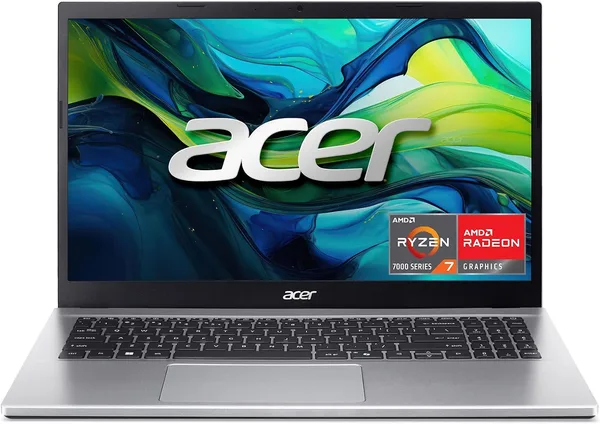
An "AI Ready" sticker on a $550 laptop is, frankly, a marketing move that gets under my skin a little. See that label and you instinctively expect an NPU, on-device neural nets, something in Copilot+ PC territory. What you actually get is a plain AMD Ryzen 7 7730U — an eight-core chip with integrated Radeon graphics — that opens cloud-hosted Copilot when you press a dedicated keyboard button. In other words, "AI Ready" means "has Wi-Fi and a browser." Welcome to marketing in 2026.
Strip the branding away, though, and look at the laptop itself, and it's a genuinely honest workhorse. The Acer Aspire Go 15 is built from simple, proven parts: a 15.6-inch FHD IPS screen with no gimmicks, 16GB of RAM — plenty for dozens of Chrome tabs alongside Excel and Zoom — and that same Ryzen 7 7730U, which handles multitasking briskly thanks to its eight cores. It's not flagship hardware, but it's also not the sluggish Celeron that vendors try to pass off as a "budget" laptop at the same price point.
I'd file this one under "bought it for work, forgot it exists." It doesn't wow you at first glance — plastic chassis, unremarkable keyboard, nothing premium about it. But it also doesn't grate on you day to day with small annoyances. The IPS panel gives you decent viewing angles, so you can turn the screen to show a colleague across the desk without tilting the whole laptop. FHD resolution is exactly right for 15.6 inches: text stays sharp, and the system doesn't choke on pushing extra pixels the way it might on a 4K panel paired with the same silicon.
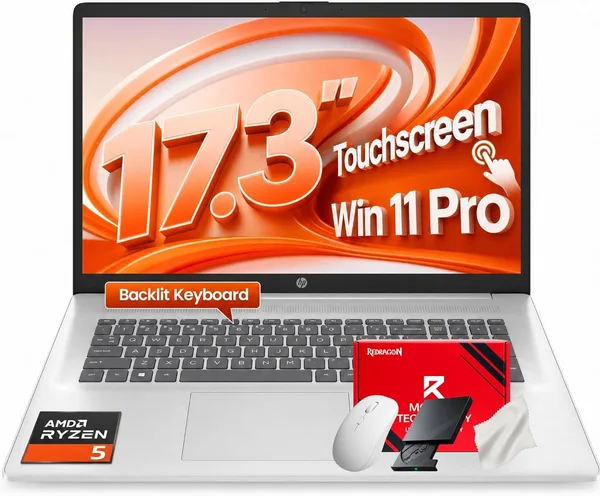
Where it really pulls ahead is against the classic Acer Aspire 3, long the default pick for "grab the first office laptop you see." The Aspire 3 usually ships with an older platform and, more often than not, just 8GB of memory — and 8GB in 2026 genuinely hurts once Windows eats half of it on boot alone. The Aspire Go 15, with its 16GB and a Ryzen 7 instead of a Ryzen 5, is a meaningful step up without jumping into a different price bracket. Stack it against business models like the HP 17.3 Business, though, and you're comparing apples to oranges — bigger screen, different audience (home office rather than portability), so the choice really comes down to whether you're willing to lug a 17-inch slab in your bag every day.
What's definitely missing here is gaming muscle and serious video rendering. The Radeon graphics baked into the Ryzen 7730U handle 4K YouTube and light Photoshop work fine, but Cyberpunk — or even CS2 on sane settings — is out of reach. If there's a voice in your head whispering "maybe I'll game on it sometimes," this isn't your laptop; go look at something with a discrete GPU instead.
On price: check the full landed cost to your country on dede.sh — item, forwarding, and import duty rolled into one number — before you decide. This isn't a splurge purchase, it's a working tool with logistics baked into the total. Compared to what a fresh Ryzen 7 with 16GB costs from local retailers, it holds its own competitively, though budget for a couple of weeks in transit as part of the deal.
Battery life deserves its own paragraph. Manufacturer numbers are always optimistic, and the Aspire Go 15 is no exception: a real-world workday on a single charge — Wi-Fi on, brightness at mid-level, a dozen tabs open — reads more like "should get you to evening, if you're lucky" than "two days without a charger." For office or home use near an outlet, that's a non-issue. If you're planning to carry it around town all day with no plug in sight, pack a power bank as backup.
The keyboard isn't premium, but it isn't mushy cardboard either — travel is enough for long typing sessions, without that "typing on jelly" feeling you get on the cheapest models. The trackpad is middling, nothing special, but precise enough not to annoy you.
Who should buy it. Students, freelancers, and home users who need a laptop for browsing, office apps, streaming, and light photo editing — and who don't want to pay extra for a gaming GPU they'll never touch. Anyone who values 16GB of RAM more than a shiny sticker on the lid.
Who should skip it. Gamers, and anyone who needs serious video editing or 3D rendering — the hardware just isn't built for that. And anyone genuinely hunting for a laptop with a local AI accelerator (NPU) for offline neural-network work — the name promises more than the processor delivers.
The core trade-off boils down to this: you pay a bit more than the cheapest Aspire 3, but you get noticeably more performance headroom for the long run — and along the way you're buying an "AI Ready" label that, in practice, means nothing. Understand that going in, and buy this laptop for what it actually is — a solid machine with a capable processor and adequate memory — and you won't be disappointed.
שאלות נפוצות
No, it's essentially a marketing sticker. There's no NPU (a dedicated chip for on-device AI) here — the Copilot button just opens Microsoft's cloud service in your browser, something you could do on any laptop with an internet connection.
Yes, with room to spare. The eight-core Ryzen handles that workload without stuttering, and 16GB is a comfortable baseline these days rather than the bare-minimum-to-survive that 8GB is on cheaper models.
If the price gap is small, go with the Aspire Go 15: a newer Ryzen 7 and, more often, 16GB of RAM against the typical 8GB in entry Aspire 3 configs is a real difference in how long the laptop stays usable — not just numbers on a spec sheet.
For something light — indie titles, older games — sure. For current AAA titles, no; this is integrated graphics, not a discrete GPU, and even low settings will feel rough.
If the hardware inside is identical, no — the difference is purely marketing, plus maybe a Copilot key on the keyboard. Judge it by processor, memory, and price, not by the word "AI" in the name.