Acer Nitro V 16S AI Review (Ryzen 7 260, RTX 5060): Is It Worth Buying?
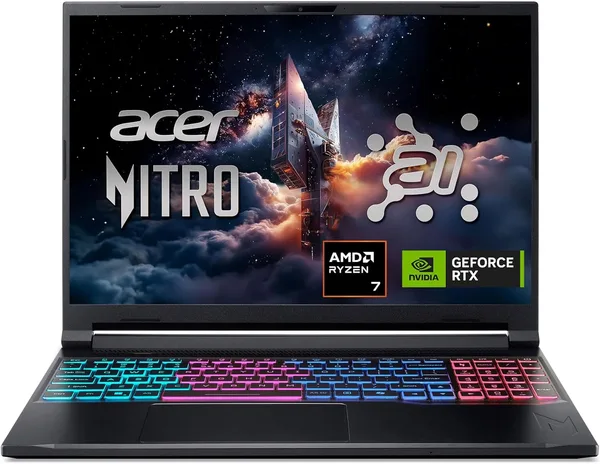
The Acer Nitro V 16S AI is a solid workhorse for 1080p gaming, built around a fresh RTX 5060 and a Ryzen 7 260. It doesn't pretend to be a premium machine — it's honest about what it's for: running games without wrecking your budget. Get it if you play anything more demanding than browser games and can live with a plastic chassis and an unremarkable screen. Skip it if you want something quiet, light, or even mildly stylish.
You know the drill: you open a marketplace, type "gaming laptop under $1,500," and get buried in an avalanche of identical black bricks with red keyboard backlighting. The Acer Nitro V 16S AI is one of them. And honestly, the first impression from the name alone — "AI Gaming Laptop... 572 AI TOPS" — feels like marketing decided that sprinkling "AI" into every other word would boost sales on its own. It won't. But underneath that noise sits a genuinely decent machine.
What's actually interesting here
The real story isn't the NPU or the "AI TOPS" figure that 99% of buyers will never touch. The real story is the Ryzen 7 260 paired with an RTX 5060 in a 16-inch chassis. The Ryzen 7 260 is AMD's newer mobile chip, striking a reasonable balance between performance and heat, while the RTX 5060 laptop GPU sits at exactly the tier that, in 2026, carries most current games at 1080p with DLSS on and no drama. It's not a flagship card — forget 4K or ray tracing on ultra — but for Cyberpunk, Baldur's Gate, Counter-Strike, or even newer releases at medium-high settings, it has plenty of headroom.
The display is a 16-inch WUXGA panel. Don't expect flagship-level color accuracy or a blazing refresh rate — this is a working panel, not a showroom one. If you're a photographer or designer who wants to game in the evenings, look elsewhere for color grading. But for a gamer watching frame counters rather than Delta E numbers, it's perfectly fine.
The chassis is black, clamshell, classic laptop form factor with zero surprises. It weighs a bit over two kilograms, and that's worth flagging — hauling this thing in a backpack daily between classes or into the office is not for the faint of shoulder. This is a "stays at home" or "once-a-week trip to a friend's place" laptop, not a subway commuter.
What it's like in real life, not on a slide deck
Picture a student writing a term paper in Word during the day and diving into Elden Ring or Marvel Rivals at night. Or a freelancer editing YouTube videos while testing new game releases on the side. For either scenario, the Acer Nitro V 16S AI is a realistic pick — enough power for both rendering and gaming, and Windows 11 Home comes preinstalled, no licensing headaches involved.
Against a classic rival in this niche — think an Asus TUF, or in our own catalog, the RTX 5070 gaming laptops — the Nitro V clearly loses on raw GPU headroom, but wins on price. That's the trade-off in a nutshell: you give up some graphics power and pocket the savings, which you can put toward extra RAM or storage if the seller allows upgrades, or just keep in your pocket.
The main irritant in daily use with Nitro-series machines, going by owner feedback on previous generations, is fan noise under load, plus a chassis that's clearly built to a budget: plastic that flexes a bit, hinges that can loosen over time. This isn't a "five years, no questions asked" laptop. But it never claims to be one either.
For the exact landed price in your country — laptop, shipping, and import duty rolled into one number — check the listing on dede.sh. This sits squarely in the mid-range gaming segment, where competition is brutal, and the Nitro V competes on raw performance-per-dollar rather than polish.
The honest verdict
Who should buy it: budget-conscious gamers who want smooth 1080p framerates in most current titles, students who need one laptop for both classes and downtime, and beginner streamers who aren't ready to invest in a top-tier RTX 5070/5080 rig.
Who should skip it: anyone who cares about design and portability (there are far more elegant ultrabooks out there), professionals doing color grading or 3D rendering who need an accurate panel and a beefier GPU, and anyone who really can't stand fan noise — the Nitro V will absolutely make itself heard under load.
Two real trade-offs worth knowing upfront: first, this isn't the quietest or coolest laptop in its class; second, the screen is good but not remarkable, and if you're used to OLED or a high refresh rate, you'll feel the downgrade. In exchange, the Ryzen 7 260 and RTX 5060 combo delivers that rare balance of getting solid performance and a couple more years of relevance for reasonable money.
שאלות נפוצות
For the most demanding games at max settings — no, don't count on it. But on high-to-medium settings with DLSS enabled, most current titles run smoothly at 1080p. Push to 1440p and you'll need to start compromising on settings.
If your budget stretches that far, an Asus with an RTX 5070 (like the V16 model with a 1TB SSD) gives you meaningfully more headroom for the future. The Nitro V is the pick when not overpaying right now matters more than squeezing out maximum performance.
Yes — the Ryzen 7 260 handles office tasks, a browser with twenty tabs open, video editing, and light graphics work without breaking a sweat. It's not a workstation, but it covers most non-gaming needs comfortably.
Honestly, no. In practice, 99% of buyers will never max out the NPU — it's more of a marketing bonus than a reason to pick this model. Buy it for the Ryzen 7 260 and RTX 5060, not for the word "AI" in the name.