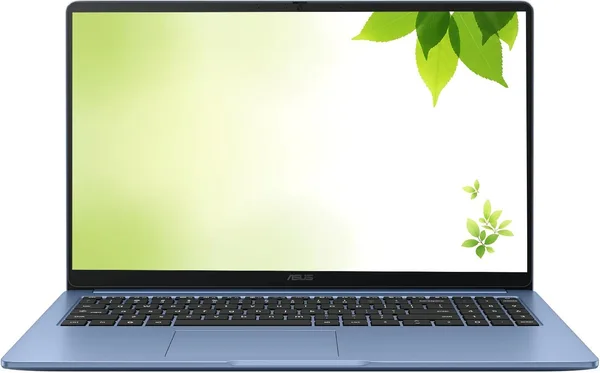
ASUS 15\" Chromebook 2026 Review: Is It Worth Buying
This isn't a laptop for Photoshop or gaming — it's a second (or third) machine for browsing, email, and Google Docs, and it earns its keep in that narrow lane. Get it if you need a light screen for a kid, your parents, or as a backup work tool for "just in case." Skip it if you're planning to run Windows software, run Zoom with a blurred background, or do anything resembling serious multitasking.
Picture this: your retired mom asks for "something simple to watch YouTube and message on Viber," and you're on the third evening in a row explaining why her ancient Windows 7 laptop chokes just opening a browser tab. Sound familiar? That's exactly the gap Chromebooks were built to fill — and the ASUS 15" FHD IPS Chromebook from 2026 sits squarely in that category.
Let's start with the big picture: this isn't a "laptop with Windows stripped out," it's a genuinely different philosophy. ChromeOS boots in about eight seconds, updates itself, practically nobody bothers writing viruses for it, and the whole interface is basically the Chrome browser with a thin shell around it. If your entire day is email, Google Docs, YouTube, and a dozen news tabs, you honestly won't notice the difference from a "grown-up" laptop. But if you need Photoshop, accounting software, or any desktop app from the Windows world — forget it, there's simply nowhere to install it.
What you actually get
A 15-inch FHD IPS screen is a genuine treat, since cheap Chromebooks often ship with dim TN panels and narrow viewing angles. This one looks even and color-accurate, holds up fine from the side too — good for the whole family piling onto the couch for a movie. The chassis is a pastel blue, more playful than serious, and that's actually a point in its favor: if you're buying it for a kid or as a second screen for the kitchen, it looks a lot friendlier than yet another black slab.
Inside: 4GB of DDR4 and 128GB of built-in storage, an Intel processor clocked up to 2.8GHz (the manufacturer conveniently skips the exact model — typical for the budget segment, where it's usually a Celeron or something in that same class). And here's the part worth being honest about: 4GB of RAM in 2026 is cutting it close. Chrome itself is hungry for memory — every tab is its own process. Open Gmail, YouTube, Google Docs, and a couple more tabs at once, and the system starts stuttering as it reloads background tabs from scratch. It's not a crash, just a one-second lag when you switch back to a tab that got unloaded. Annoying? A little. A dealbreaker? Not if you can live with 3-4 open tabs instead of 20.
The 128GB of storage deserves the same reality check — this isn't a drive for hoarding terabytes of photos and video. But ChromeOS was never about local storage to begin with: files live in Google Drive, and the onboard storage is really there for cache, offline documents, and the odd game from Google Play (yes, Chromebooks run Android apps, and that genuinely saves the day when you need something outside the browser).
Battery life is the other reason people buy Chromebooks in the first place: a lightweight OS paired with a modest processor means a full day of work without hunting for an outlet is a real thing, not a marketing line. Grab it on your way to a coffee shop, work for three or four hours, and there's still juice left.
What to compare it against
This ASUS most often gets cross-shopped with Acer — for good reason, since the catalog also has the Acer R13 Chromebook, also a Chromebook, also 4GB of RAM, but with a smaller 13.3-inch screen and only 32GB of storage — offset by a 360-degree touchscreen that's handier in tablet mode. If a bigger screen and more storage matter more to you, ASUS wins. If you want something compact with a convertible form factor, look at the Acer instead.
And if what you actually want is a full Windows laptop with real performance headroom, it's worth browsing the whole laptop category — there's a Lenovo Yoga with dual-mode use, plus gaming models. But that's a different budget and a different weight class entirely; comparing them directly to a budget Chromebook is like comparing a city bike to an off-roader.
Who should buy it, and who shouldn't
Buy it if: you need a second screen around the house, a laptop for a kid at school (schools increasingly run on ChromeOS via Google Classroom anyway), a spare machine for aging parents, or just "something for the browser" without any illusions beyond that. At its price point on the marketplace — before you factor in shipping and import duty to your own country, which push the real landed cost a bit higher — it still lands solidly in the budget bracket. For the full breakdown of item price, forwarding, and duty as one final number for your country, check the listing on dede.sh.
Don't buy it if: you're planning to edit video, install specialized software, keep twenty tabs open at once, or play anything heavier than a casual game from Google Play. You'll hit the ceiling of that 4GB of RAM fast, and there's no upgrading it — the memory is soldered in.
The real compromise here isn't the screen or the chassis — it's the RAM. The manufacturer could have gone with at least 6GB and made the whole experience noticeably smoother. But then the price wouldn't be what it is, and the entire point of a budget Chromebook is doing one thing well for not much money.
שאלות נפוצות
For 3-5 tabs plus a video running in the background — yes, no problem. But if you're used to keeping 15+ tabs open alongside YouTube, Zoom, and whatever else, brace for stutters and tabs reloading from scratch. That's not a bug, that's just how limited memory behaves.
No. ChromeOS doesn't support installing Windows programs — only web apps and a subset of Android apps from Google Play. If you need familiar desktop software, this isn't the machine for you; look at a regular laptop instead.
If you want a bigger 15-inch screen and more built-in storage, go ASUS. If compactness, a convertible touchscreen, and tablet mode matter more, go Acer R13. Performance is essentially identical between them; the difference is entirely in form factor.
Yes, that's one of the most popular uses for Chromebooks — schools increasingly run on Google Classroom, and parents don't have to worry about viruses or a system file getting deleted by accident.