ASUS TUF Gaming F16 (2025) Review: Is It Worth Buying
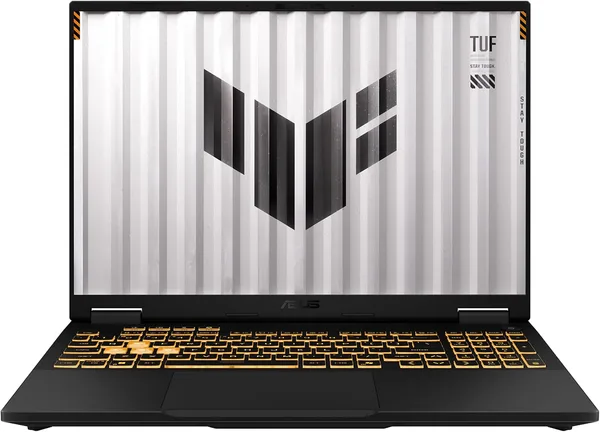
The ASUS TUF Gaming F16 (2025) isn't the prettiest laptop on the shelf, but it's an honest one. Check the full landed price for your country on dede.sh (device plus forwarding and import duty rolled into one number), and in return you get a 165Hz 16:10 screen, a discrete GeForce RTX chip, and a chassis built to survive an actual fall off the couch. Get it if you game mostly at home and rarely haul it anywhere; if you want a café-hopping ultrabook, keep walking.
Picture the situation: you need one laptop that handles your workday, lets you unwind in Cyberpunk after your shift, and doesn't embarrass you in front of friends when you pull it out. Most gaming laptops are either too thick and too hot, or so drenched in edge-to-edge RGB that people mistake them for a Christmas tree. The TUF Gaming F16 tries to be the exception — and, credit where it's due, it mostly pulls it off.
What this beast actually is
ASUS TUF is Asus's "blue-collar" gaming line — less glamorous than ROG, but cheaper and, by Asus's own claims, tougher: MIL-STD-810H military-grade durability testing, a reinforced chassis, a keyboard supposedly built to survive a spilled drink (I wouldn't recommend testing that particular claim yourself, but the fact that they make it says something). The 2025 F16 comes with a 16-inch 16:10 display running at 165Hz — basically the going standard for the mid-range gaming segment now, and the jump from 60Hz is genuinely noticeable within minutes, not just in shooters but even scrolling a browser.
Under the hood sits an Intel Core i5-13450HX. It's not a flagship chip, but it has plenty of headroom for most everyday tasks: twenty browser tabs, editing short clips, compiling small projects — the laptop chews through all of that without breaking a sweat. Paired with it is a discrete GeForce RTX GPU, which is what actually carries the "gaming" half of the promise.
How it holds up in the field
This is where things get interesting. In competitive titles like CS2 or Valorant, that 165Hz panel really shines — the image is smooth, input lag is minimal, and the difference versus a 60Hz office laptop is almost physical, like taking off a pair of gloves. In heavier AAA titles with ray tracing, though, you'll have to either dial back the settings or lean hard on DLSS — there's no magic here, an i5 paired with an entry-level RTX chip isn't going to replace a desktop running a proper i7-class CPU and GPU.
The most practical thing to know before buying is cooling. TUF laptops have always run louder than lightweight ultrabooks, and the F16 is no exception: under sustained load the fans spin up loud enough to hear from the next room over in a quiet house. If you're planning to game with headphones on, the problem solves itself. If you're planning to sit next to someone watching a show, give them a heads-up first.
The second thing worth saying plainly: this isn't a laptop you want slinging into a backpack for daily commutes between classes or meetings. The chassis is chunky and the battery drains fast under gaming load — that's true of pretty much every gaming laptop, and the ASUS TUF Gaming F16 is no exception here, it's just upfront about it: this machine wants to live near an outlet, not on the road.
What to compare it against
Its closest rivals in this price bracket are the MSI GF65 and the GP76 Leopard, both of which pack RTX 30-series GPUs for similar money, sometimes with more RAM or storage out of the box. The real difference is philosophy: MSI leans harder into the "gaming laptop" look, with a bolder design and a fan noise profile that tends to run louder under load, while the TUF plays it restrained — a black chassis with no unnecessary lighting that you wouldn't hesitate to bring to a job interview. If raw FPS-per-dollar is your priority, look at MSI. If you want a balance between "can game" and "can show up to work with it," the TUF wins.
Compared to earlier generations of Asus gaming laptops, the biggest leap is the screen: 16:10 instead of the usual 16:9 gives you more vertical real estate, and that shows up not just in games but in everyday work with documents or code. Small detail, genuinely nice to have.
Who should buy it, and who shouldn't
Buy it if: you game mostly at home, want a single device that covers work and play, care about staying stable under sustained load, and a 165Hz screen is a real argument for you rather than a nice-to-have. The i5-13450HX paired with the discrete RTX GPU sits at exactly the level where you can run current titles on medium-to-high settings without feeling like you're constantly compromising.
Skip it if: you need a light companion for daily travel, or you're counting on more than a few hours of unplugged battery life during active use. Also skip it if your goal is maxed-out performance in the heaviest AAA titles at ultra settings — for that, look at higher-tier configs with an i7 and a flagship GPU, since the i5 does show its ceiling there.
The core trade-off is simple: you're not paying for the most powerful hardware on the market, you're paying for a solid mix of fair pricing, a durable chassis, and a fast screen. It's an honest deal — just a deal, not a miracle.

שאלות נפוצות
For most online games and even recent AAA titles on medium settings — yes, especially with DLSS turned on. For ultra settings and ray tracing in the heaviest releases, no — the CPU will start holding the GPU back. If you mostly play competitive shooters, the i5 is actually more than enough.
If FPS per dollar is what matters most, MSI often wins on raw specs in this price bracket. If chassis durability and a more restrained look you don't mind pulling out at work matter more, the TUF is the more logical pick. Compare current prices on both before deciding.
Yes — under sustained gaming load the fans are audible even from the next room. That's a general trait of gaming laptops in this class, not a unique flaw of the TUF. Gaming with headphones on removes the issue entirely.
Easily — the 16:10 screen gives you more room for documents and code, and the i5 handles everyday office tasks with headroom to spare. Just keep in mind it's on the heavy side for a daily commute, and the battery isn't built for a full day unplugged.