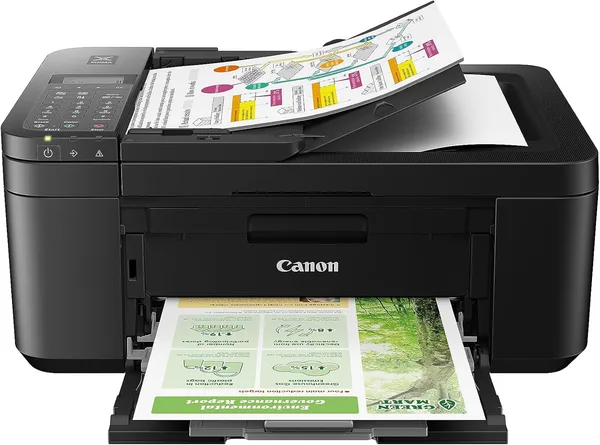
Canon PIXMA TR4720 Review: Is This Home All-in-One Printer Worth It
The Canon PIXMA TR4720 is a solid pick for a household that needs a printer maybe once a week: a receipt here, a scanned form for the bank there, a school assignment the night before it's due. Wi-Fi and the app just work, and the built-in fax is a genuine bonus for anyone who still has to deal with one. The catch is the ink math — print often and the cartridges will quietly eat every dollar you saved on the machine itself.
Picture this: your kid suddenly needs a report printed at 10 p.m., and the nearest copy shop closed an hour ago. Or the bank wants a scanned document, and you just need the thing to turn on and work the first time you press the button. That's the entire reason people keep a printer at home — not because they love printing, but because of moments exactly like this. The TR4720 is built for that job. It's not about photo quality or office-grade output. It's about being there when you need it.
What this machine actually is
It's a compact inkjet all-in-one — print, scan, copy, and, surprisingly rare in 2026, a real built-in fax line. Fax hasn't fully died, and if you deal with older relatives, clinics, or government offices that still accept documents by fax, this isn't a marketing leftover — it actually works as advertised. Most modern home printers have quietly dropped that button entirely.
Setup runs through the Canon PRINT app, and it's the usual story with home electronics: connect to Wi-Fi, let the printer find itself, print a test page, and ten minutes later you've forgotten you ever set it up. The 20-page automatic document feeder is a small but real convenience if you need to scan a stack of bills or a medical file instead of one sheet at a time — without it, you'd be placing each page on the glass by hand, which gets old fast.
It's not a fast printer, and it's not a quiet one — this isn't something you park next to a bedroom and forget about. But for home use that barely matters; you're not printing a thesis every night.
Where it actually saves you a headache
The core use case is a family with school-age kids, or a small home office where printing is rare but always "needed right now." Compared to a trip to a print shop, the TR4720 wins outright — no getting dressed, no drive, no waiting in line to print a single page. Against similarly priced HP DeskJet models, Canon usually pulls ahead on scan quality — text comes out sharper, and the app is simpler for everyday use.
Mobile printing is covered too: AirPrint, print straight from your phone, no fuss. For anyone who already expects "everything prints from my phone" as a baseline, not a bonus, that box is checked.
Here's the honest catch
Entry-level inkjets sell cheap for a reason: the manufacturer makes its money on cartridges. Genuine Canon cartridges for this model cost significantly more per printed page than the printer itself would suggest — that's not a secret, it's the standard business model across the entire industry. If you expect to print more than a few dozen pages a month, do the math on a full year of ownership before you buy, not just the price tag on the box.
The other thing to factor in: this printer ships from the US, and while the sticker price looks small, shipping, duty, and import tax all get added on top. You can see the full landed price — item, forwarding, and import duty combined — on the product page on dede.sh before you commit, and it's worth weighing against whatever sells locally with an in-country warranty and service. Cartridges are a separate headache too — either import them alongside the printer or hunt for trustworthy compatible ones locally, which is its own question of print-quality trust.
Who should buy it, who shouldn't
Buy it if you print rarely, value a compact footprint, and want one machine that covers documents, scans, and the occasional fax. For that use case, the TR4720 earns its price honestly.
Skip it if you're setting up a home office with regular printing, photo printing, or high volumes — the cartridge economics will sour on you within a couple of months. In that case, look at monochrome laser printers (cheaper cost per page) or inkjets with a continuous ink supply system, where consumables cost pennies.
And one more thing: if you genuinely don't need fax — which, let's be honest, is most people — don't pay extra for it. Look for a simpler, cheaper model in the same lineup.
If you're weighing what to compare the Canon PIXMA TR4720 against on a home-electronics budget, check out laptops and SSDs in the catalog too — the laptop section on dede.sh and storage drives are also worth a look when you're planning out a home workspace.
שאלות נפוצות
Yes — for text documents and even simple graphics, this printer is more than capable. Text print quality is solid, and scanning is actually better than you'd expect from a budget all-in-one.
No. Fax is a niche feature that only pays off if you genuinely deal with it — clinics, certain government offices, older relatives. If not, look for a simpler model without it; it'll cost less.
If you print a lot and mostly text, a laser printer will be cheaper in the long run. The TR4720 wins where you need scanning and copying alongside occasional printing, not constant heavy use.
The printer itself is inexpensive, but once shipping, duty, and import tax are added, the full landed price ends up noticeably higher than the listed price. Check the full price breakdown on the product page before buying — never go by the sticker price alone.