Creality K2 Pro Combo (A) Review: Is This Multicolor 3D Printer Worth Buying
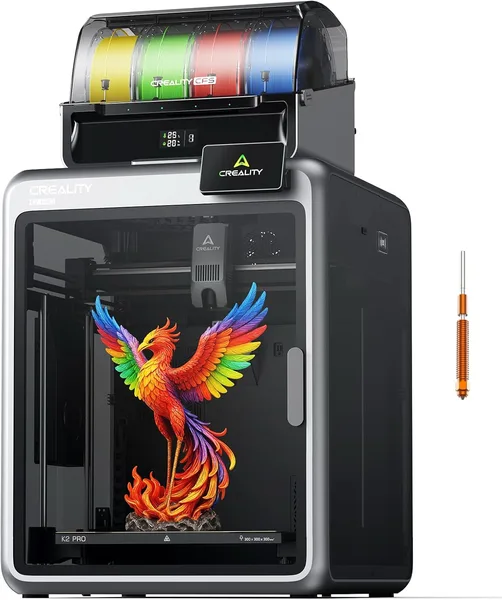
The Creality K2 Pro Combo (A) is a fast, enclosed printer with a factory color-switching module (CFS) and a dual AI camera, and it genuinely prints at 500-600mm/s without drama. Get it if you specifically need a multicolor enclosed machine straight out of the box and you're willing to deal with CFS calibration. Skip it if you just want one printer for one color "once and for all" — here you'd be paying extra for functionality you'll use once a month.
Picture this: you want to print your kid a house key with their name in a different color. Or make a spool with a company logo in brand colors. On a regular single-color printer, that's either impossible or turns into a manual mid-print filament swap with a real risk of ruining the model. That's exactly the use case Creality built the K2 Pro Combo for — a printer where multicolor isn't a "hack," it's a built-in feature straight out of the box.
Your first impression is that this is a heavy, serious machine. 38+ kilos of pure weight, plus a separate CFS unit (Color Filament System, the same four-spool module that sits off to the side) — this isn't a printer you carry from room to room every week. Set it down once on a table or shelf and forget about it. On the plus side, the frame is fully enclosed — important if you print ABS or another "temperamental" plastic and don't want a draft from the window ruining layer after layer.
Speed is honestly the whole reason people buy a K2 rather than an older Ender model. The claimed 600mm/s isn't a marketing figure for show — the printer really does churn out parts several times faster than classic budget FDM machines from 2020-2022. In practice it feels like "made a coffee, model's basically done" rather than "went to sleep, it's still printing in the morning." For anyone printing on commission or handling prototypes daily, that's not a nice-to-have, it's hours saved every week.
Now about CFS — the main selling point and, at the same time, the main source of stress. The system works well with PLA and PETG, giving clean color transitions without bleeding on the model's walls. But there's a catch: with ABS or any moisture-loving material, CFS demands discipline — drying spools, watching humidity in the room, or your first prints will come out "fuzzy" on the surface. Compared to Bambu Lab's AMS, which a lot of people consider the gold standard for multicolor, Creality is catching up here rather than leading — calibration is a bit rougher, and sometimes you need to manually tell the printer where a spool ran out.
The dual AI camera is a nice bonus that sounds great on paper ("print monitoring, defect detection") and in practice saves your nerves roughly once every ten prints, when the printer stops the job on its own after spotting spaghetti on the bed instead of continuing to pump plastic into the void. Not a revolution, but not a marketing placeholder either — it genuinely works.
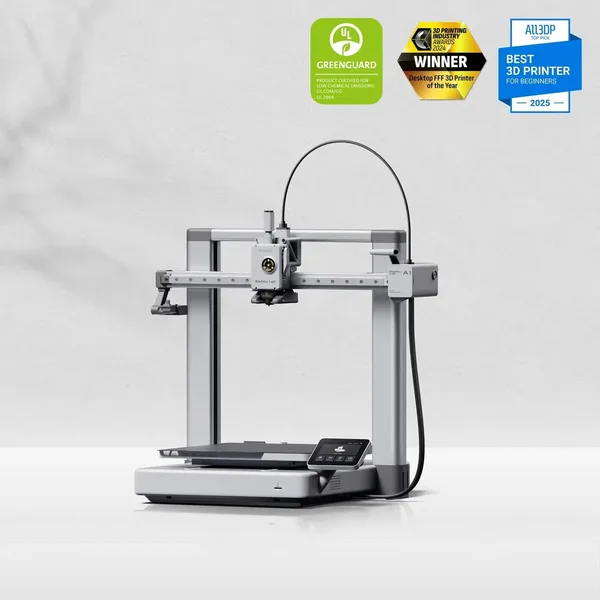
The number one competitor here is the Bambu Lab A1. It's smaller, cheaper, easier to set up, and if your goal is just to try multicolor without diving deep, the A1 wins on effort-to-result ratio. But the K2 Pro Combo earns its keep where large-volume speed and a fully enclosed print chamber matter — exactly where the open-frame A1 clearly loses.
Build quality is something Creality has always bragged about, and here it genuinely delivers: the box arrives in an "almost-ready printer" state, no hours spent turning screws following a three-language manual. That's a difference you feel immediately if you've got experience with Chinese kits where the first evening goes toward assembling the frame, not printing.
A printer like this runs around $743 on the marketplace. For the full cost with shipping and import duty to your own country, check the landed price on the Creality K2 Pro Combo (A) product page before deciding. This isn't an impulse buy — it's an investment worth planning ahead for, forwarding included.
Honest conclusion: if you make merch, client prototypes, or just love complex multicolor models and are willing to spend an evening on calibration, this is one of the best options in its class right now. If you need "a printer for one figurine once a month," don't pay extra for CFS and the enclosed chamber — get something simpler and cheaper. One more thing people often forget: spare nozzles and CFS parts will also need to be sourced from abroad, since local service for K2 machines is still fairly limited.
שאלות נפוצות
If you genuinely plan to print colorful models regularly — yes, it's worth it, since the alternative is manually swapping filament and downtime. If multicolor is a once-or-twice-a-year thing, the premium won't pay off — get the base version without Combo.
For a beginner with a compact desk — the A1, it's simpler and cheaper. For fast printing of large parts in an enclosed chamber and more serious volume — the K2 Pro Combo, it's more powerful but also more demanding to set up.
For most orders — yes, it noticeably cuts turnaround time compared to older printers running 60-100mm/s. But on very small parts with thin walls, you'll still need to dial the speed back for quality's sake, so don't treat the number as a universal constant.
Harder than just turning on the printer and printing, but easier than it looks from the outside. The key is keeping spools dry and not skimping on calibration for the first few prints — after that, the system runs stably.