Creality SPARKX i7 Multi-Color 3D Printer: Is It Worth Buying?
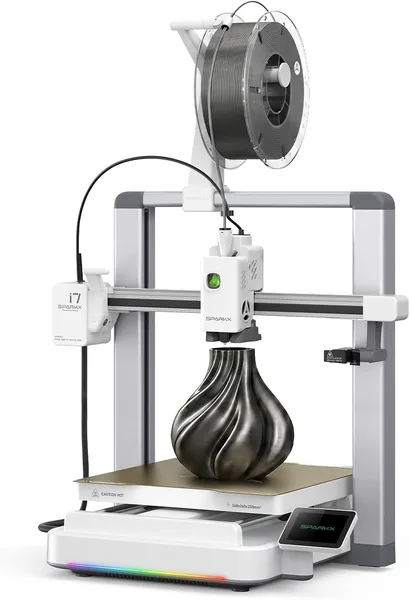
The Creality SPARKX i7 is a fast CoreXY printer with multi-color printing at a reasonable price, and for a home workshop or a small print shop it's a genuinely solid pick. Don't expect quiet operation, perfect out-of-box calibration, or the toughness of an industrial K2 Plus from it — this is still the budget segment, just a very nimble one.
Picture this: a customer wants a character figurine in three colors by Friday, and all you have is a regular single-color printer and a lot of time to spend manually swapping filament. A familiar pain for anyone who's ever tried making something colorful on a budget FDM machine. This is exactly where the SPARKX i7 tries to seize the initiative — not just printing fast, but printing fast in color, without wrestling with manual spool changes.
What this actually is
The SPARKX i7 is a CoreXY machine from Creality, meaning the print head rides X and Y simultaneously via two belts, rather than dragging the entire bed around like old Enders did. That's already a big step on its own: fewer vibrations, fewer "ghosting" artifacts on model walls at high speed. Speed is rated up to 500mm/s — a number that's marketing in the sense of "maximum under ideal conditions," but even at a real-world 300-350mm/s it's noticeably faster than a typical Ender 3 or even many previous-generation Creality printers.
The printer arrives 95% assembled — and that's not an empty claim. Out of the box you basically need to screw in a few parts and connect cables, not build a frame from extrusions like some fully DIY kits require. For someone buying their first printer and worried they'll have to learn mechanical engineering before their first print, that removes a solid half of the stress.
Multi-color printing, and where the catch is
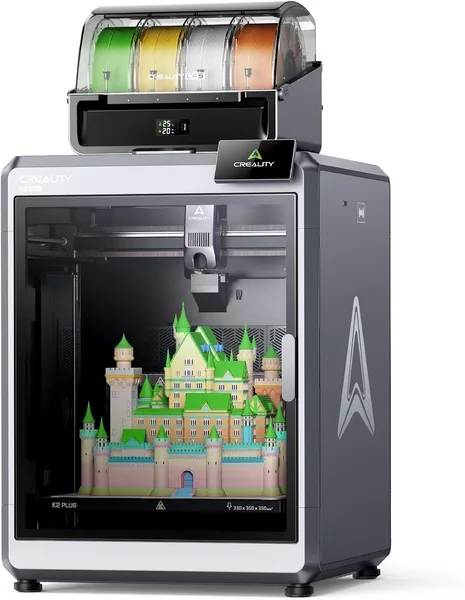
This is where things get interesting, and where most of the questions come in. Multi-color here isn't implemented the way it is on the flagship K2 Plus with its separate filament feed station (CFS) — there, colors switch on the fly automatically from four spools. The i7 takes a simpler, and honestly more compromised, approach: the system does swap filament, but slower and with more waste on "nozzle purging" between color switches. That means a small four-color part eats up noticeably more material and time than the same model printed in a single color.
This isn't a flaw specific to this printer — it's just the physics of budget multi-color printing in general. But it's worth knowing upfront, rather than finding out after the fact why a small colored figurine took twice as long as expected.
What it's like to use
Auto bed leveling is here, and it genuinely saves your nerves — no more crawling around with a sheet of paper under the nozzle every time. The bed is a flexible magnetic sheet, removable, and models pop off without a fight against a scraper. A small thing, but it's nice not having to worry about scratching the plate every time.
Noise is a topic sellers stay quiet about. At high speed, the i7 isn't quiet. If you're planning to put it in a bedroom or a room where someone's working nearby, be ready to either manually reduce speed or move the printer to a separate room. This is a general issue with fast CoreXY machines in this price segment, not a unique quirk of this specific model — but that's no reason to ignore it either.
Compared to a classic Ender 3 (same brand, different era), the difference is immediate: frame rigidity is different, and the speed gap isn't a multiple, it's an order of magnitude. But compared to something like the Bambu Lab A1 mini — a competitor playing on the same "fast and affordable" turf — the SPARKX i7 loses on ecosystem and firmware stability, but often wins on price and on the fact that more parts can be unscrewed and repaired yourself, without needing official service.
Who should buy it, and who shouldn't
If you need a first home printer, want to print toys for the kids, cosplay parts, or organizers, the Creality SPARKX i7 covers that with room to spare and without any assembly hassle. It also suits anyone who's already "outgrown" a slow Ender and wants to feel what normal speed is like without paying flagship prices.
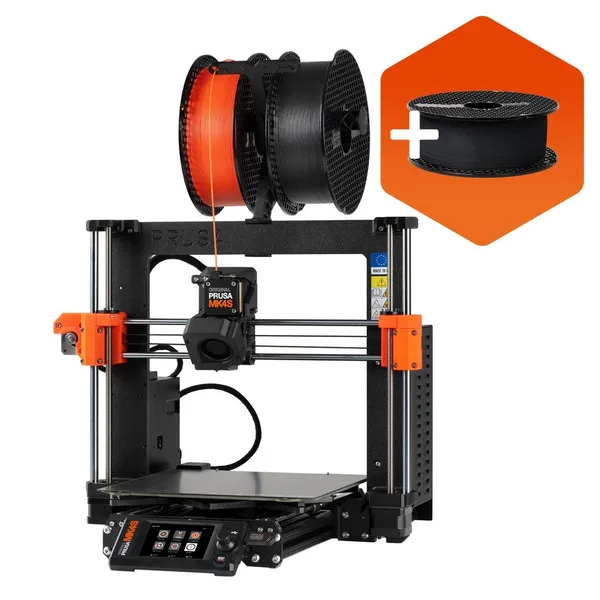
But if your goal is commercial multi-color miniature printing daily at industrial volumes, you're better off looking straight at the K2 Plus with a CFS station, or even toward Prusa — reliability is higher there, and material waste on color changes is lower. The main trade-off here is simple: you pay less, get speed and multi-color capability, but put up with noise and not-the-most-economical filament-swap logic.
The listing price is around $262. For the full cost with shipping and import duty to your own country, check the landed price on dede.sh — it's a figure that would have made a CoreXY printer with auto-leveling and color printing an unthinkable dream just a few years ago.
שאלות נפוצות
No, there's no point. If 90% of your models are single-color functional parts, it's simpler and cheaper to get a classic single-color CoreXY printer. The multi-color module only pays off if you genuinely plan to print colored figurines or presentation models regularly.
For an absolute beginner afraid of complex assembly and calibration, the i7 is more convenient specifically because of the 95% pre-assembly and auto-leveling. The Ender is cheaper but demands more manual work and patience up front.
In practice, few people print at the maximum rated speed constantly — quality suffers. A realistic 250-350mm/s at decent quality is already substantially faster than most budget printers, and for home or small commercial use that's more than enough.
Honestly, better not to, especially at high speed. If you don't have a separate room or balcony, either manually lower the print speed at night or look straight at printers with an enclosed, sound-dampened housing.
If you're still weighing your options, it's worth checking out the alternatives in the same category to compare price, speed, and approach to multi-color printing side by side.