Dell Chromebook 2-in-1 11 3100 review: is it worth it at around $67?
The Dell Chromebook 3100 2-in-1 isn't a laptop for work or school in the usual sense — it's a cheap "second machine" for browsing, YouTube, and reading mail. The Celeron N4000 and 4GB of RAM handle Chrome OS reasonably well, because the system is built around weak hardware, not around Windows. But this is a used, school-issued device by origin, and it's only worth buying once you understand it's a compromise, not a full laptop replacement.
Picture the situation: mom wants her kid doing homework on something with a keyboard, not a phone. Or you need a laptop you can toss in a bag without worrying it'll get dropped and you'll be out real money. Or — the most common case — you just need something for browsing and Zoom because the main computer is busy or flat-out broken. In all these situations, people usually search "cheapest laptop" and stumble onto a pile of used Chromebooks going for pocket change. The Dell Chromebook 2-in-1 11 3100 is one of them.
What this machine actually is
This is a school Chromebook. Literally: the 3100 was bought in bulk by American schools for remote learning for years, and the secondhand market is now flooded with these things — decommissioned, wiped, sometimes still carrying an asset-tag sticker under the keyboard that the seller forgot to peel off. Inside: an Intel Celeron N4000, 4GB of RAM, and a modest 32GB eMMC drive. On paper, that looks pretty grim for 2026. And if we were talking about Windows, I'd tell you to close the tab and look elsewhere.
But this runs Chrome OS, not Windows, and that's the crucial difference. Over the years Google has made the system light enough that even a weak Celeron and 4 gigabytes of RAM run it without serious lag — as long as you're not trying to open 20 tabs while running a heavy Android app in parallel. For the browser, Google Docs, YouTube, Zoom (within reason), and email, it's enough. And it's enough consistently, without the weird stutters you get on cheap Windows laptops with the same specs.
The 2-in-1 hinge and touchscreen — a gimmick that actually works
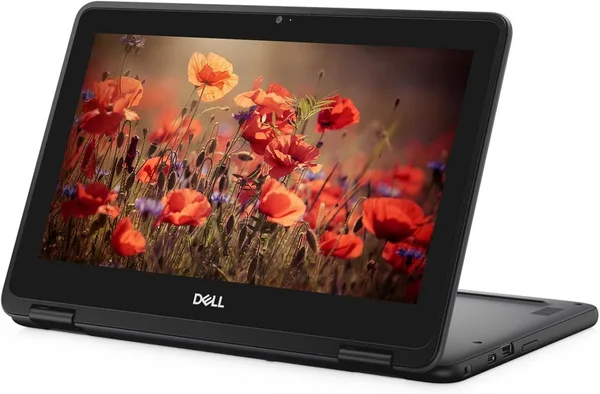
The main thing that sets this model apart from a regular Chromebook is the 360-degree hinge and the touchscreen. You can fold the screen back and use it like a tablet: scroll a feed, draw in an app, watch a movie in bed without holding a keyboard up in front of you. For a kid, that's a genuinely nice bonus — drawing with a finger or a stylus (bought separately, since none is included) is a real step up from a classic clamshell. Adults get some use out of it too, even if it's just watching a video in the kitchen when your hands are full.
The 11.6-inch panel is no Retina display, obviously — viewing angles and brightness are mediocre — but it's plenty for text and video. Compared to the Dell 5190 2-in-1 — another school-issued convertible Chromebook, also touchscreen, also 11.6 inches — the difference is minimal, both come from the same generation of school hardware. Against the Lenovo 300e, the classic rival in this niche, the 3100 wins with a slightly newer N4000 chipset versus the N4020 — though honestly the gap is so small you won't notice it in practice.
Where this actually hurts
32GB of storage is next to nothing. The system itself, browser cache, and a couple of extensions eat up a big chunk right away. Offline movies, heavy games, or a local photo library are out of the question — you'll have to live in the cloud, keeping everything in Google Drive or something similar. If that's unfamiliar and uncomfortable for you, get a 64GB-or-higher model instead. The 4GB of RAM will also make itself known the moment you open a video call, a document, and a dozen tabs at once — the system starts to lag, and you'll need to close things. It's not a disaster, just a discipline you have to get used to.
And here's something sellers won't mention: at this age, the battery may already hold a charge worse than the spec sheet claims. This is a used device, and the battery is the first thing to degrade over the years. So expect noticeably less real-world runtime than advertised, and don't be surprised by it.
What it actually costs
The Dell Chromebook 2-in-1 11 3100 goes for around $67.50 — that's the price of a used device, without a premium box or charger, often in "Grade B/C" cosmetic condition. Once you add international shipping, forwarding, and customs handling, the final landed total ends up noticeably higher than the sticker price, but even then it remains one of the cheapest ways to get a working keyboard-and-screen device in the house — substantially cheaper than a new budget laptop from a local store.
Who should buy it, and who shouldn't
Worth buying if this is a second or third device in the family, a machine for a younger schoolkid, or a spare "just in case" unit for when the main laptop is in for repair. It also suits older relatives who just need mail, news, and video calls with the grandkids — Chrome OS's simplicity is even a plus here, since there's less chance of breaking something with a stray click.
Not worth buying if you need serious work done: video editing, heavy spreadsheets, specific Windows software (accounting apps, CAD, games) — Chrome OS simply isn't the tool for that, no matter how many gigahertz the chip has. Also skip it if you want "one laptop for life" — this device is already a bit old, and after two or three years of active use, the battery and storage will make themselves felt even more.
The honest compromise here: you pay next to nothing for a device that does a narrow set of tasks well, and nothing else at all. If your use case fits inside that circle, buy it and don't look back. If it doesn't, better to spend more and get something more capable right away than to swap devices twice.
If you'd like to compare it against other options in this same niche, check out the broader dede.sh laptop catalog — it has both Windows models and other Chromebooks across generations.

שאלות נפוצות
For 5-8 tabs, Google Docs, and mail — plenty. Add a Zoom call, a heavy website, and a document all at once, and the system starts to lag. Chrome OS manages memory more efficiently than Windows, so the real-world experience is better than "4GB" sounds on paper, but there's still a ceiling.
Practically the same: both are school Chromebooks from the same generation with very similar Celeron chips. The Dell 3100 has a slightly newer processor and the touchscreen 2-in-1 form factor, so if you specifically want a convertible with a touch display, grab this one. If the form factor doesn't matter to you, just compare the condition and price of the specific listing.
Technically there are ways, but it's not recommended: 4GB of RAM and 32GB of eMMC storage are nowhere near enough for a comfortable Windows experience — you'd end up with a slow, disappointing machine. If you need Windows specifically, look for a different model built for it.
If you're buying it for a kid or for watching video and drawing, yes — it's a genuinely noticeable difference in convenience. If you just need a text editor and mail, you can save money with a regular clamshell without touch, and the price difference usually justifies the saving.