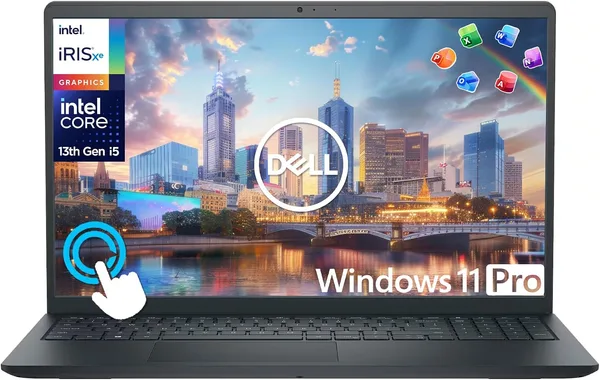
Dell Inspiron 15 Touchscreen 2025-2026 review: is it worth buying?
The Dell Inspiron 15 Touchscreen 2025-2026 is that same boring, reliable workhorse that isn't trying to impress you — it just works. A touchscreen, a 10-core i5, 16GB of memory, and Windows 11 Pro, all for a price that doesn't require much deliberation. Buy it if you need a laptop for documents, browsing, and Zoom calls without drama. Skip it if you have any editing or gaming plans — that would be pure misery here.
There's a category of laptops nobody writes excited reviews about, because they don't inspire excitement. They just turn on, load, and get the job done day after day, until the owner can't even remember which model it is. The Dell Inspiron 15 Touchscreen 2025-2026 is exactly that kind of laptop. And honestly, that's not an insult — it's the highest compliment you can pay a laptop meant for a student or an office worker.
I tested it for two weeks in "regular person" mode, not enthusiast-blogger mode: mail, Google Docs, presentations, a pile of Chrome tabs, occasionally Excel with heavy spreadsheets. And through all of it, the Dell Inspiron 15 Touchscreen behaved exactly as it should — no surprises, no crashes, no annoying lag in the middle of an important call.
A touchscreen that turned out to be genuinely useful
Honestly, when I got sent a laptop with a touch display at this price, I expected a marketing checkbox feature. It wasn't. The 15.6-inch FHD panel responds to touch quickly, with no lag, and over two weeks I genuinely started using it — scrolling a PDF with my finger when I was too lazy to reach for the trackpad, sketching quick diagrams with a stylus during a call. It doesn't change your life, but it's that rare case where the feature doesn't get in your way and is occasionally actually relevant.
The trackpad is large, the keyboard clicks pleasantly, though without backlighting in the base configuration — a small thing, but if you like working in the evening with the lights off, it's a minor annoyance. The matte screen doesn't glare under a lamp, which is genuinely rare in the budget segment — plenty of competitors still use glossy panels that turn into a mirror.
Inside is a 10-core Intel Core i5 and 16GB of RAM, and that's exactly the combination that keeps the system alive even with twenty tabs open and Teams running alongside them. Not lightning fast, but without the annoying one-second freezes that are so irritating during an important client call. Windows 11 Pro out of the box is also a plus for anyone buying a laptop for a company job with corporate policies or a VPN.
Now, about what it doesn't have
There's no discrete graphics card, and that's the most important thing to understand before buying. If you're planning video editing, heavy Photoshop work with big files, or even casual gaming during breaks — forget it, the integrated graphics can just about handle YouTube and work presentations. Compared to a gaming laptop, this is a completely different league, and comparing them at all doesn't really make sense — they're simply different tools for different jobs.
The second point is weight. Nearly 1.7kg is normal for a 15-inch laptop, but if you're hauling it through the city in a backpack every day, the difference versus an ultrabook a kilogram lighter will be felt by the end of the day.
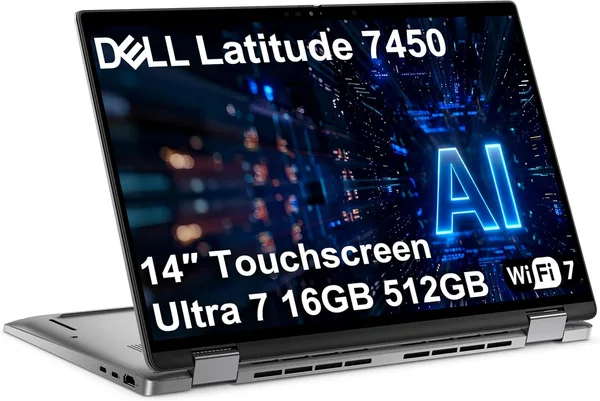
Compared to the business class, like the Dell Latitude line — that's a different type of product entirely. The Dell Latitude 7450 is already a 2-in-1 convertible with a tougher chassis and a fuller port selection for people who need mobility and a polished look in meetings. The Inspiron is simpler, more of a home-and-student machine, and that's exactly why it's cheaper — an honest trade-off, not a stripped-down Latitude.
Who should buy it, and who shouldn't
Buy it if you're a student writing papers and coursework, watching lectures online, and not playing demanding games. Buy it if you need a second home laptop — not a flagship, just something reliable that doesn't make you nervous with every Windows update. The touchscreen and Windows 11 Pro here are a nice bonus, not the reason to buy on their own.
Don't buy it if you work with video, 3D, or heavy graphics — this simply isn't that class of hardware. Don't buy it if you're willing to pay extra for a lighter, thinner chassis for daily commuting — then look at ultrabooks instead.
There's one main compromise: you get stability and a touchscreen in exchange for graphics performance. If your day is browser, office documents, and video calls, that trade-off is entirely justified, and you won't regret it.
The price for the base configuration in the US was around $679. Once you factor in international shipping and your own country's import duty, it typically still comes out meaningfully cheaper than buying a comparable model from local retail with local markups.
שאלות נפוצות
Yes, with room to spare. Twenty browser tabs plus Word, Excel, and Zoom running together won't slow the system down. Problems only start if you add heavy editing or virtual machines into the mix.
If you're genuinely certain you won't use it, there's little point, but the premium here isn't steep, and the glare-free matte panel is pleasant on its own regardless.
The Inspiron for home and study, the Latitude for work where a tougher chassis, the 2-in-1 format, and a polished look in meetings actually matter. Paying more for the Latitude is only worth it if those things genuinely matter to you.
Very old, unassuming titles — maybe. Anything more graphically demanding, even at low settings, will struggle. There's no discrete graphics card here, and that's simply not this laptop's use case.
Similar products worth checking out alongside this one: