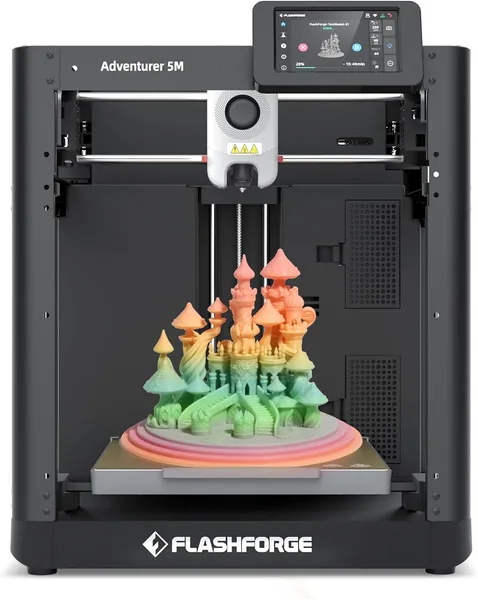
Flashforge Adventurer 5M review: is it the right first 3D printer?
The Flashforge Adventurer 5M answers the one question every beginner is secretly afraid to ask: "what if I mess up the setup and this thing never works?" Auto-leveling, an enclosed chassis, and decent print speed make it about as safe a first step into 3D printing as you'll find. It's not a printer that wows anyone — it just works, and for a lot of people that's the whole point.
Full landed price to your country — item, shipping, and import duty in one number — is on the product page on dede.sh.
You know the scene. A friend wants a headphone stand printed. Your kid wants a figurine from their favorite game. And you've spent six months reading 3D-printing forums without ever hitting "buy," because every tutorial video starts with "first, manually level your bed using a sheet of paper." That exact fear is what Flashforge's Adventurer line is built to erase.
What it actually is
The AD5M (that's the official model name — "5M" on the box is marketing) is an enclosed FDM printer with a direct-drive extruder and a claimed top speed of 600 mm/s. That number is pure marketing bait: at 600 mm/s you're only printing test cubes for Instagram, and real parts with decent surface quality come out somewhere around 200-350 mm/s. Still, that's two to three times faster than a typical budget printer from five years ago, so I had zero complaints about speed — a palm-sized part prints in an hour, not three.
The real headline isn't speed, though. It's that you take it out of the box, plug it in, and the printer finds its own bed level. No paper feeler gauge under the nozzle, no knobs you're twisting "by feel." For someone who's never touched a 3D printer, that's the difference between "tried it once and gave up" and "tried it and actually kept going."
Where it genuinely shines
The enclosure isn't just for looks. A closed chamber holds a stable internal temperature, so ABS parts — or even mildly fussy PETG — don't peel off the bed because a window or an AC vent created a draft. Anyone who's printed on an open Ender-style machine in a drafty apartment in winter knows exactly how painful that problem is: cracks in tall prints, curling corners. Here, it basically doesn't happen.
The hotend goes up to 280°C — enough for ABS, PETG, and some lightweight nylons, not just baseline PLA. That matters, because plenty of "beginner printers" only really handle PLA well, and then the moment you want something tougher, you hit a hardware ceiling. Here there's almost no ceiling — just the limits of your own patience with slicer material settings.
It's quiet, too. Not silent, but quiet enough that you can leave it printing overnight in the next room and not get woken up by the whine of old stepper motors running without silent drivers.
And now, the annoying parts
Flashforge's own software is a mixed bag. The bundled slicer is Orca-based and it works, but by default it nudges you toward buying Flashforge-branded filament and isn't always friendly to third-party profiles. You can sort it out with an hour of googling, but a beginner who was promised "just press the button" might get stuck right here.
Second issue: this is a one-color, one-material-at-a-time printer. If you want multi-color prints without manually swapping filament, look at its bigger sibling in the same lineup, the Flashforge AD5X — same core mechanics, but with a module for multiple spools. The AD5M is about nailing basic, reliable prints, not about effects.
And yes, the ecosystem is a bit more closed than the Bambu Lab A1 mini, which right now is the main competitor in this price bracket — Bambu's software is friendlier out of the box, but it doesn't come with a fully enclosed chamber in its base configuration. So the "AD5M or Bambu A1 mini" decision really comes down to friendlier software versus better thermal control. Personally, I'd take the AD5M if you're planning to print anything tougher than PLA toys.
Who should buy it, and who shouldn't
Get it if you've never printed before and you're scared of ruining your first experience with manual calibration — the whole design is built around removing exactly that fear. Get it if you want to print more than decorative trinkets — functional ABS or PETG parts, brackets, cases, replacement parts. Skip it if you need multi-color printing right away — the premium for the AD5X is worth paying if that feature actually matters to you from day one. And skip it if you're already an experienced maker who wants full control over the firmware — Flashforge's closed-ecosystem approach will start to grate on you fast.
The full landed cost — printer plus shipping plus any import duty for your country — works out to a mid-range entry price for 3D printing: not the cheapest way in, but nowhere near premium either. See the exact number for your location on the Flashforge Adventurer 5M product page on dede.sh. What you're paying for is a stress-free start, not any particularly unique feature.
Honestly, after a few weeks of printing, what won me over most was that the thing just quietly works: turn it on, print, turn it off. No drama. For a hobby that already has plenty of learning curve baked into the slicer and material choices, that's worth a lot.
שאלות נפוצות
Technically, yes — that's the maximum head travel speed. In practice, for quality parts you'll be printing at 150-350 mm/s depending on model complexity and material. Even that is noticeably faster than older budget printers, where 60 mm/s used to count as fast.
If you're not planning multi-color prints right away, go with the AD5M — it's simpler and cheaper. The AD5X is the same printer plus a color/material-switching module, and that option costs extra money and adds a bit of extra maintenance hassle.
An enclosed chamber cuts down on smell and warping, but it's not a substitute for a proper filtered fume extractor. For occasional prints in a ventilated room, that's fine; for printing ABS daily, add an activated-carbon filter or position the printer near a window.
For miniatures with fine facial detail, FDM printers as a category fall short of resin (SLA) machines — it's a different printing technology entirely. The AD5M handles larger figures, bases, and custom terrain pieces just fine, but for 28-32 mm miniatures with fine features, look at a dedicated resin printer instead.
Related products worth checking before you buy: