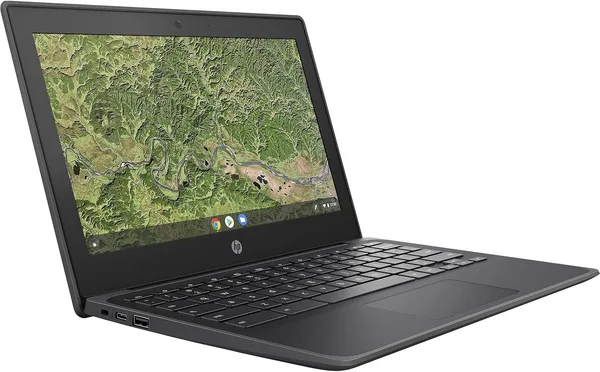
HP Chromebook 11A G8 Education Edition Review: Worth Buying Used?
The HP Chromebook 11A G8 Education Edition isn't a laptop for work or gaming — it's an internet-connected typewriter that costs less than a decent pizza dinner. The AMD A4-9120C and 4GB of RAM can handle Google Docs, Zoom classes, and a dozen Chrome tabs — and nothing much beyond that. If you need a second, third, or "the one I won't cry about handing to a kid" laptop, this is it. If you need speed, keep scrolling.
Picture the scenario: your kid needs a laptop of their own for remote schoolwork, because the one you actually work on somehow lost half its drivers within a week of them touching it. Spending real money feels wrong — it'll get dropped, drenched in juice, or the charger will vanish into a backpack black hole. This exact scenario is why laptops like the HP Chromebook 11A G8 Education Edition exist.
This is a school Chromebook in the most literal sense — American classrooms were issued these by the thousand, and the secondary market is now flooded with them. The chassis is thick plastic with rubber bumpers on the corners, built on the assumption it'll hit the floor at least twenty times a school year. The 11.6-inch screen is compact enough to slide into any backpack, but if you're an adult with less-than-perfect eyesight, it'll feel cramped fast.
What's inside, and why it isn't about speed
The AMD A4-9120C is an entry-level chip that wasn't impressive even back in 2019, when this Chromebook launched. Paired with 4GB of DDR4 and a 32GB eMMC drive, it's built for exactly one job: browser, docs, video calls, all running through ChromeOS. Try opening fifteen tabs at once while music plays in the background, and you'll feel it choke. Compare that to a MacBook Air, or even a budget Windows machine running a Celeron N4500, and the gap is like comparing a bicycle to a scooter — both get you there, but the bicycle at least doesn't go flat on the first pothole.
32GB of storage sounds laughable next to modern 512GB SSDs, but for a Chromebook it's par for the course — almost everything lives in the cloud, not on the disk. Google Drive, Docs, Classroom — none of that needs local space. The trouble starts if your kid decides to install a few Android apps from the Play Store (yes, ChromeOS can do that) — that's when 32 gigabytes runs out faster than you'd like.
Battery life is where ChromeOS actually shines. Weak processors like this one sip power because the system never has to work hard to keep up. A full school day unplugged is genuinely realistic, and that's probably the single biggest reason schools buy Chromebooks by the pallet instead of similarly priced Windows laptops.
How it stacks up against real alternatives
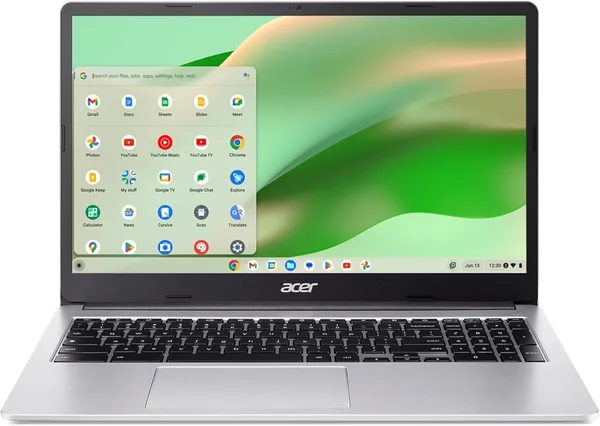
Browse the neighboring listings in the laptop catalog and the closest rival is another education Chromebook, the Acer 311, running the same AMD A4 with the same 4GB/32GB combo. The difference between them is negligible, so the smart move is to shop by price and condition of the specific listing rather than by brand. HP earns zero premium for its logo here — this is one of those rare cases where the name on the lid buys you nothing.
If you want something that'll hold up a bit longer before it feels obsolete, look at Chromebooks running an Intel Celeron N4500, like the Acer 315 — more RAM, a processor several generations newer, though it won't fit in a bag quite as easily. The price gap is usually small, so if you spot one sitting next to an A4 model, it's almost always the smarter pick.
And to be blunt — don't compare this to a Windows laptop in the same price bracket. ChromeOS on weak hardware still feels responsive; Windows 11 on the same chip is frustrating from the first boot screen. Google has optimized its OS so well that even an A4-9120C looks respectable running it, in a spot where Windows would simply gasp for air.
Who should buy it, and who shouldn't
This is a laptop you buy for someone else, not for yourself. For a kid who hasn't yet earned the right to something expensive. For a grandparent who just needs messaging apps and the news. For a backup workstation at home when the main machine is busy. For the "just in case something happens on the trip" laptop you won't mourn if it gets left behind in a hotel room.
The listing price alone tells you everything about how this machine is positioned — it sits at the very bottom of the laptop market. Add forwarding and whatever import duty applies where you live, and — check the full landed price on dede.sh, item plus forwarding plus duty in one number — it still comes out to pocket change next to any new laptop on a store shelf.
Skip it if you're planning to edit video, play anything more demanding than Solitaire, work with heavy spreadsheets, or want a machine that'll still be running fine in five years without complaints — the battery and storage here have already been through a previous owner (it is, after all, secondhand school equipment), so its remaining lifespan isn't what you'd get from something new. The other real limitation: there's no upgrading it. No adding RAM, no swapping in a bigger drive. Whatever you buy is whatever you're stuck with.
Bottom line
This isn't the best Chromebook out there, and it's not even the best in its price bracket — but it's honest. It does exactly what it promises: opens a browser, holds a charge, survives getting knocked off the couch. Asking for more at this price is like being annoyed at an alarm clock for not also brewing your coffee.
שאלות נפוצות
Yes — that's basically its entire reason for existing. Zoom, Google Classroom, docs all run smoothly. Keeping 20 tabs open while streaming YouTube on the side, though, is a different story.
Practically no difference — both run AMD A4 with 4GB/32GB. Buy whichever one is in better condition and priced lower; the brand isn't doing any work here.
Technically you can get Linux running through Crostini, or try an alternative OS, but on hardware this weak with only 32GB of storage, it's not really worth it — you'd just lose ChromeOS's main advantage, which is staying fast on weak hardware.
If the price difference is small, yes. The Celeron N4500 feels noticeably peppier and won't start feeling dated as quickly.