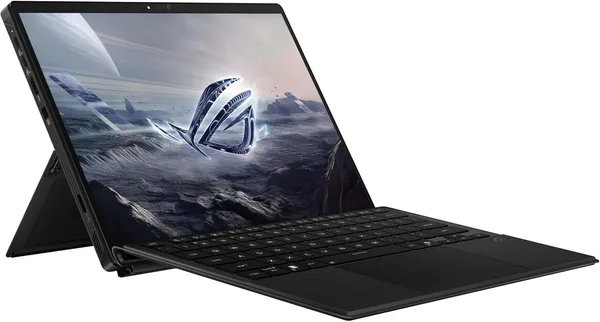
ASUS ROG Flow Z13 (2026) Review: The Tablet That's Secretly a Gaming PC
The ROG Flow Z13 is a 13.4-inch tablet hiding a full-blown gaming PC underneath, built around AMD's Ryzen AI MAX+ 395 and 32GB of unified memory. It won't dethrone a desktop rig, but it will replace your laptop, your tablet, and half the chargers in your backpack all at once. Buy it if you genuinely bounce between work, travel, and gaming — skip it if you just want "the most powerful laptop for the money."
Picture the scenario: you're heading out on a work trip, and your bag has a laptop for work, a separate tablet for note-taking on the plane, and — tucked away somewhere — a vague hope of playing something heavier than Solitaire in the hotel room at night. Three devices, three chargers, extra weight for no good reason. ASUS decided that was nonsense and built the Z13 — a machine that behaves like a Surface by day and turns into something that can push modern games at medium-to-high settings by night. It sounds like a marketing fairy tale, but this time the hardware actually backs it up.
What this thing actually is
The heart of the device is AMD's Ryzen AI MAX+ 395, a chip ASUS and AMD co-developed specifically for the "tablet instead of laptop" format. This isn't a mobile processor with graphics clipped to save battery — it's a genuine APU platform with unified memory. Here you get 32GB, and a substantial chunk of it gets handed over to the integrated graphics as video memory whenever needed. In practice, that means the Z13 runs games that used to demand a dedicated GPU roughly on par with a laptop RTX 4060. Not an RTX 4090, obviously, but nowhere near the miserable 20fps-on-low territory either.
The screen is its own story, and it's where ASUS clearly didn't cut corners. 2.5K resolution, 180Hz, 3ms response time, ROG Nebula tech — this is a panel that actually feels smoother in games than a typical 60Hz laptop display, not just a spec-sheet number for bragging rights. Add a touch layer and full tablet functionality — stylus support, gesture controls, a fold-out kickstand instead of a traditional hinge — and you've got something genuinely dual-purpose.
What it's like to actually live with
This is where it gets interesting. During the day, as a tablet with the keyboard attached (sold separately on some configurations — check before you buy), the Z13 holds up fine as a work machine: twenty browser tabs, Figma, heavy spreadsheets, no problem. Windows 11 Pro here isn't just a checkbox — it means you can actually join it to a corporate domain. Battery life gets you through a workday, as long as you're not gaming at max performance the whole time.
Then in the evening you plug in an external monitor over USB-C (Wi-Fi 7 and a full port lineup are on board), lay the device flat, and suddenly your work tablet is a compact gaming rig. Compared to something like a Steam Deck or the ASUS ROG Ally, the Z13 isn't a handheld console — there are no thumbsticks — but you get full, uncompromised Windows compatibility and a screen you won't be embarrassed to show off. Compared to a classic gaming laptop like a TUF or a Lenovo Legion, though, the Z13 loses on sustained cooling under long loads: a thin tablet chassis physically can't dissipate heat the way a thick, triple-fan laptop brick can. Run it through an hour-long stress test and performance dips noticeably, with the fans working overtime the whole way.
One more thing that keeps coming up in discussions: this model weighs a little over a kilogram without the keyboard, which is exactly why it's genuinely pleasant to travel with — unlike any "gaming laptop" you'd actually want to carry in a backpack every day.
Who it's for, and who should skip it
Honestly: if you just want a powerful laptop for gaming and have zero intention of using the tablet form factor, don't overpay for the Z13. For the same money, a classic gaming laptop with a dedicated RTX card and better cooling will give you steadier performance under sustained load, with no throttling. The Z13 is built for a specific scenario — someone constantly on the move, who values compactness above all else and is fine with peak performance lasting minutes, not hours on end.
But if you're a designer who sketches outdoors, a streamer who needs a lightweight backup rig for remote streams, or just someone who's sick of carrying two devices instead of one, this is genuinely one of the smartest products in its niche. You'll find the full landed price for your country — device, forwarding, and import duty rolled into one number — on the ASUS ROG Flow Z13 product page. It's not cheap once shipping and duties are added on top of the US sticker price, so run the numbers before you buy, not after.
The other real trade-off is price per gram. You're paying a premium not just for performance, but for the engineering that squeezes it all into a thin chassis. If compactness isn't critical for you, you'll find equivalent power for less money in a regular laptop format.
Bottom line
The ROG Flow Z13 isn't for everyone, and that's fine. It's a niche, expensive, thoughtfully engineered device for people with a specific lifestyle: lots of travel, a need for both a tablet and a gaming machine, and no patience for carrying extra gear. If that's you, buy it without a second thought. If you're just hunting for "a powerful laptop," look at classic gaming models instead — you'll get more performance per dollar there.
FAQ
At medium-to-high, yes — and that's impressive for integrated graphics. Push to ultra with ray tracing in demanding titles, and no, you'll drop to 30-40fps or lower. For someone who games occasionally on the road, it's more than enough.
If you don't need gaming at all, the Surface Pro is lighter, cheaper, and lasts longer on a charge in everyday work use. The Z13 only wins when you genuinely need to run games or heavy 3D work on the same device.
For fast shooters, even a beginner will feel the difference. For slower RPGs or work, it's a nice bonus but not essential. If your budget is tight, it's the first thing you can cut by going with the lower-tier screen option.
Noticeably. A thin tablet chassis is a hard physical limit on cooling, so during long gaming sessions the fans are audible and performance dips a bit over time. For short gaming sessions it's a non-issue; for marathon sessions, factor it in ahead of time.
Still torn between formats? Here are some alternatives worth comparing: