HP 15.6 FHD Laptop 2026 with Copilot AI: is it worth the money
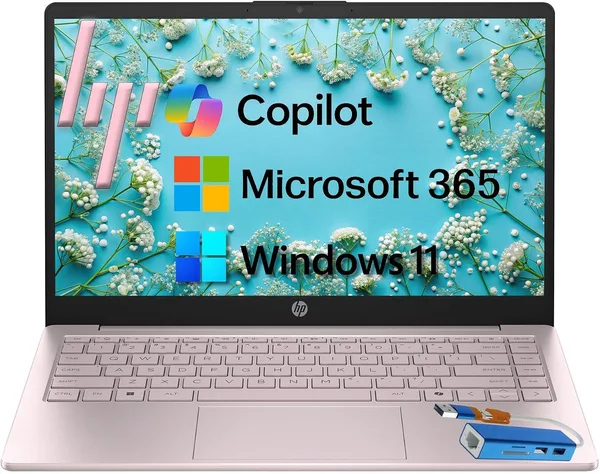
The HP 15.6 FHD 2026 with a Copilot key is a textbook "office" laptop at a budget price: 8GB of RAM, a 256GB SSD, and zero pretensions to being anything more. The Copilot button is there for the marketing copy, not for actual work. Get it if you need a second machine for email, a browser, and documents, and you've already made peace with the fact that 8GB is the bare minimum. For anything heavier — photo work, editing, a browser choking on tabs — look for a 16GB configuration instead, because this one will start to choke sooner than you'd like.
Every summer HP rolls out another "2026 laptop," and every year the marketing team bolts a new word onto the name. This time it's Copilot AI: a key on the keyboard that opens a chatbot. That's the entire "artificial intelligence" story in the budget segment — a physical button standing in for actual horsepower. Strip away that marketing layer, though, and there's a perfectly ordinary work laptop underneath, and that's the machine worth talking about honestly, without the AI-revolution theatrics.
The HP 15.6 FHD Laptop 2026 Edition is the classic "something to put on the kid's desk for school" or "backup laptop for the cabin" machine. A 15.6-inch Full HD screen, an entry-level Intel processor, 8GB of RAM, and a 256GB SSD. It looks modest on paper, and honestly, it feels just as modest in daily use.
What it actually handles well
Let's start where this machine doesn't let you down. A browser with a dozen tabs open, Google Docs, Netflix, Zoom calls, email — it chews through all of that without complaint. The 256GB SSD means the system boots in seconds rather than the minute-plus you might remember from old spinning hard drives. That's really the whole reason budget laptops make sense at all in 2026: even a weak processor feels responsive on an SSD, because the drive stopped being the bottleneck years ago.
For a student cranking out essays and sitting through presentations, or a grandparent who just wants video calls with the grandkids, this is more than enough. Honestly, paying extra for something beefier in that scenario would be money down the drain.
Where the trouble starts
Here's where we have to be blunt: 8GB of RAM in 2026 isn't "enough" anymore — it's "just barely." Windows alone eats a hefty chunk of it, and the moment you've got Chrome with ten tabs plus Zoom running at the same time, you'll feel the system start to drag — that annoying half-second hitch before every mouse click. It's not a dealbreaker, but it's irritating enough to sour an otherwise decent machine.
There's plenty to compare it against: the same category is stuffed with budget laptops, and nearly every top-tier option in it has already moved to 16GB as the baseline, leaving 8GB for the cheapest configurations only. HP isn't an outlier here, and it's not some uniquely bad pick — this is just the price segment doing what price segments do, not an engineering mistake. Stack it against something like the Lenovo Yoga 7i, which ships with noticeably more memory and folds into a tablet, and the HP loses on flexibility but wins on price — a fair trade if you're not chasing extra features.
Then there's Copilot, which deserves its own paragraph. That keyboard button summons Windows' virtual assistant, and on this level of processor it feels like a party trick rather than a tool. It adds essentially nothing useful for the average buyer, even though it sounds impressive in the marketing copy. Don't buy this laptop for Copilot — buy it if everything else about it works for you.
Screen, keyboard, and the everyday details
The 15.6-inch FHD panel is standard fare that isn't trying to wow anyone. Colors don't pop, viewing angles are middling, but for text, spreadsheets, and video it does the job. The keyboard is typical HP-at-this-price: key travel isn't the deepest, but the separate number pad on the right is the kind of thing accountants and engineering students will silently thank you for.
Battery life is where budget manufacturers traditionally promise more than they deliver. Push it hard with video and Zoom calls and you won't make it to evening without a charger; stick to documents and browsing with the brightness turned down, and it'll comfortably cover a workday.
Who should buy it, and who shouldn't
Buy it if you need a second, third, or spare laptop for the basics: email, documents, browsing, video calls. The asking price is fair for that package — it starts around $429.99 stateside, and you can check the full landed price to your country — item, forwarding, and import duty all rolled into one number — right here on dede.sh. For a machine that honestly does the job of an office workhorse, that's reasonable money.
Don't buy it if you plan on running a pile of apps at once, editing video, wrestling with heavy Excel spreadsheets, or you simply want a laptop that'll serve you without complaint for five years. In that case, 8GB will become a chronic headache, and sooner or later you'll wish you'd just paid up for 16GB from the start.
There's really one compromise here, and it's the same reason the price is low: memory. Everything else about this machine is perfectly decent for its segment, and the fact that the SSD keeps the system feeling snappy forgives a lot. But brace yourself — one day you'll leave one too many tabs open, and the laptop will remind you with that little pause before every cursor movement.
FAQ
For basic school and college tasks, yes, absolutely. The trouble starts when Zoom, a dozen browser tabs, and a heavyweight presentation editor are all open at once. If your budget stretches even a little, look for a 16GB configuration instead — the difference in day-to-day comfort is something you'll notice constantly, not just occasionally.
No, don't let that drive the decision. Copilot here is a physical button and a software wrapper, not extra hardware power. If you're choosing between two similar models and the price gap comes down to "AI features," take the cheaper one — you won't regret it.
If you just need a simple work machine for the least money, the HP does its job. If you want more memory, more flexibility (tablet mode), and headroom for the next few years, it's worth looking at the Lenovo Yoga 7i, even if it costs more upfront.