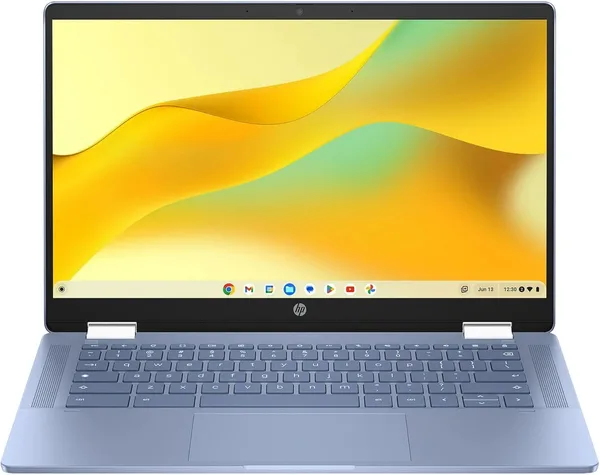
HP Chromebook x360 14-inch review: is it worth buying in 2026
The HP Chromebook x360 14" isn't a backup laptop for power users — it's a first laptop for a kid, a grandparent, or anyone who just needs a browser, Zoom, and Google Docs. The touchscreen that folds into a tablet and ChromeOS keep it surprisingly usable even on a modest Intel N100 chip with 4GB of RAM — as long as you're not trying to juggle 20 tabs at once. At roughly $275 for the item alone, it's one of the cheapest ways to get a brand-new laptop with a genuinely good screen instead of a used one.
Picture the scenario: a kid starts school and needs a laptop for Google Classroom, not a gaming beast their parents are terrified to hand over. Or a mom who wants to look up recipes in the kitchen and doodle with her grandkid in a drawing app, without fighting Windows updates that eat twenty minutes of her evening. That's exactly the niche the HP Chromebook x360 14" was built for — and, credit where it's due, it plays that role well.
What this thing actually is
It's a 2-in-1: a 14-inch FHD IPS touchscreen on a 360-degree hinge that folds flat into a tablet, props up like a tent for watching video, or flips around for presenting to someone across the table. The IPS panel isn't just a spec-sheet checkbox — it's a real advantage. Viewing angles are wide and colors don't wash out from the side, which matters when three kids are crowding around one screen or you're passing photos around the couch to relatives.
Under the hood is an Intel N100, part of the Alder Lake-N family — the same chip powering half the budget Chromebooks and mini PCs on the market right now. It's not built for raw speed; it's built for efficiency. Paired with ChromeOS, which is already dramatically lighter than Windows, the N100 handles browser tabs, Google Docs, YouTube, and even light video editing in the built-in apps without breaking a sweat. Try running Photoshop over Chrome Remote Desktop while juggling 15 tabs, though, and you'll watch the "this is basically a real laptop" illusion evaporate fast.
4GB of RAM — and no, that's not a typo
This is worth pausing on, because it's the single most common question in the comments under laptops like this one. Yes, 4 gigabytes of RAM is the bare minimum you'd even consider for ChromeOS in 2026. On Windows, that number would be laughable at this point. But ChromeOS manages memory differently: tabs you're not actively using get unloaded, most apps are lightweight and web-based, and the OS itself takes up far less memory than Windows or even macOS.
Here's the reality: with 5-7 tabs open, Google Docs, and a YouTube player running, it's smooth — you won't notice any lag. But if you're the type who keeps 30 tabs open "just in case," this laptop will hate you, and you'll hate it right back. That's not a matter of taste — it's a matter of RAM physics.
64GB of storage — also not for your movie collection
The second number that trips people up, especially if they're used to laptops with terabytes of storage, is 64GB of built-in space. Same story here: ChromeOS logic works differently. Google Drive, cloud documents, streaming instead of downloading — the whole system assumes local storage is only needed for the OS, cache, and a handful of offline files. 64GB is plenty for schoolwork, document editing, and even downloading an episode or two for a train ride. But if you're planning to store a DSLR photo library or stack up Linux apps, forget it — you'll run out of space embarrassingly fast.
How it stacks up against real alternatives
The closest competitor in spirit is the Acer R13 Convertible Chromebook, also a 2-in-1 with the same 4GB of RAM but a smaller 13.3-inch screen and half the storage at 32GB. The HP pulls ahead thanks to its larger and, going by the spec sheet, newer FHD display — a difference you'll actually notice if you watch video or read long text on it.
Compare it instead to a classic Windows budget laptop like the Acer Aspire 3, and the choice becomes philosophical rather than spec-driven. A Windows laptop gives you full desktop apps, offline Office, games through Steam, or any software you find online. But for the same money or a bit more, you typically get a slower drive, more system bloat, and longer waits for updates. A Chromebook is the inverse trade-off: fewer capabilities, but what's there runs fast and rarely breaks.
Battery life and that touchscreen again
ChromeOS laptops have always been known for long battery life on a single charge — probably the main reason moms and students love them. No need to lug a charger around campus. The touchscreen combined with the 360-degree hinge makes the device friendly for anyone who isn't used to a trackpad: tapping is more intuitive than clicking a cursor. That's especially noticeable with older users — a touchscreen forgives more fumbles than a mouse ever will.
The honest verdict
Buy it if: you need a second (or first) laptop for browsing, schoolwork, and video, and you live mostly in the cloud — Google Docs, Gmail, YouTube, Zoom. Especially if it's meant for a kid, a teenager, or someone who's afraid of "breaking" a complicated system. The item itself runs around $275 on dede.sh — check the full landed price to your country on the product page (item plus forwarding plus import duty in one number), and it typically lands in the same range as a budget new Windows laptop. That's a fair price for something new, not used, and backed by a warranty.
Skip it if: you're planning to run heavy software, edit video in Premiere, play anything more demanding than cloud gaming, or you simply can't stand ChromeOS's limitations. Also skip it if you're a serial tab-hoarder who keeps dozens of windows and apps open at once — 4GB won't keep up, and you'll be cursing at it within a week.
The core trade-off here is honest and obvious: you pay less for a laptop that does less. That's not a flaw specific to the HP x360 — it's just what a Chromebook is, as a category. If you accept those rules, the device is genuinely pleasant to use: a good screen, an easy fold into tablet mode, and it just works, right up until you try to make it something it isn't.
FAQ
Yes — for Google Classroom, Zoom classes, and a handful of browser tabs, it's plenty. ChromeOS unloads unused tabs on its own. Trouble starts if the kid is used to keeping dozens of tabs open or running heavy web games.
No, not in the traditional sense. ChromeOS supports Android apps from Google Play and, to a lesser extent, Linux apps, but full Windows software like Photoshop or demanding games won't run here.
If a bigger, sharper screen matters to you, the HP x360's 14-inch FHD panel beats the Acer R13's 13.3-inch display. Both share the same 4GB of RAM, so the performance difference is minimal.
It depends on your use case. For browsing, documents, and video, a Chromebook feels faster and more stable than a budget Windows equivalent like the Acer Aspire 3. But if you need offline software or gaming, a Windows laptop is more flexible.
No — that storage is meant for the system and a handful of offline files, not a local media library. Plan on the cloud — Google Drive or streaming — as your main way of storing things.