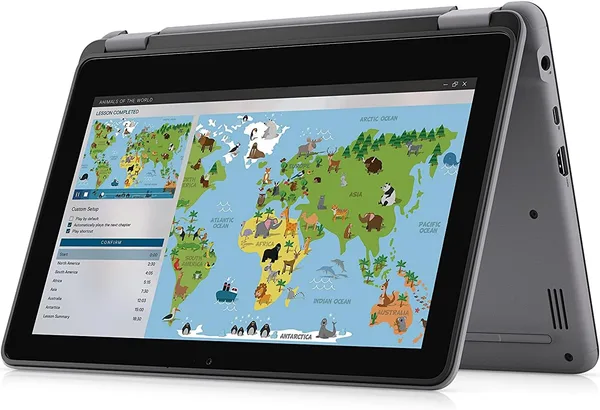
Dell Latitude 3120 2-in-1: is this convertible laptop worth buying?
The Dell Latitude 3120 2-in-1 isn't a laptop for full-time work or study — it's a cheap, durable convertible tablet for a very narrow set of jobs: browsing, mail, PDFs, recording a lecture. The Pentium N6000 and the 1366x768 HD screen are the ceiling here, and there's no jumping over it. But for the money (around $120 on the marketplace) and a chassis built for schoolkids and corporate fleets, it's an honest deal, as long as your expectations are set right.
Picture the scene: parents are looking for "something for school" that won't hurt if it falls off a desk, gets doused in juice, or gets left on a bus. A laptop worth a few hundred dollars for that scenario is like hauling firewood in a luxury sedan. That's where the Dell Latitude 3120 2-in-1 comes in — an old friend from corporate fleets, now sold off en masse from used or refurbished batches from American companies.
This isn't a new flagship, and it isn't even a new budget model. The Latitude 3120 belongs to that Dell line companies buy by the thousands for employees who just need to log into a CRM and write emails. A year or two later the hardware gets decommissioned and lands on the secondary market — and here it is, dressed up as a "convertible touchscreen laptop" for pocket change.
What it's actually like in real life
The 11.6-inch screen at 1366x768 resolution is, honestly, the point where it's worth pausing to think twice. In 2026, an HD screen sounds like an archaeological find. Text is readable, video is watchable, but forget about photo editing or working with a 40-column spreadsheet. This is a screen for reading, not for creative work.
The Pentium N6000 is a "press the button and it turned on" class of processor. It handles Windows, Chrome with a dozen tabs (without enthusiasm), Word, and Zoom below average resolution. Games, heavy Photoshop, editing — no, don't even try, you'll be disappointed instantly. But for repetitive office routines, or for a kid writing an essay while watching YouTube on a break, it turns out to be enough — and that's the main argument in favor of this machine.
The 128GB SSD is also worth understanding correctly: it's not storage for a movie collection, it's a drive for the system and a dozen documents. On the plus side, it's an actual SSD, not the slow eMMC common in truly cheap "school" laptops, so OS boot and basic responsiveness feel noticeably livelier than the processor's spec sheet would suggest.
The touchscreen and 2-in-1 format are where the Latitude unexpectedly plays its own game. The chassis is built to fold into tablet mode, comfortable to hold in a meeting or on the go, letting you take notes with a finger or a stylus (if one is included — check the specific listing, since this is a used market and bundles vary). Compared to a classic non-touch laptop, this is a real advantage for people who like flipping through documents or PDFs without a mouse.
Comparing it to the obvious alternative
The natural competitor in this niche is a Chromebook. If your needs narrow down to "browser plus Google Docs plus YouTube," a Chromebook often wins on responsiveness and battery life, since ChromeOS is lighter than Windows. But the Latitude 3120 wins on flexibility: full Windows means you can install accounting software, a banking client, specific corporate tools, or just regular offline Word — things that are either impossible on a Chromebook or come with compromises through a web version.
Another alternative is newer budget Windows laptops with 8GB of RAM and a Full HD screen, which cost more but deliver a noticeably more comfortable experience for years to come. If your budget stretches even a little further, I'd look that way rather than trying to save another $30-40 on the Latitude.
The honest verdict
The marketplace price is around $119.99, and it's worth viewing that sum through the lens of a "single-purpose work tool," not an investment in a computer for years. For the full landed cost with international shipping and import duty factored in, check the total price for your own country on dede.sh — a figure that instantly clears any guilt, provided the device lives a year or two and retires without regret.
Who should buy it: parents of a schoolkid or student for essays and browsing, office workers who need a "second, spare" laptop for the bag, anyone who wants a convertible tablet for notes and reading documents without expecting real performance. It's also a decent machine for an older relative who needs a big touchscreen for video calls and the news.
Who should absolutely pass: technical students working with CAD or calculations, anyone editing video or photo, gamers (not even up for discussion), and anyone who wants one laptop for five years with no upgrades — over that time, the HD screen and the typical 4GB of RAM (check the specific listing) will feel increasingly heavier to live with. The main compromise here is the screen, the second is that this is a used market with all the risks around battery health and hinge wear, which are worth checking through the listing's photos and description before buying.
FAQ
For humanities subjects, notes, essays, and presentations — yes, it'll handle that easily. For engineering disciplines with heavy software like AutoCAD or MATLAB — no, the processor would simply give up midway through a calculation.
If your whole life happens in a browser, get the Chromebook — it's snappier day-to-day and holds a charge longer. If you need full Windows with offline programs or specific corporate software, the Latitude 3120 wins on flexibility alone.
If you find a listing with 256GB instead of 128GB for a difference of $15-20, yes, it's worth it — 128GB fills up faster than you'd like after Windows updates. If the price gap is bigger, it's simpler to just add an external SSD or cloud storage.
Corporate-grade Dell units are usually physically sturdier than consumer budget models, built for daily carrying in a bag. The main thing is checking battery health and hinge condition in the listing — those are the weakest points on any convertible after a year of active use.
If after all this you'd like to compare it against something in a similar price range, take a look at the alternatives below — there's a classic slim laptop and another touchscreen convertible for different use cases.