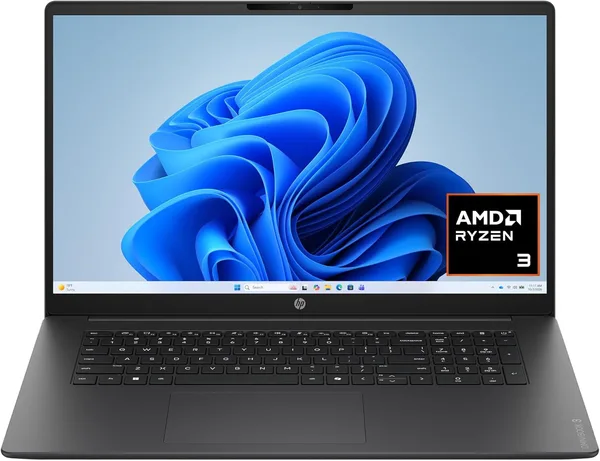
HP OmniBook 3 17.3-inch review: is a big-screen laptop worth it?
The HP OmniBook 3 17.3" isn't a laptop for working from a coffee shop — it's a desktop computer wearing a laptop's clothes. A big screen, a modest Ryzen 3 chip, and 8GB of RAM that can handle office work and video streaming but choke the moment you ask for anything more serious. Worth buying only if what you actually want is a big screen parked in one spot for reasonable money — not portability, and not headroom for the years ahead.
Picture your grandmother, or your mom, who wants to watch Netflix, read the news, and occasionally touch up vacation photos — on a screen big enough to read from across the room without glasses. That's exactly who 17-inch laptops are built for these days, and the HP OmniBook 3 17.3" is a rare specimen of this nearly extinct genre — endangered, but not pointless.
Here's the thing: the industry settled long ago on 15.6 inches as the compromise that works for everyone, and 17.3 inches as the niche pick for people who will genuinely never move their laptop from where it sits. HP is honest about that here — no marketing spin about "portability." This machine lives on a desk, plugged into the wall, and its only trip out the door is when you move house.
What's inside, and why it matters
AMD's Ryzen 3 is an entry-level chip — don't confuse it with a Ryzen 5 or 7. It'll handle a browser with twenty tabs open, Word, Excel, YouTube running in the background. But try opening a heavy Photoshop file or launching anything more demanding than solitaire, and the fan spins up while the system visibly thinks about it. 8GB of RAM in 2026 is already the bare floor of comfort: Windows alone eats a good third of it, and with a dozen Chrome tabs open the laptop starts to stutter. Honestly, I'd budget for a RAM upgrade right away if the module is even user-replaceable — because that one detail decides whether this machine lasts three trouble-free years or starts annoying you within six months.
512GB of SSD storage is where HP didn't cut corners, and it shows. Plenty of room for the OS, a mountain of vacation photos, and a handful of games if you ever feel like something undemanding.
The FHD 17.3-inch display is the actual reason to consider this model at all. Bigger letters, more room for spreadsheets or two windows side by side, and no need to buy a separate monitor. Next to a typical 15.6" laptop, you simply see more on screen at once — and for anyone over 45 who's tired of squinting at tiny text, that's a real argument, not a marketing line.
Where it genuinely falls short
Forget portability from the start. A 17-inch chassis means weight and backpack bulk that are a non-starter for daily commutes with a laptop in tow. If you're a student or freelancer who splits time between home and a coffee shop, this isn't your machine — look at something in the 14-15 inch range instead.
Second: battery life. A bigger screen drains the battery faster than compact models do, and if you're hoping for "a full workday unplugged," don't count on it here. This is an office machine in the most literal sense — it works wherever there's an outlet nearby.
And third, the big one: there's no upgrade path and no performance headroom baked in. The Ryzen 3 is not a chip you'd plan video editing or heavy database work around. If your future plans involve anything more demanding than office apps, a browser, and movies, look toward a Ryzen 5 or at least an Intel Core i5.
Who should actually buy this
The honest answer: someone who wants one big screen at home, doesn't care about weight, and has no intention of carrying a laptop anywhere. The other candidate is a family that needs a "shared" computer for movies, documents, online banking, and video calls with relatives. Street price hovers in the low-to-mid hundreds right now, and for that kind of money, getting a 17-inch screen and a decent SSD is a solid deal for exactly that use case.
Who should walk right past it: gamers (the integrated graphics here have nothing to do with gaming), video editors, anyone for whom portability matters, and anyone expecting a laptop that will still feel current years from now without upgrades. For comparison, dede.sh's own laptop catalog has plenty of 15.6-inch models with Ryzen 5 chips for similar or slightly higher prices — if portability and performance headroom matter more to you than screen size, that's where to look instead.
The full landed price to your country — item, forwarding, and import duty all rolled into one number — will obviously run higher than the US sticker price, so before you click "buy," check the full breakdown on the product page.
FAQ
For basic tasks, yes. For years of comfortable use, no. If you're used to keeping a dozen tabs and several programs open at once, you'll feel the slowdown within the first month. This is the model's weakest point by far.
Only if the laptop is going to sit in one spot permanently and a big screen genuinely matters to you — say, you struggle to read small text. For travel, coffee shops, or a shoulder bag, it's a firm no — too heavy and too bulky.
No, and don't even try. A Ryzen 3 with integrated graphics is browser-game and simplest-indie-title territory, nothing more. Anything more serious needs a dedicated graphics card, which this simply doesn't have.
If you need actual power and flexibility (the Yoga also folds into a tablet), the Yoga 7i wins by a wide margin. The HP OmniBook 3 wins only on price and screen size — these are really two different categories of buyer.