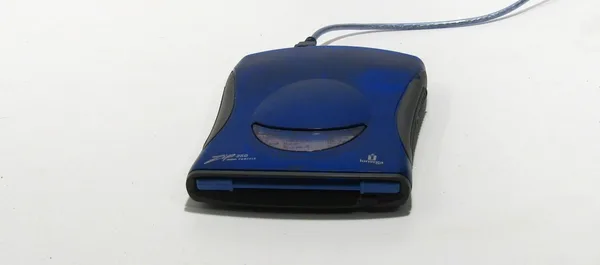
Iomega Zip 250 USB Drive: Is It Worth Buying in 2026?
The Iomega Zip 250 USB isn't for everyday storage — it's a tool for exactly one job: pulling files off old Zip 100/250 disks that have been sitting in a drawer since flash drives were a luxury item. If you've got a box of those disks, this drive earns its price in one evening. If you don't, skip it. Seriously.
Found a box of square disks in plastic cases up in the attic, labeled "Zip 250" in pencil? Congratulations — you're holding an artifact from the late nineties, and also a headache, because no modern laptop can read it. That's exactly why the Iomega Zip 250 MB USB exists: an external drive that still does what no new computer can.
Back in the day, Zip disks were the answer to the 3.5" floppy — 250 megabytes instead of a measly 1.44, which felt astronomical in 1998. Designers, newsroom staff, lawyers, hospital records departments — everyone hauled files around on these things for years. Then CD-Rs showed up, then flash drives, and Zip quietly died, leaving millions of disks scattered in drawers everywhere. This drive exists to dig through them.
How it actually works
The main selling point of this particular version is USB. Older Zip drives connected via parallel port or SCSI, and getting one running on a modern PC meant hunting down adapters, Windows 98 drivers, and a fair bit of prayer. This one is just a USB cable, power either from the same USB port or a separate brick (depends on the batch), and Windows 10/11 picks it up as a regular removable drive within seconds. Mac sees it fine too — FAT is natively supported.
Speed-wise: this isn't an SSD, and it isn't even the slowest flash drive you own. Copying a full 250 MB disk takes minutes, not seconds. The drive clicks and whirs while it works — that's normal, it's spinning a magnetic platter, not reading flash memory. Startling the first time, then you get used to it.
One detail people often miss: this drive also reads 100 MB Zip disks, but not the 750 MB version — that used different mechanics entirely. If your box has a mix of disk types, check the labels carefully before you buy, or you'll be disappointed.
What people actually compare this to
The real alternative here isn't another drive — it's a data recovery service, which is what people turn to when a Zip disk won't read at all or the drive itself is unobtainable. That costs several times more than the drive and takes weeks. The other option is finding someone with an old PC that still has an internal Zip drive and asking nicely. Realistically, in 2026, that's basically impossible — nobody you know still has that gear lying around.
Compared to the old parallel-port versions, this USB model is simply in a different league of convenience. I'd go as far as saying it's the only reason to even consider a Zip drive today: if it's not USB, don't bother — you'll fight the connection more than you'll fight the actual disks.
On price: this has become collector-item territory, not a reflection of nineties hardware costs. Nobody makes these anymore, so the price is set by scarcity and condition, not manufacturing cost — and once you factor in shipping and import duty to your country, the final number gets noticeably bigger. Check the full landed price — item, forwarding, and import duty combined — on dede.sh before you click buy.
The honest verdict
Buy it if you genuinely have Zip 100 or 250 disks you need to pull data off — wedding photos from 2001, an old thesis archive, a bookkeeping database from some company that closed years ago. In that case, the drive pays for itself in one evening of digging, and there's really no alternative except a paid data recovery service that costs several times more.
Don't buy it if you're just feeling nostalgic or want a "retro shelf piece" — there are cheaper, better-looking items for that. And definitely don't think of it as a way to store anything new: a regular external SSD gives you hundreds of times more space, speed, and reliability for the same money, and Zip disks have a nasty habit of degrading and demagnetizing with age — the infamous "click of death" that made these drives notorious in the first place.
There's really one trade-off here: you're paying a collector's price for a narrow, one-time-use (okay, maybe a few-times-use) tool. If that's exactly your situation, it's a fair deal. If not, spend the money elsewhere.
FAQ
100 MB and 250 MB disks — yes, no question. The 750 MB Zip version — a later, rarer mechanism — no. Check the labeling on your disks before buying so you don't get caught out.
Absolutely. You won't find a parallel port on a modern PC, so you'd need an adapter and separate drivers on top of everything else. USB just works out of the box — the premium is worth it.
If the disks read normally (no physical damage, no water exposure), the drive is cheaper and faster. A recovery service only makes sense if a disk is physically damaged or the drive can't read it anymore.
It writes exactly as well as it reads — this is a fully functional drive, not a read-only recovery tool. That said, there's zero reason to write new data to Zip disks in 2026: regular flash drives and external SSDs exist for that.
If you came here looking for a way to store data rather than rescue old disks, take a look at something from the current lineup of external storage instead.