Gogogo 2-in-1 Laptop Tablet 2026 Review: Is the Magnetic Keyboard Combo Worth It?
This isn't a laptop in the usual sense — it's a Windows tablet that ships with a magnetic keyboard, and you need to judge it on those terms. At its base listing price, cheaper than a mid-range smartphone, you get a decent 2K screen, a year of Office 365, and genuine portability. But the horsepower tops out at "write a document and keep twenty browser tabs open" — nothing more. For a student who wants something light for notes and Netflix on the go, it's a solid pick. For any serious work, look elsewhere.
Picture this: you need something you can drag onto a commuter train to finish a presentation, then use that same evening to binge a show in a hotel room — without lugging around a gaming laptop and a separate tablet. That's exactly the scenario the 2-in-1 Laptop Tablet 2026 from Gogogo seems built for — a Chinese brand that specializes in budget "two-in-one" hybrids.
What this actually is
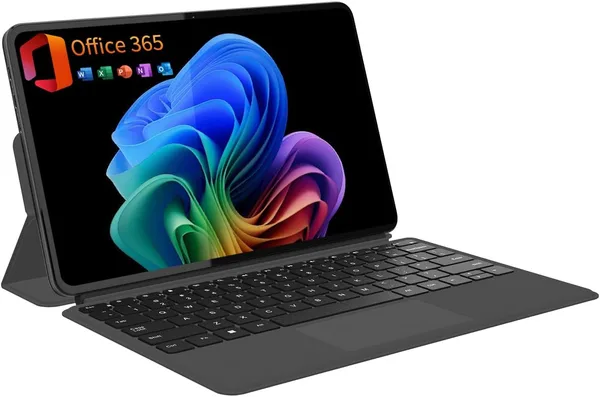
Formally, it's a 12-inch tablet with a 2K IPS screen running Windows, bundled with a magnetic keyboard — meaning you're not buying a laptop, you're buying a tablet that plays the part of one when you need it to. That distinction isn't just semantics. The keyboard attaches with magnets, the same way cheaper Surface clones do, and that's where the first catch shows up: on a soft surface — a couch, your lap on a plane — it wobbles a little, because there's no rigid hinge holding the screen angle steady. On a desk, it's fine and stays put.
The 2K IPS panel is a genuinely pleasant surprise for the price. Text is crisp, viewing angles are decent, and it's comfortable for reading PDFs or flipping through photos. The touchscreen responds quickly, and if you're used to Android tablets or an iPad, the adjustment period is minimal. The catch is what's running underneath: Windows. And here's the compromise sellers tend not to mention — hybrids like this at this price point typically run on economy chips like Intel's N-series with 8GB of RAM. That's enough for a browser with a dozen tabs, Word, Excel, YouTube — but don't even think about firing up Photoshop or a heavy Premiere project. The system starts choking the moment you try running two demanding apps at once.
Is a year of Office 365 an actual perk, or just marketing
Honestly, this is one of the few bonuses here that genuinely saves you money. A standalone annual Microsoft 365 Personal subscription runs around $70, so if you actually need Word, Excel, PowerPoint, and cloud Outlook — rather than free alternatives like Google Docs or LibreOffice — bundling the subscription into the price makes sense. But if you're already living in Google Workspace, or you just don't get along with Microsoft's ecosystem, this perk is worth zero to you, and paying extra for it separately would be a waste.
How it stacks up against the obvious rivals
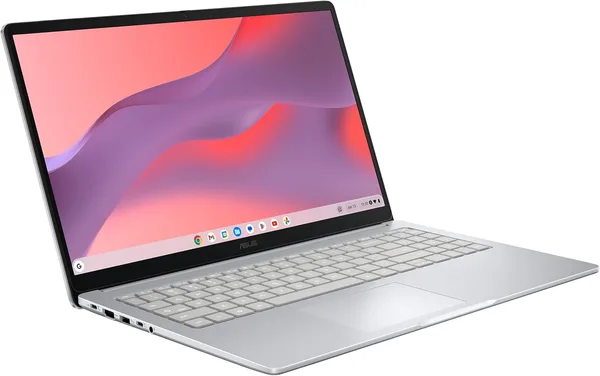
The most direct competitor in the same catalog is the laptops section, packed with budget Chromebook hybrids like the 2-in-1 Acer R13, which also converts into a tablet but runs ChromeOS instead. The difference matters: ChromeOS is lighter and chokes less on weak hardware, but it doesn't run full Windows software if you need something specific for work or school. Compared to a classic budget Windows laptop like the Acer Aspire at a similar price, you'd get better keyboard battery life (since it's not detachable and the battery is bigger) and usually slightly stronger hardware — but no touchscreen and none of the "tablet on the couch" flexibility.
So the trade-off is straightforward: pick mobility and a touchscreen, and you give up power. Pick power, and you give up the form factor. Gogogo plays the mobility-and-lightness card honestly, and it does that job reasonably well.
Who this suits, and who should skip it
Get this if: you're a student who needs something light for notes, papers, and reading lecture slides on the move; you travel often and want one gadget instead of a tablet plus a laptop; basic office tasks and a browser cover your needs, and you're not planning to edit video or play anything more demanding than Solitaire.
Skip it if: you're a developer, designer, or anyone who needs a pile of heavy programs open at once — there simply isn't enough RAM or processing power here; a sturdy keyboard for long typing sessions matters to you (magnetic attachments wear out faster than hinged ones); or you're hoping for any gaming or video-editing capability — forget it.
The main thing to keep in mind: the real price you pay isn't just the listing price — it's the listing plus shipping and your country's import duties, so the final number on dede.sh's product page can end up noticeably higher than what the store itself shows. That's normal for any international order; just budget for it upfront instead of getting surprised at checkout.
Verdict
At its base listing price — well under what you'd pay for a mid-range smartphone, and you can see the full landed cost with shipping and duties on dede.sh before ordering — this is a fairly honest offer in the "light hybrid for undemanding tasks" segment. The screen impresses, the bundled Office 365 is real savings for anyone who needs it, and the detachable keyboard gives you flexibility a regular laptop can't match. But it's not a replacement for a proper work machine, and if you're after something for serious business, look toward full-fledged laptops with dedicated hardware. This one is about mobility and compromise, not power.
FAQ
For lectures, notes, essays in Word, and PowerPoint presentations — yes, easily. For engineering majors running heavy software like AutoCAD or MATLAB — no, you'll need something more powerful.
If mobility and a touchscreen matter to you, go with the hybrid. If you need a stable keyboard for long typing sessions and a bit more power for the same money, a classic laptop like the Acer Aspire is the more practical choice.
No. If you're already living in the Google ecosystem, you won't need the Microsoft 365 subscription, and paying for it hidden inside the device price is just throwing money away.
It holds firmly on a hard surface like a desk, but wobbles a bit on soft surfaces — your lap, a couch — since there's no rigid hinge. For heavy daily typing, that can get annoying.