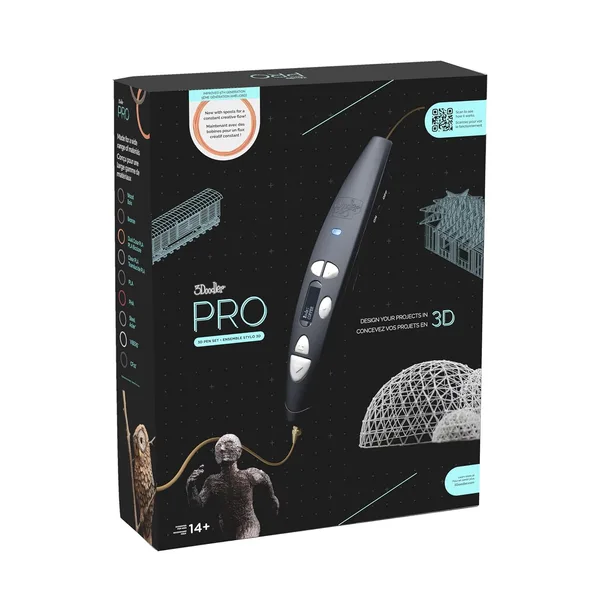
3Doodler PRO (2025) Review: Is the Pro 3D Pen Worth It for Designers?
The 3Doodler PRO isn't a kids' toy — it's a working tool: precise temperature control, steady plastic feed, and settings tuned for ABS, PLA, and even nylon. If you're an architect, model-maker, or designer who's constantly gluing together cardboard and wire, this genuinely saves you hours. If you just want to "draw in the air" once a month for fun, it's overkill — get the base model instead.
Remember wanting a glue gun back in school — one that didn't leave hot-glue strings all over your hands and the table? A 3D pen is basically that glue gun grown up: for people building architectural models, electronics enclosures, or part prototypes they need to physically hold before committing money to a 3D print.
What changes when the pen actually "understands" the material
The PRO's real advantage isn't the shell — it's the brain. On budget 3D pens, nozzle temperature is basically a compromise: hot enough for one plastic, not hot enough for another. The PRO lets you dial in precise temperatures per material — ABS, PLA, nylon, even wood-composite filament if you go that far. The difference shows immediately: the line lays down evenly, without the ugly drips and sagging strands that turn your model into something resembling a spiderweb.
Second, the feed rate adjusts smoothly instead of in clunky steps. When you're doing fine detail — lettering, a joint connector, thin reinforcement — you feel it right in your fingertips: you're controlling line thickness, not fighting a pen that either floods the surface or starves the tip.
How it stacks up against what's usually on a model-maker's desk
The classic go-to for fast prototypes is hot glue and cardboard, or a wire armature with epoxy. That works, but it always looks a little rough around the edges, and — more importantly — it's slower to cure and harder to fix mistakes on. The 3Doodler PRO lets you "sketch" a part directly in mid-air, no mold, no digital model, no waiting in a print queue. For fast iterative prototyping — when you need to show a client a shape today, not after three days on an FDM printer — this wins on time almost every time.
Who should buy it — and who shouldn't
If you build models regularly — an architecture studio, a design shop, a product-design instructor, anyone prototyping enclosures for startups — this tool pays for itself quickly just through the time saved on small iterations. Check the full landed price to your country — item, shipping, and import duty all in one number — on dede.sh; against the hourly cost of a model-maker's time or a wasted reprint, it's genuinely inexpensive.
If you're just curious about "drawing in the air" once every few months, or it's for a kid or a weekend hobby, paying extra for PRO-level features doesn't make sense — the base 3Doodler or even a decent no-name alternative covers that need for less. One more honest downside: the branded plastic refill sticks cost more than plain printer filament, and if you plan to use the pen actively every week, budget for that upfront rather than discovering it after your third refill pack.
The core trade-off here is simple: you're paying for precision and consistency, not for a shortcut to skill — you'll still have to train your hand to hold a straight line; no amount of electronics does that part for you.
FAQ
If you're planning to use the pen once a month as a hobby — no, the premium won't pay off. But if you're doing regular prototyping or model work, the precise temperature and feed control will justify the price difference within your first week of use.
They're not competitors, they complement each other. The printer is more accurate for finished parts, while the pen is faster for rough iterations and hand-sketching a shape before the model even exists digitally.
For a small model, yes. For anything bigger, the sticks run out faster than you'd expect. Buy extra upfront — running out mid-project is annoying.
For short sessions in a ventilated room, yes — the smell on the PRO is noticeably weaker than on budget pens. But for long working days with ABS, ventilation or at least an open window is still a good idea.