Acer Nitro V with RTX 4050: is this gaming laptop worth buying in 2026
The Acer Nitro V with an i5-13420H and RTX 4050 is built for people who want to play current-gen games on high or medium settings without paying a premium brand tax. It handles most popular titles at 1080p with a stable 60+ fps, runs loud and hot under load, but the price keeps it ahead of the pack. If you need quiet or portability, look elsewhere.
Picture this: you need a laptop that can actually run Cyberpunk or Baldur's Gate 3, and your budget says "absolutely not" to anything with Predator, ROG, or Legion stamped on the lid. Sound familiar? That's exactly where the Nitro V steps in — Acer's line that's spent a couple of years now playing the role of "gaming laptop for people who count their money."
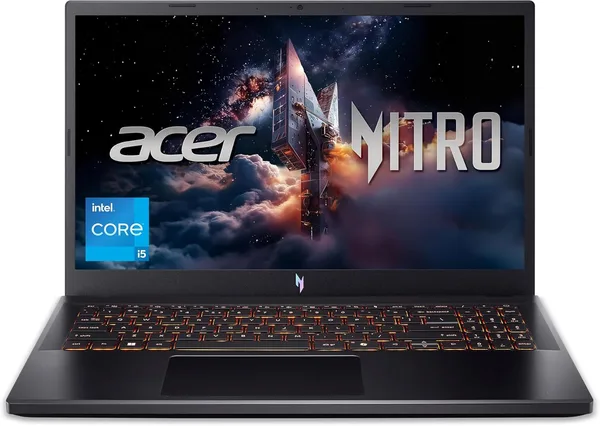
Let's get the big caveat out of the way first: this is not a premium machine. The plastic chassis is on the chunky side for 2026, and the styling is unapologetic — black with red accents shouting "I'm a gamer" so loudly it's almost charming. But under the hood sits an Intel Core i5-13420H, an eight-thread 13th-gen chip, paired with an NVIDIA RTX 4050 packing 6GB of VRAM. A combo that would've counted as a solid mid-ranger just a year or two ago.
How it actually games
The RTX 4050 isn't a flagship card, and let's say that plainly, no sugarcoating. This is the card you play at 1080p with, not the one you dream of running 1440p ultra on. In something like Fortnite or CS2 it comfortably clears a hundred frames, no complaints there. But in heavier titles — Cyberpunk 2077, Alan Wake 2 — you'll either need to flip on DLSS or drop from Ultra down to High. That's not a tragedy; it's just the reality of any 4050 on the market, including ones stuffed into laptops twice the price.
The pleasant surprise is that the processor isn't the bottleneck here. The i5-13420H keeps up with the GPU in games just fine, and in everyday work — editing short clips, compiling small projects, a dozen Chrome tabs alongside Discord and Spotify — it doesn't break a sweat. It's no workstation, obviously, but for a student or freelancer who games at night and works in Figma or VS Code during the day, it's got plenty left in the tank.
The real weak spot is noise and heat. Under serious load the fans spin up loud enough to hear through a closed door, and the area above the keyboard gets noticeably warm. That's the typical affliction of budget gaming laptops — the cooling wasn't the line item they splurged on, and you can't cheat physics. If you're gaming with headphones on, the problem solves itself. If you value quiet, you're either making peace with it or fiddling with power profiles by hand.
Up against the competition
The closest rival isn't even from another brand — it's a sibling model. The Acer Nitro V sits right next to the bigger Nitro 5 with an RTX 4060: the performance gap runs about 20-25% in heavier scenes, but the pricier model's cost climbs to match. If your budget is tight, the 4050 answers the question "can I actually game on this" with an unqualified yes.
Stack it against an ASUS ROG Strix G16 on the same RTX 4060, though, and the picture shifts — better screen, smarter cooling, simply because of the class and price bracket the machine lives in. That's a different weight class entirely, aimed at "I want performance and comfort," not just "maximum fps for minimum cash."
Rather than quote a single sticker price that won't mean much across different currencies and customs regimes, check dede.sh for the full landed cost to your country — item, forwarding, and import duty rolled into one number. That's where the Nitro V's value case really gets made, since comparable hardware from bigger names often runs 15-20% higher just for the logo on the lid.
Who should buy it, and who shouldn't
Buy it if you're a student or a newcomer to PC gaming who wants one machine for lectures by day and a few rounds by night, and fan noise doesn't bother you on principle. It's also a good fit for anyone who understands that the RTX 4050 is a compromise and is choosing it deliberately for the price.
Skip it if you're hauling the laptop around in a bag every day — the thickness and weight will wear on you over time. And definitely skip it if you're chasing max settings in heavy AAA titles and aren't willing to compromise on graphics — look toward a 4060 or 4070 instead, or you'll be disappointed within the first week.
The core trade-off with this laptop is simple: you pay less and get a louder, hotter machine with a screen that won't wow you on color accuracy. It's an honest deal, as long as you know what you're signing up for.
FAQ
For 1080p and most current games, yes — especially with DLSS turned on. For 1440p or ultra settings in demanding titles, no — you'll need to compromise on graphics.
If your budget allows it, the 4060 delivers a noticeable performance bump, roughly a quarter more. If you're counting every dollar, the 4050 covers the basics and costs meaningfully less.
Only if screen quality and a quieter cooling system matter to you. For raw performance alone, the premium isn't always justified.
During gaming, the fans are audible even through a closed door. Not an issue if you're wearing headphones; a downside if you value a quiet room.