Amazon Fire 7 Kids Tablet Review: Is It Worth Buying for Your Kid?
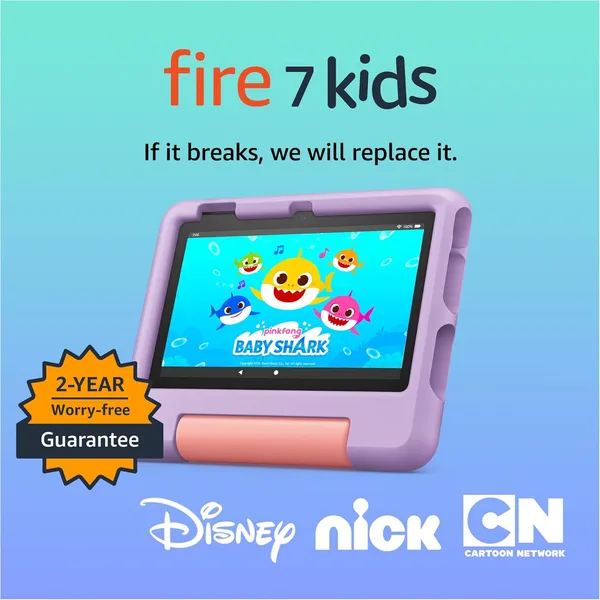
The Amazon Fire 7 Kids isn't a "cool tablet" — it's a shield between your phone and sticky little fingers. It's slow, the screen is nothing special, but it's nearly indestructible and comes with a two-year "broke it, we'll replace it free" guarantee. If your goal is surviving a long car ride or a waiting room without a meltdown, this thing delivers. If you're hunting for your kid's "real tablet," look elsewhere.
You know the scene: you hand your kid your phone for "five minutes of cartoons," and an hour later it comes back with a cracked screen and your banking app mysteriously deleted. Sound familiar? That's exactly the gap kids' tablets exist to fill, and the Amazon Fire 7 Kids is the best-seller in this category for good reason.
Let's start with the obvious: this is not about performance. Inside you get a weak processor, 2GB of RAM, and a 7-inch screen with a resolution that feels lifted from five years ago. Open a heavier game and you'll wait a beat or two for it to catch up. But here's the thing — a three-to-seven-year-old couldn't care less about frame rates. They're watching cartoons, finger-painting, tapping through simple games, and listening to bedtime stories. The processor handles all of that with room to spare.
What actually matters is the case. Thick, rubberized, with a stand-slash-handle that kids immediately start shoving random objects into. It's been dropped off the couch, out of a stroller, and once — no exaggeration — down a ladder at a country house. Not a scratch on the screen. That's not marketing fluff; it's the whole reason to pay extra for the "Kids" version instead of grabbing a regular Fire 7 and a case off some marketplace. On top of that, there's the same two-year "worry-free" guarantee: break it within two years, Amazon replaces it, no questions asked. Regular tablets simply don't offer that.
Parental controls here are actually built with some thought, not just bolted on for a checkbox. You can set a daily time limit, block specific apps after a certain hour, and check exactly what your kid watched and for how long. There are multiple child profiles too — handy if you've got siblings two or three years apart and the older one is allowed more screen time. Compared to how most parents "control" a regular tablet or phone (translation: they don't, beyond yelling "turn it off!"), this is a different universe.
Where the tablet genuinely gets annoying is the app store. It's not Google Play — it's the trimmed-down Amazon Appstore, and half the apps kids usually want just aren't there. YouTube Kids has to be installed through the browser, and even that takes some fiddling. If your kid already has a favorite game from the App Store or Google Play, forget it — it won't be here. That's the main trade-off, and it's the part product listings conveniently skip over.
Compared to an iPad mini, your kid gets far fewer options, but you get peace of mind — a tablet you don't mind handing to a three-year-old tornado. Compared to the no-name "kids tablets" flooding marketplaces for pennies, this one at least has real support, security updates, and parental controls that actually work instead of glitching out after a week.
Rather than quoting a single price tag that won't mean much once you're outside one currency, check the full landed cost to your country on dede.sh — item, forwarding, and import duty rolled into one number. Even so, the tablet ships bundled with the case and a year of kids' content subscription (Amazon Kids+, which auto-renews as paid afterward), so the starting outlay is modest set against the cost of replacing a cracked flagship phone screen after a toddler gets hold of it.
Who should buy it. Parents of kids aged 3-6 who want to hand their child a "personal" device without risking the family budget or losing sleep over every scratch. Anyone who travels with kids by car, train, or plane and needs something that can survive a drop on a train-carriage floor. Anyone who actually cares about parental controls that work, not just ones that look good on a spec sheet.
Who should skip it. Kids aged 8-9 and up will outgrow this fast — too many restrictions, not enough speed, and your child will notice the difference the moment a classmate whips out something faster. It's also not the move if you're hoping for a "full" learning device with a solid catalog of educational apps — the selection is thin. And if you've already got an old iPad gathering dust, honestly, a cheap grip case plus iOS's built-in parental controls might solve the exact same problem without a new purchase.
The core trade-off here is speed versus durability. Once you choose durability, how smoothly the menu scrolls stops mattering nearly as much.
FAQ
For first or second grade, sure — if you just need something simple like an e-reader or basic learning games. For older kids, no: the app selection isn't there, and your child will start wanting "what their friends have" anyway.
If your child is under 7 and your main priority is a device that survives being dropped, go with the Fire 7 Kids. If the tablet will be shared with parents or your kid is already 9+, the iPad wins on functionality — though it costs several times more and offers no protection against breakage.
Yes, and here's why: the price difference is small, and the Kids version bundles that same unbreakable case plus a two-year guarantee in case it gets smashed. Buying the standard Fire 7 for a kid doesn't make sense — you save a little cash and lose a lot of sleep.
Not directly — it runs the Amazon Appstore instead, and the library is much smaller. Workarounds exist, but for a kids' tablet that's extra hassle that defeats the whole point of a simple, low-maintenance device.