Amazon Fire HD 10 Kids Review: Is the Kids Tablet Worth It for Ages 3-7?
The Fire HD 10 Kids isn't a "baby iPad" — it's its own category of device: a thick bumper case, a year of content and parental controls that actually work. If your kid is 3-7 and you want to hand over a tablet without flinching every time it hits the floor, buy it. If your kid is already 9 or 10 and wants a "real" tablet for gaming, look elsewhere.
There was a moment when my daughter knocked my phone off the couch for the third time that week, and I finally asked myself why I was handing a device that costs half a paycheck to a toddler while I kept it wrapped in a case like a museum piece. The Fire HD 10 Kids solves exactly that problem — not by being cool, but by simply not caring if it gets thrown at a wall.
What this thing actually is
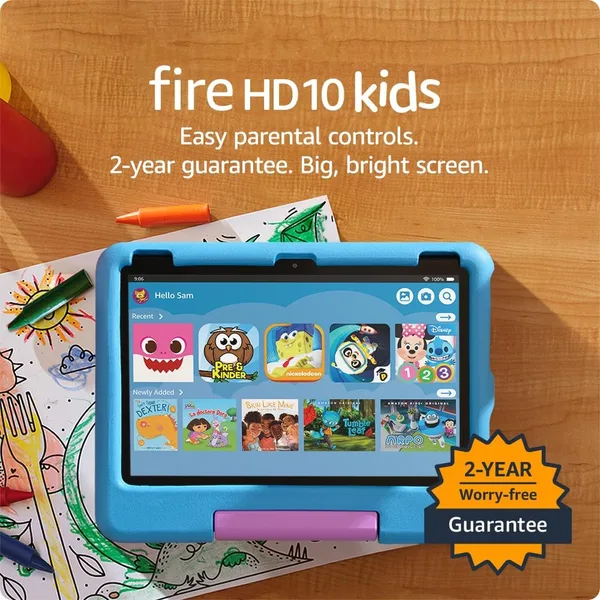
Under the hood, it's a Fire HD 10 — a perfectly decent 10.1-inch tablet with an HD screen — wrapped in a thick rubber bumper-slash-stand and set up with a kids' profile out of the box. There's no separate "kid hardware" here: same processor, same Fire OS as the adult version, it just boots straight into Amazon Kids mode. That's the thing to understand — you're not paying for a toy. You're paying for a proper tablet plus insurance against toddler chaos plus a year of content.
The tablet itself sits in the mid-range on Amazon, and that price already bundles the bumper, the stand, and a year of Amazon Kids+. Buy an adult Fire HD 10 separately, add a case of comparable protection, then tack on a content subscription, and you'll spend more than the kids' bundle costs as a package — which sounds backwards until you actually run the numbers.
Living with it in a real house
The first week, I kept waiting for the catch. There wasn't one. The bumper really is thick — I deliberately dropped it off a table onto tile, and nothing happened. Drop number two, out of my five-year-old's hands mid-jump on the couch, also left zero scratches on the screen. Amazon backs this with a two-year "Kid-Proof" guarantee: if it breaks, they replace it, no questions asked. It's one of those rare cases where the marketing promise matches reality.
The screen isn't the sharpest or the brightest — it's HD, not Full HD, let alone the 2K panels on flagship tablets. In adult hands that would bug me. For a kid watching cartoons and playing simple games instead of editing photos, it's a total non-issue.
Parental controls are where this tablet genuinely beats handing a kid your old iPad with YouTube Kids installed. The Amazon Parent Dashboard app lets you set screen-time limits, lock out the browser entirely, choose exactly which apps your child can even see, and set an "educational quota" — basically, entertainment time gets earned through reading or learning apps. This isn't a checkbox buried in settings; it's a mechanism I actually use every single day.
The real downside: the Amazon ecosystem. There's no official Google Play here, so Netflix, Disney+, or specific kids' apps either require sideloading through unofficial channels or you settle for whatever's in the Amazon Appstore — and the selection is thinner. If your household already has a Disney+ subscription and your kid is attached to specific shows there, check the Amazon Appstore beforehand. Finding out after unboxing is not a fun surprise.
Against the no-name $40-50 tablets flooding marketplaces, the Fire HD 10 Kids wins by a landslide: faster processor, longer software support, and — the big one — an actual warranty when it breaks. Cheap no-name tablets tend to fail exactly where a kid stresses them most, and there's no replacement waiting when they do.
Who should buy it, and who shouldn't
Buy it if your kid is between 3 and 7 and the main goal is a self-sufficient, safe device you don't have to babysit. Buy it if you're sick of slapping screen protectors on adult gadgets. Skip it if your kid is 9 or older — they'll outgrow the kids' content filter fast and start asking for a "real" tablet with full Google Play. And skip it if you're planning to hand it down to younger siblings years from now — by then the hardware will be dated and the cartoon obsessions will have cycled through a dozen phases.
Worth saying plainly: the free year of Kids+ is a nice bonus, but it switches to a monthly charge afterward, and that's worth knowing before you buy, not eleven months in when the charge quietly hits your card.
Shipping adds the usual cross-border layers on top — forwarding and import duty — so check the full landed price (device + forwarding + duty, all in one number) on the product page on dede.sh before you buy. That's normal for any order shipped internationally.

FAQ
Do the math honestly and a case of equivalent protection, a stand, and a year of content bought separately usually costs the same or more. Plus the kids' version comes with a breakage warranty that no one offers on the regular tablet. The "premium" here is mostly an illusion.
A used iPad gets you a better screen and the full App Store, but no thick bumper and no built-in parental controls at this level — you'd need to buy a case and install third-party restriction apps separately. If your kid is still young and throws gadgets around, the Fire HD 10 Kids is more practical. If they're closer to 8-9 and screen quality or gaming matters more, the iPad wins.
Yes, with room to spare. The Fire HD 10 handles YouTube, cartoon streaming, and light kids' games without stuttering. Problems only show up if you try to run heavy 3D games — but that's not the use case this tablet is built for.
Yes — the bumper comes off, and underneath is a standard Fire HD 10 you can keep using without the kids' profile. That's a nice bit of future-proofing: the device doesn't become junk the moment your kid outgrows kid mode.