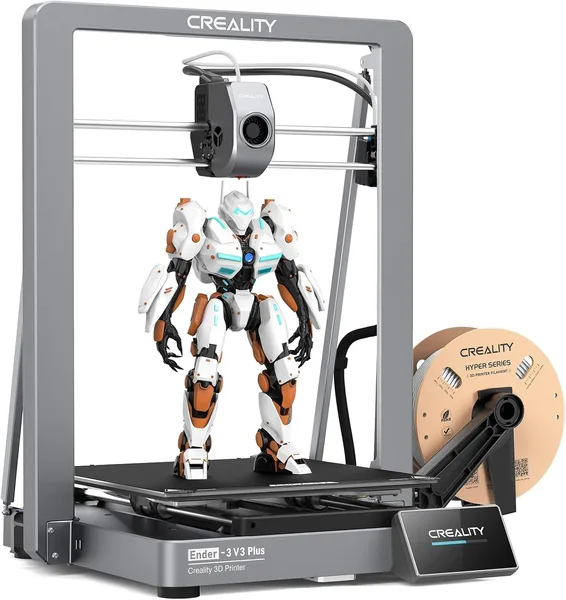
Creality Ender 3 V3 Plus Review: Is It Worth Buying in 2026
The Ender 3 V3 Plus is that rare case of a "fast" printer that's actually fast, not just fast on the spec sheet with a 600mm/s sticker. The CoreXZ frame holds its geometry through hard acceleration, auto bed-leveling removes the biggest beginner headache, and the direct drive extruder means flexible filaments actually print properly. Get it if you need large format and speed — not if you're after the cheapest possible first printer.
There's a moment familiar to anyone who prints in 3D: an eight-hour model, a deadline tomorrow morning, and you're sitting there doing the math on whether the machine will finish in time. On a classic Ender 3, it won't, and you know it. Creality eventually admitted its own weak spot: the old Bowden extruder and the wobbly Z-tower weren't "classic charm," they were a bottleneck. The Ender 3 V3 Plus is the company's answer to its own criticism, just bigger.
CoreXZ isn't marketing — it's a real, noticeable difference
On a regular Ender 3, speeds above 150mm/s bring on "ringing" — ghostly wavy marks on the walls of a model, the visible echo of the whole frame getting rocked back and forth by the print head. CoreXZ solves this differently: instead of moving the entire heavy structure, belts transmit motion through a stationary frame that barely wobbles at all. That's why the 600mm/s figure in the name isn't just a spec-sheet checkbox — it's a real top speed the printer can hold its shape at. In daily use you'll rarely print flat-out at max speed (Creality Slicer itself recommends 300-400mm/s profiles for decent quality), but here's the nice part: even at 250-300mm/s, parts come out with crisp corners, no "ripples" on vertical walls that you'd spot with the naked eye on cheaper printers.
The second thing worth thanking Creality's engineers for is automatic bed leveling. Forget the sheet of paper and the four thumbscrews under the plate that you used to twist and curse at for an hour. The printer maps the bed surface before every print and compensates for unevenness in software. This is the moment where the gap between "a hobby for the patient" and "just hit print" becomes physically noticeable — especially if you're buying someone's first printer as a gift and don't want to field complaints later.
Direct drive extrusion is the third thing that genuinely affects what you can print. On Bowden systems, TPU and other flexible filaments are a gamble — the plastic compresses in the long tube, jams, and the print fails in the middle of the night. Here the spool sits right above the nozzle, the filament path is short, and TPU prints without surprises. If you're planning phone cases, rubber gaskets, or anything made of elastic material, that's the exact reason to go with the V3 Plus over a regular Ender 3.
Now for what isn't quite so perfect
The "Plus" size means a bigger bed and a taller build volume — great for helmets, enclosures, large cosplay pieces, or furniture hardware prototypes. But a bigger printer also means more floor space in your apartment, and the bed takes a bit longer to heat up before a print starts. If you live in a one-bedroom place and the printer will sit on a balcony, think twice about whether you actually need that much "plus."
Second: this is still an open-frame printer with no enclosure. In winter, with drafts or cold air near a window, ABS and similar materials can crack at the corners from uneven cooling. PLA and PETG are no problem, but if you're planning functional parts in ABS or ASA, you'll either need to rig up a foil tent or buy an enclosure separately — extra money and hassle that promo videos conveniently skip.
Compared to competitors in this class — say, the Bambu Lab P1S — the Ender 3 V3 Plus loses on automation (no AMS for multicolor out of the box, no fully enclosed chamber), but wins on openness: it's easier to tinker with, swap in a third-party nozzle, or run a different slicer without fighting a proprietary ecosystem. For people who like to tinker, that's a plus, not a minus.
Who should buy it, and who shouldn't
Get it if: you need a large build volume, want fast prints without endless waiting, and value auto bed leveling because your hands are busy with something more important than fiddling with thumbscrews. Get it if you're also planning to print flexible materials.
Skip it if: this is your first printer and your budget is tight — start with something smaller and cheaper, get comfortable with basic slicer settings, and upgrade later. Skip it if your apartment is small and there's genuinely no room for a big bed — paying for a "Plus" footprint you'll never use makes zero sense.
The Creality Ender 3 V3 Plus currently sits at around $410. On top of that, factor in shipping and customs — for the full cost with shipping and import duty to your own country, check the landed price on the product page, since this printer is heavy and bulky and the full total will land noticeably above the seller's sticker price.
Overall, this is a solid, honest workhorse without extra flash. Not the prettiest printer on the market, but one that genuinely prints fast and doesn't make you relearn bed calibration every single time.
FAQ
If you mostly print small items — keychains, holders, small parts — the premium won't pay off; the regular bed size is plenty. But if you're planning large single-piece parts — helmets, enclosures, frames — the bigger bed saves you hours of gluing sections together and a lot of frustration.
The P1S is friendlier for anyone who wants to "hit print and forget it": enclosed chamber, automatic color switching via AMS, less manual tuning. The Ender 3 V3 Plus is cheaper, more open for modification, and gives you a bigger build volume for the same money. If you like tinkering with settings and want large format, go Creality; if you want minimal hassle, go Bambu.
Yes, that's the main reason to go with the direct-drive version instead of Bowden. The short filament path to the nozzle means flexible plastic doesn't jam or compress in the tube, so TPU prints reliably even at moderate speeds.
For PLA and PETG — no, it prints fine without one. If you're planning ABS or ASA, especially in winter near a window or on a balcony, an enclosure (even a homemade one from foil or acrylic panels) is definitely worth buying or building — otherwise corners will delaminate from drafts.