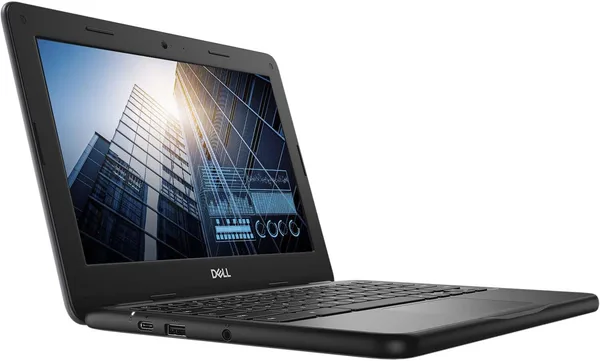
Dell Chromebook 11 3100 2-in-1 Review: Worth Buying in 2026?
The Dell Chromebook 11 3100 2-in-1 isn't a laptop for Photoshop — it's a cheap, nearly indestructible workhorse for a kid, note-taking, or a second screen on the road. At around $85, it's one of the cheapest ways to get a touchscreen that folds into a tablet and a battery that lasts a full school day. But the processor dates back to 2020, and you'll feel it the moment you open more than five tabs at once.
Picture this: your kid starts fifth grade, needs a laptop for Google Classroom and Zoom lessons, and buying something with a Core i5 processor just to view presentations feels a bit like using a microscope to hammer a nail. That's exactly the scenario Dell built the Chromebook 11 3100 for. And honestly, they did it well — with the caveat that the design and internals date back to the pre-pandemic era.
What kind of machine this is
An 11.6-inch screen at HD resolution — 1366x768, so not Retina, not FHD, and noticeably less crisp than modern budget laptops. But it does have a touch layer and a 360-degree hinge, so the device turns into a clunky but perfectly workable tablet for reading or finger-drawing in Google Keep. Inside is an Intel Celeron, ChromeOS instead of Windows, and that combination is the device's whole selling point: an operating system that doesn't lag even on weak hardware, because it simply doesn't carry around half the extra background processes Windows 11 does.
Compared to a Windows laptop at the same price — something like the budget Acer Aspire 3 — the difference is obvious the moment you turn it on. A Windows machine at that price will spend a minute loading the system, then another minute "catching up" on updates and background services. The Chromebook boots in seconds and is ready to go immediately. That's not a marketing line, it's just a different philosophy: fewer capabilities, but what's there works reliably.
What it's like in real life
Opening Google Docs, checking mail, watching a lecture on YouTube, sitting through a Zoom call — the Dell Chromebook 11 3100 handles all of it without complaint. But try opening 10 Chrome tabs at once, three of them YouTube, and the machine will start to stutter. 4GB of RAM (the standard configuration for this model) is the threshold where the browser starts unloading inactive tabs from memory, and returning to them means the page reloads from scratch. Annoying? A little. A dealbreaker for a kid doing homework? No.
The keyboard isn't premium, key travel is shallow, but it's perfectly fine for typing up notes. The speakers are typical for the budget class — flat and quiet, better to use headphones for music. Battery life is where it actually shines: ChromeOS is so efficient that even a not-brand-new battery on this model comfortably lasts a full school day without a recharge. For parents buying their kid's first laptop and worried they'll forget the charger at home, that's a genuinely important selling point.
Another scenario where this machine shines: as a second device on the road. Light, compact, and you won't feel bad if it falls off the couch or gets splashed with juice. ChromeOS updates itself automatically and doesn't need antivirus software, so you can hand it off to a family member who "just checks email and Facebook" and forget about tech support for years.
The main trade-offs
First is screen resolution. HD looks dated in 2026 even on 11.6 inches, and text looks a bit "fuzzy" up close. If you're used to FHD screens on your phone, the switch will be noticeable.
Second is performance beyond the basics. No video editing, no heavy Excel with macros, no gaming beyond light Android apps through Google Play (which ChromeOS does support). This is a machine for consumption and light typing, not for creative or heavy work.
And third, a less obvious point: platform age. Chromebooks only receive ChromeOS updates for a certain number of years from their release date (Google calls this Auto Update Expiration). The 2020 model is already approaching the end of that cycle, so before buying, check the current AUE status for the specific device — otherwise you might be left without security updates in a year or two.
Who should buy it, and who shouldn't
Get it if you're looking for a second, third, or "kid's" laptop for basic tasks, and the main criterion is not minding if it gets broken or has tea spilled on it. Get it if instant boot-up and all-day battery matter more to you than raw power. Get it if your main use case is the browser, the Google ecosystem, and light Android apps.
Don't get it if you need a primary work machine for multitasking, heavy files, or even light photo/video editing. Don't get it if screen resolution is a dealbreaker for you — look toward FHD models even within the Chromebook segment. And don't get it if you plan to use the device for more than three or four years — platform age and the limited update cycle work against you here.
As for price: marketplaces sell this specific Dell Chromebook 11 3100 2-in-1 for around $85 — basically the price of a decent pair of wireless headphones, not a laptop. That's exactly why it's one of the most popular picks as "a kid's first gadget" or "a spare laptop to toss in a bag," rather than a primary work machine.
FAQ
For Google Classroom, Zoom lessons, and writing essays — yes, with room to spare. But if the school requires specific Windows software (like drafting or accounting programs), better to look straight at a classic Windows laptop instead.
If you plan to watch videos or read text for long stretches, yes — the difference is noticeable within the first half hour of use. If this is a second device for quick email checks and browsing, HD is a perfectly acceptable trade-off for the price.
For an infrequent user, a Chromebook wins almost every time: fewer problems with updates, viruses, and the system slowing down over time. A Windows option like the Acer Aspire 3 only makes sense if you need specific desktop programs that aren't available on the web or in the Play Store.
Yes, and that's one of the best use cases thanks to the battery life. Just don't expect a crisp picture at full screen — HD resolution isn't the level where you'd want to enable full-screen mode at maximum quality.