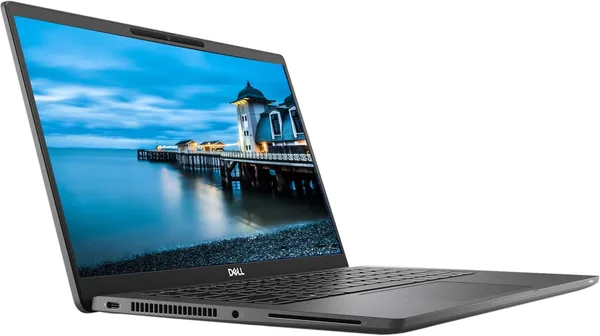
Dell Latitude 7420 review: is a used business laptop worth buying?
The Dell Latitude 7420 isn't a laptop for TikTok or streaming, it's a workhorse for people who just need their machine to work: Excel, Zoom, fifty tabs in Chrome, and zero surprises. With an 11th-gen i7 and 16GB of RAM it handles all of that without complaint, and the price on the secondary market makes it one of the smartest picks around for home use or freelancing. There's one downside, but an important one — this is used corporate hardware, and it's worth buying with that fact in mind.
Picture this: your old laptop, which after the second Zoom call opened, starts making noises like it's trying to take off. The fan roars, the cursor lags, and your colleagues are already asking whether you're still on the call. Sound familiar? That's exactly who a whole category of "corporate second-life" laptops exists for — freelancers, remote accountants, students writing a thesis while watching lectures in a second window. And the Dell Latitude 7420 is one of the brightest examples of the genre.
This isn't a new laptop in the classic sense. The Latitude 7420 is a model Dell sold to companies in bulk: banks, consultancies, government agencies. These machines live in offices for two or three years, then get decommissioned or their lease ends — and they land on the secondary market in batches, often in a condition you wouldn't dare call "used." That's exactly why you can currently find this model with an 11th-gen i7 and 16 gigs of RAM for $269.99 on eBay. Compare that to the price of a new laptop with similar internals, and the difference becomes obvious immediately.
What this machine actually is
Forget gaming laptops with RGB lighting and fans the size of a dinner plate. The Latitude 7420 is a serious business suit among laptops: black, strict, no frills. Inside is an 11th-generation Intel Core i7 that, while not a 2026 novelty, is still more than enough for everyday tasks. 16 gigabytes of RAM is the amount that lets you keep a twenty-tab browser, Teams, a heavy Excel spreadsheet, and something else in the background open at once — without the machine starting to "think."
The FHD screen here isn't about brightness for its own sake — Dell traditionally builds panels that are easy on the eyes through an eight-hour workday, without the fatigue that cheap TN panels tend to cause. And the keyboard is where the Latitude genuinely wins compared to something like an HP ProBook or even part of the MacBook Air lineup: crisp key travel, backlighting included, and a layout that doesn't force your fingers into awkward corners.
What it definitely doesn't have is a discrete graphics card. If you're planning to edit 4K video or play anything heavier than Hearthstone, look elsewhere in the catalog. This is a machine for text, spreadsheets, browsing, and video calls, not for rendering.
Where it genuinely shows character
The Latitude 7420 shines brightest exactly where other laptops in this price segment start to give up. The battery lasts noticeably longer than a typical gaming or multimedia laptop — Dell has historically tuned power efficiency well in its business line, and in practice that means a full workday without hunting for an outlet in a café. The chassis is magnesium alloy, not the kind of plastic that picks up scratches and corner cracks within a year. These laptops passed MIL-STD durability testing, because that's exactly what corporate procurement demanded — and you can feel it in how it sits in your hand when you pick it up off a desk with one hand.
It also has something half of budget new releases lack — ports. USB-C with Thunderbolt, full-size USB-A, HDMI, a SIM card slot on some versions (for a built-in LTE modem). No need to carry a fistful of adapters, unlike new MacBooks or ultra-thin ultrabooks that leave you with just two USB-C ports and a shrug.
Honestly, the main inconvenience is the lack of a manufacturer warranty in the usual sense, and the fact that some units arrive with a previous company's sticker still on the lid or light wear on the palm rest. Sellers on eBay usually describe condition honestly, but it's worth reading the description carefully rather than just glancing at the photos.
Who should buy it, and who shouldn't
If you're a freelancer, student, accountant, remote manager, or simply someone who wants a dependable work tool without paying extra for a gaming graphics card you'll never use, this is one of the smartest picks in its price range. Especially since a 16-gig RAM configuration is already a comfortable, not just minimal, amount for years to come.
Don't buy it if you need graphics power for design work, editing, or gaming — it simply isn't there, and no technical trick will make up for that. It's also not for anyone who's genuinely put off by the word "used" — even in excellent condition, this is hardware with a history, and some people struggle with that psychologically even though there's no technical issue at all.
Compared to a new budget laptop at a similar price, the Latitude 7420 wins on nearly every count except one — warranty and "box-fresh" newness. But if real specs matter more to you than the smell of new plastic, the choice is obvious.
FAQ
If you work with heavy spreadsheets, several virtual machines, or keep a pile of apps open constantly — yes, the difference is noticeable. For a basic office setup and browsing, the i5 is enough, but the i7 gives you headroom that won't have you thinking about an upgrade for another three years or so.
Yes, with room to spare. This is the amount at which the system doesn't start lagging when you open a heavy spreadsheet, a call, and a dozen tabs at once. Problems with 16 gigs only start with heavy virtual machines or editing — but that's not a job for this laptop anyway.
Both are proven business-segment workhorses, and the difference often comes down to personal habits: ThinkPad fans are used to the trackpoint and a different layout, while Dell has a slightly thinner chassis and, in my opinion, a more comfortable keyboard. If you're comparing specific models from the same generation, take whichever is cheaper in the configuration you need — there's no meaningful difference in reliability.
Something light like old indie titles or browser games — sure. Anything modern and demanding — no, there's no discrete graphics card here, and that's a deliberate business-class trade-off in favor of weight, quiet, and battery life.
Similar options for comparison, if you're still weighing a few models: