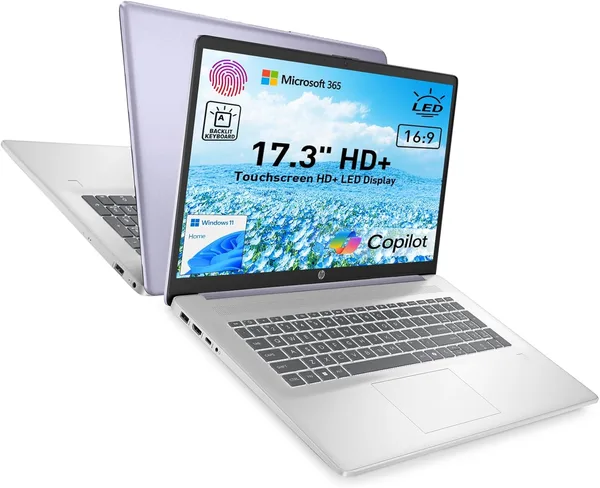
HP 17.3\" Touchscreen Laptop: Review and Is It Worth Buying
This is about the cheapest way to get a big 17.3-inch touchscreen with licensed Microsoft 365 thrown in — check the full landed price (item + forwarding + import duty, all in one number) on dede.sh. But 128GB of storage and 8GB of RAM is survival mode, not headroom for the future. Buy it if you want a big screen for the house on the cheap and accept this is a second or third machine, not a workhorse you'll lean on for years.
Picture a kitchen table where a laptop always sits open — pulling up recipes, filing paperwork online, and in the evening the grandkids crank up a cartoon full screen. That's exactly the scenario this HP 17.3" was built for. Not video editing, not gaming, and honestly not for anyone who keeps twenty Chrome tabs open with a Zoom call running in the background.
The first thing you notice is the sheer size. At 17.3 inches this stops being a "laptop" in the usual sense and starts feeling like a desktop monitor you can fold up and carry somewhere else. Not many brands offer a screen this big at this price point, which is why the model keeps popping up in searches from people tired of squinting at a 13-inch hand-me-down to watch a show. The touchscreen isn't just a box-ticking spec either — swiping through news, doodling in Paint with the kids, or dismissing a reminder with one tap is genuinely handy when the trackpad is being temperamental.
Now, the elephant in the room: 8GB of RAM and a 128GB drive in 2026 isn't "budget" anymore, it's "the bare minimum." Windows 11 chews through a good chunk of that SSD the moment updates start installing, and if you're planning to dump a couple of Steam games or a decade of photos on there — don't. This machine is built for a browser, documents, YouTube, and, crucially, the Microsoft 365 subscription that comes bundled in — which is honestly the only reason the price makes sense at all. A standalone Office subscription runs somewhere around $70 a year, so you're effectively getting a year or more of the office suite free with the hardware.
Compared to a Chromebook at a similar price, the HP wins because it's a full Windows machine — you can install any program, plug in a printer over USB without a fight, or open some ancient .exe someone emailed you back in 2015. A Chromebook can't do any of that, but it will feel snappier on the same 8GB, since ChromeOS is a lot lighter than Windows 11. If your whole use case is browsing and Google Docs, a Chromebook will honestly be the more pleasant daily driver. But if you specifically need Windows and specifically need Office, there's almost nothing else at this price.
A webcam with a physical shutter is one of those things you only appreciate once you have it. Slide it shut and stop wondering whether anyone's watching through the camera while the laptop sits open on the counter. The fingerprint reader is a nice bonus too — log in without typing a password every time you need to check something quickly. Small stuff, but it's exactly the small stuff that makes daily use less annoying.
Now for the honest math on getting it to your door. This model sells on a US marketplace, and once you fold in forwarding, import duty, and payment fees, you land on a total that already accounts for everything — no customs surprises later. Check the exact landed price for your country on the product page; it isn't the cheapest laptop in the catalog, but for a screen this big with a licensed copy of Office attached, it holds a solid spot among budget 17-inch machines.
Who should actually buy this laptop? Someone who wants a big screen at home — for movies, for following a recipe off the display, for doing the household books in Excel once a week. A student who can't stretch to something more powerful but needs Office for essays and presentations. An older relative who wants one big, legible screen without reading glasses. Who will regret it: a freelance designer, a gamer, anyone who keeps Photoshop and ten Chrome tabs open at once, or someone who plans to lug a laptop to work in a bag every day. At this size and weight, it's not a mobile machine — it's a fixture for one spot in the house.
The one real trade-off here is memory. A 128GB SSD means offloading your photo and video library to the cloud from day one, and 8GB of RAM will start choking around the tenth open browser tab with Zoom running in the background. If you can live with that in exchange for a huge screen and bundled Office, this model delivers honestly on what it promises. If not, spend a bit more and look for something with 16GB of RAM and a 256GB SSD — the headroom is a completely different story.
FAQ
Barely, at the start. After Windows, updates, and Office are installed, you'll have roughly 80-90GB left — plenty for documents and a handful of apps, but nowhere near enough for a large photo library or games. Set up cloud storage or an external drive from day one.
If your budget allows it, absolutely. 8GB only covers light use — browser, documents, video. A 16GB option like the Lenovo Yoga 7i gives you far more headroom for the future, though it costs noticeably more.
Depends where it's going to live. If the laptop rarely leaves the table, the 17.3" touchscreen is nicer for movies and browsing. If you sometimes need to carry it around, a 15.6" option like the Fusion5 S15 is lighter and more compact, though it also ships with 8GB of RAM.
Not on anything heavier than solitaire or browser games. There's no dedicated graphics card, and 8GB of RAM limits it even for light indie titles. For actual gaming, look at models with a discrete GPU — that's a different category and a different price entirely.