HP 67 Black + Tri-Color 2-Pack: Is It Worth Buying
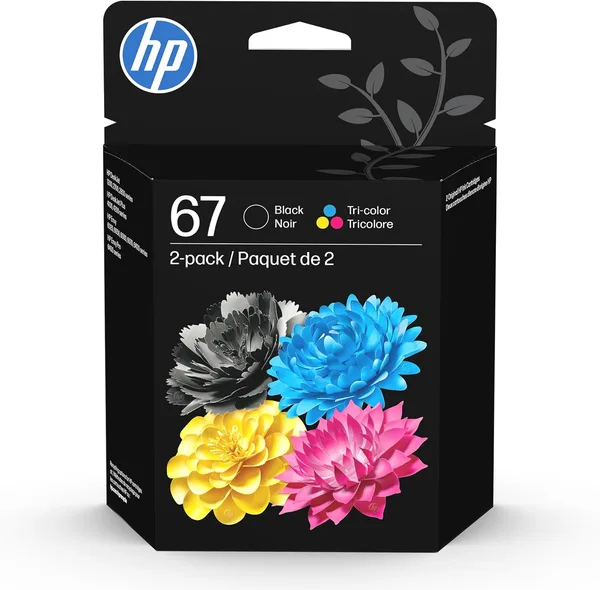
HP 67 is the entry-level cartridge for older (and not-so-old) DeskJet and Envy printers, and the black + tri-color pair covers 90% of home printing without making you think twice. It's not the cheapest ink per milliliter you can buy, but it's the simplest: pop it in, print, forget about it. If your printer already chews through original cartridges at an alarming rate, look at the XL version instead of this one.
Check dede.sh for the full landed price of the pair to your country — item, forwarding, and import duty rolled into one number. It's not pocket change, but this is one of those rare cases where paying more for the genuine article actually pays off.
That moment when you need to print out some certificate "yesterday" and the printer just blinks yellow, flat-out refusing to print even plain black text — pretty much every DeskJet owner has been there. And every time you're stuck with the same choice: buy the official HP cartridge, or gamble on some no-name "compatible" one from an online marketplace that either leaks or the printer refuses to even recognize.
The HP 67 Black/Tri-Color is exactly that genuine option — the one HP puts in budget DeskJet 1255, 2700, 4100 models and part of the Envy lineup. It's a two-cartridge set: one pure black, one tri-color where cyan, magenta and yellow share a single housing. It's an old design with well-known upsides and downsides, and it's worth talking about those honestly instead of just repeating what's printed on the box.
What it actually gets you in everyday printing
Let's start with the obvious part: if you're mostly printing text — certificates, receipts, the kid's homework — the black cartridge does its job well. Crisp text, no streaking, dries fast, paper doesn't warp. This is where HP has traditionally held the line, and it's exactly why people pay extra for the original instead of a cut-price Chinese clone.
The tri-color cartridge is a more interesting story. Since all three colors share one reservoir, it drains unevenly — some people run out of cyan first because of photos with blue skies, others burn through yellow first because of documents with yellow letterhead stamps (yes, that really happens). And the moment one color hits zero, the whole cartridge reads as empty, even if the other two are still half full. That's an old HP pain point, and the 67 is no different from its predecessors here — Canon, with its separate cartridge for each color, is more economical in this respect, even if pricier upfront.
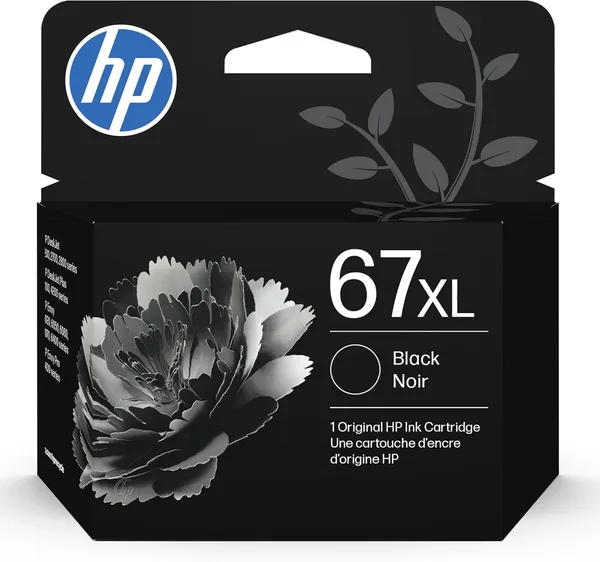
Second thing worth knowing: the HP 67 is not the XL version. Yield is roughly a couple hundred pages of mixed printing, and if you print regularly — not once a month, but weekly — you'll be refilling more often than you'd like. HP also sells the 67XL with a higher yield, and if your printer sees more than occasional use, it makes more sense to go straight for that, even at a higher sticker price. Do the math on cost per page, not cost per cartridge — this is the rare case where paying more upfront genuinely saves money.
One more thing the box doesn't tell you: the HP 67 is built for a specific generation of printers. It won't fit older DeskJet models or premium-tier printers with separate ink tanks — those use different part numbers. Check your printer model against what's listed before buying, because returning an opened cartridge afterward is either expensive or flat-out impossible.
Versus the alternatives
The obvious competitor here is compatible (non-OEM) cartridges, which flood online marketplaces at a third of the price. Honestly? Sometimes they work fine. But with HP printers specifically, the risk is higher than with, say, Epson — HP firmware often checks chip authenticity and can simply refuse to print with a "wrong" cartridge after a firmware update. So the savings upfront can turn into buying the original anyway, right when the printer decides to get stubborn. I wouldn't cut corners here if the printer matters for work, rather than the occasional once-a-month print job.
The other option is cartridge refill services, still found in every other strip mall. Cheaper than buying new ink outright, but ink quality varies wildly from shop to shop, and after the third or fourth refill the nozzles tend to clog. For "just get it on paper" printing, refills work fine. For anything that actually matters, get a fresh original.
Who should buy it, who shouldn't
Buy it if you have a home DeskJet or Envy with the matching part number, and you print occasionally rather than daily — certificates, receipts, homework. This is exactly the case where the HP 67 shines: no thinking required, it just works. Check dede.sh for the full landed cost of the pair to your country before you buy — it's not a giveaway, but it's not a rip-off for an original either.
Skip it if you print a lot of photos or documents every week — the HP 67XL wins on cost per page there, even with a higher price tag upfront. And skip it if your printer is already on its last legs — sometimes it's cheaper and smarter to cut your losses and buy a new inkjet for the same money, rather than pour cartridges into a machine that's about to give up anyway.
FAQ
If the printer is needed for work or a kid's schoolwork — yes, it's worth it. Compatible cartridges for HP printers often clash with the firmware after updates, and you risk losing both money and time exactly when you need to print something urgently.
If you print rarely, the standard 67 is enough, and there's no point buying the XL — the ink will simply dry out before it runs out. If you print regularly, the XL is cheaper per page, even though the box costs more upfront.
Technically yes, refill kits are widely sold. But the nozzles on these cartridges are delicate, and after a second or third DIY refill, print quality tends to drop noticeably. Fine for a one-off save, not great for regular use.
Because all three colors share a single reservoir, and the cartridge reads as empty the moment even one of the three runs dry — even if the other two are still full. That's a quirk of HP's technology itself, not a bad batch.