HP ProBook x360 11 G2 EE Review: Is This Cheap 11.6-Inch 2-in-1 Worth It
The HP ProBook x360 11 G2 EE is a school-issue convertible from 2017 that now sells for roughly the price of a decent pizza: 8GB of RAM, a low-power Core i5-7Y54 that couldn't win a race against a modern budget chip, and a chassis built to survive being dropped by a twelve-year-old. For browsing, documents, and Zoom calls, it holds up fine. For anything more demanding, don't even try.
There's a category of laptops people buy not because they want to, but because someone needs a device put in their hands — a kid for school, a grandparent for video calls, or yourself as a backup you won't cry over if it gets left on a train. The HP ProBook x360 11 G2 EE lives squarely in that category. The "EE" isn't marketing fluff — it stands for Education Edition, meaning HP shipped these by the pallet-load into American schools for years, built to a brutal spec: drop it off a desk, it survives; spill juice on it, it survives; hand it to a first-grader to take home, it survives that too. That "survives" is the whole reason these things are still floating around years after the processor inside them went obsolete.
What's inside, and why the release date shouldn't scare you off
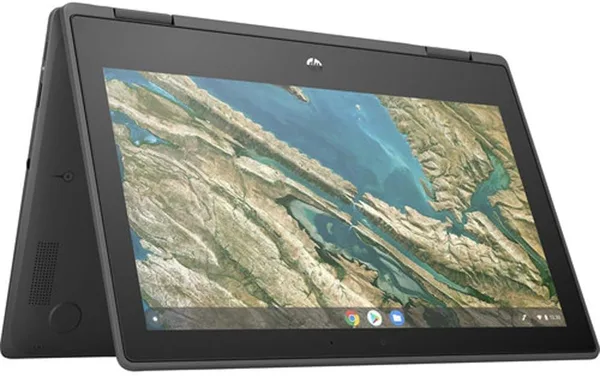
The Core i5-7Y54 is a Kaby Lake Y-series chip, the kind Intel built specifically for thin, fanless devices: it runs cool and quiet, but there's not much horsepower under the hood — somewhere around a modern budget Celeron, just older and a bit more power-efficient. 8GB of RAM wasn't a record even back in 2017, but it's enough to run one browser with a dozen tabs alongside Google Docs without the system having a meltdown. The 11.6-inch touchscreen flips a full 360 degrees on its hinge — the same "fold it into a tablet and read it lying down" trick, just shrunk to a size that actually fits small hands or a bag with no room to spare.
Worth being upfront about one thing: this isn't a "work" laptop in the sense of video editing or spreadsheets choking on macros. It's the second or third machine in the house, doing one narrow job reliably, right up until something mechanical gives out — and the chassis here is built to outlast the electronics inside it.
What it's actually like to use
Picture a kid doing remote schoolwork: logging into Google Classroom every day, writing an essay, watching an educational video on YouTube. Or someone who wants a second screen at home — not for work, just so they're not hauling the main laptop from room to room. That's exactly where the HP ProBook x360 11 G2 EE feels at home. Chrome with a couple of tabs boots up in about fifteen seconds — not lightning-fast, but tolerable. Open a heavy, ad-cluttered site full of animations, though, and the chip starts to wheeze; the cursor stutters for a second or two, and you remember this thing is pushing ten years old.
Stacked against its closest rival in the same price bracket — something like the Acer Chromebook Spin 311 — the HP loses on raw responsiveness but wins on flexibility: it runs full Windows, not ChromeOS with its offline quirks and narrower app selection. If a kid needs a specific Windows-only program for school, the ProBook suddenly becomes the only option between the two. But if all you need is a browser and a handful of web apps, a Chromebook in the same class will feel snappier day to day, simply because ChromeOS is far lighter than Windows 10 or 11.
Battery life isn't a record-holder by today's standards, but it's not embarrassing either — a few hours of continuous text-and-browser work is realistic, especially if you keep the brightness down. Gaming ambitions, though, should stay firmly out of the picture: even mid-tier browser games are enough to bring it to its knees.
Who should buy it, and who definitely shouldn't
Buy it if you're after a second or third laptop for the household on the smallest possible budget — for a kid's schoolwork, for a grandparent's video calls, or as your own backup you won't stress over losing on a trip. Prices out of the US start around $69.89, and once you add forwarding and import charges, the full landed cost works out to roughly what you'd pay for a single food delivery order — you can check the exact number for your own country on dede.sh. This is impulse-buy money, not a purchase that needs weeks of deliberation.
Don't buy it if you're planning to run anything heavier than a browser, documents, and video calls. Photoshop, editing, hefty spreadsheets, modern games — none of that is happening on a Core i5-7Y54 with 8GB of RAM, and "I'll just put up with it for the price" tends to collapse into regret within the first week. Also worth remembering: this is used hardware from 2017-2018 — the battery isn't factory-fresh anymore, and the internals may carry the scars of heavy classroom use. That's not hidden, it's just the reality of this class of device, and you should buy in with that fully accepted, not hoping for a miracle.
There's really one trade-off here: you pay the bare minimum and get exactly the performance that sum buys. No catch, no fine print — just an honest old workhorse at an honest low price.
FAQ
For the basics — yes: browser, Google Docs, video calls, watching lesson videos. But if a teacher asks for a heavy editor or specialized software, check ahead of time whether this chip can handle it. Better to test on a similar setup than find out the hard way.
If you specifically need Windows for certain programs, get the HP. If a browser and web apps are all you need, a Chromebook in the same class, like the Acer Chromebook Spin 311, will feel faster day to day, since ChromeOS is a much lighter system.
It's not really extra here — the touchscreen and 360-degree hinge are already baked into this rock-bottom price. The real question is whether you or your kid will actually use tablet mode. If so, nice bonus; if not, it's simply not in the way.
The chassis is built for classroom abuse and is genuinely tough, but the battery and storage are used, with their own mileage already on them. Think of this as a device for a year or two of active use, not five, and you won't be disappointed.
Similar options in the same niche, if you're still comparing: