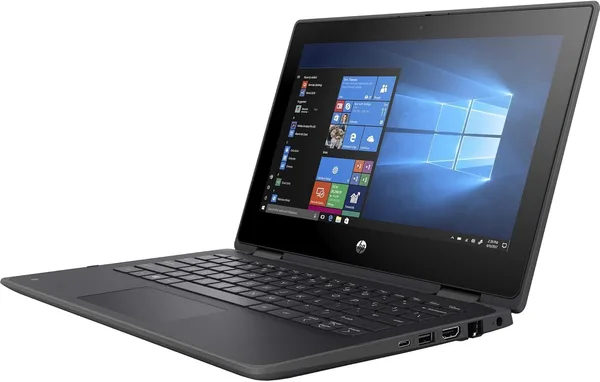
HP ProBook x360 11 G5 EE Review: Is This Budget 2-in-1 Worth It
The HP ProBook x360 11 G5 EE isn't built for video editing or crunching spreadsheets — it's a small, unfussy workhorse: an 11.6" touchscreen that folds into a tablet, a quad-core Pentium, and a price low enough that you won't panic if it takes a tumble down the stairs. Get it if you need a second, travel, or kid's laptop for browsing, Zoom, and documents — and skip it entirely if you're hoping for anything more.
Picture the scenario: your kid needs a laptop for school, your partner wants something light for reading email on the go, and you don't want to hand over your main machine to the risk of a spilled coffee. The classic dilemma — buy something good and expensive, or something cheap you won't cry over — and that's exactly the gap the HP ProBook x360 11 G5 EE is aiming for.
The "EE" in the name isn't decoration. It stands for Education Edition, meaning HP built this specifically for schools: a reinforced chassis, rubber corner bumpers, a hinge engineered to survive being flipped into tablet mode a hundred times a day by careless kid hands. And honestly, that's the device's biggest strength — not speed, not the screen, but the fact that it simply survives the everyday abuse that would kill a regular ultrabook in six months.
What this thing actually is
Inside sits a quad-core Intel Pentium, so video editing or heavy macro-laden spreadsheets are off the table entirely. This is a machine for browser tabs, Google Docs, Zoom calls, video streaming, and light school apps. In that role it behaves decently: the system boots, tabs stay open, and the fan — if there even is one, since the weak processor keeps things passively cooled — doesn't roar in your ear. Try opening 20 Chrome tabs while rendering something in the background, though, and you'll hit that same sluggish wall familiar to anyone who owned a netbook back in the mid-2010s.
The 11.6-inch touchscreen with 360-degree hinge rotation is the headline feature of the x360 format. Fold it into a tablet for reading on the couch, prop it up tent-style for watching a movie on a train, or flip it back to standard laptop mode for typing. The screen is small, so it's not the most comfortable choice for long stretches of text work — fonts run tiny and screen real estate is tight. But as a kid's laptop or a second device for "lying around with YouTube," it's exactly right.
What should you compare it against? The obvious rival in this niche is a Chromebook: also light, also cheap, also built for browser-based use, but running on ChromeOS with no full Windows and no offline software. The HP ProBook x360 wins by being a genuine Windows machine — you can install accounting software, your bank's desktop client, or whatever program school or work demands, instead of hoping a web version exists. Stack it against something like the Acer Aspire 3, and that one gives you more raw horsepower for roughly the same money — but no touchscreen and no folding into a tablet. It's a clear trade: form-factor flexibility versus straight-up performance.
Where it genuinely disappoints
Memory and storage in the budget EE-series configurations are traditionally modest — if you're the type who keeps mail, a messenger, several tabs, and something else running in the background all at once, the system will start bogging down sooner than you'd like. Second, this is strictly a "work" machine, not a "fun" one: gaming, heavy Photoshop, video editing — forget it. Third, the speakers and camera are firmly in "it works" territory, with zero pretense of quality video calls for anything important.
One more thing worth flagging: depending on the listing, this can be a used, refurbished, or stripped-down configuration, so check the actual condition in the seller's listing rather than going purely off the model name.
What it costs and whether it's worth buying
The HP ProBook x360 11 G5 EE is listed around $199.99 in its base configuration — check dede.sh for the full landed price to your country, item plus forwarding plus import duty rolled into one number. Whatever that figure comes out to, you won't be buying a brand-new full-spec ultrabook for it — but you will get a sturdy, compact backup machine.
Worth buying if: you need a cheap, durable laptop for a kid, a second "couch" device, or an inexpensive stand-in while your main machine is in for repair. Skip it if: you expect real multitasking speed, editing power, or gaming performance, or if a big, sharp screen matters to you — 11.6" is genuinely small.
My honest take: this isn't a "wow" purchase, it's smart frugality applied where it actually makes sense. Buy it with the right expectations, and it'll earn its keep without complaint.
FAQ
No, don't even try. This is an office-and-study machine running a Pentium chip — it's not built for anything heavier than browser games or the simplest casual titles. For gaming, look at dedicated models with a discrete graphics card.
For Google Docs, school portals, Zoom, and video streaming — absolutely, no problem. If your kid keeps a pile of tabs open while downloading large files at the same time, the system will start lagging sooner than you'd like. For a basic study workload, it's plenty.
If you need full Windows with classic desktop software and banking clients, get the HP. If your entire use case fits inside a browser and Google services, a Chromebook often runs faster and holds a charge longer for the same money.
If you'll actually use tablet mode — reading lying down, sketching with a stylus, watching video folded in half — yes, it's worth it. If you just want it "to have it," save the money and get a standard form factor without the 360-degree hinge.