Lenovo IdeaTab 11 (2.5K, 90Hz): Review and Should You Buy
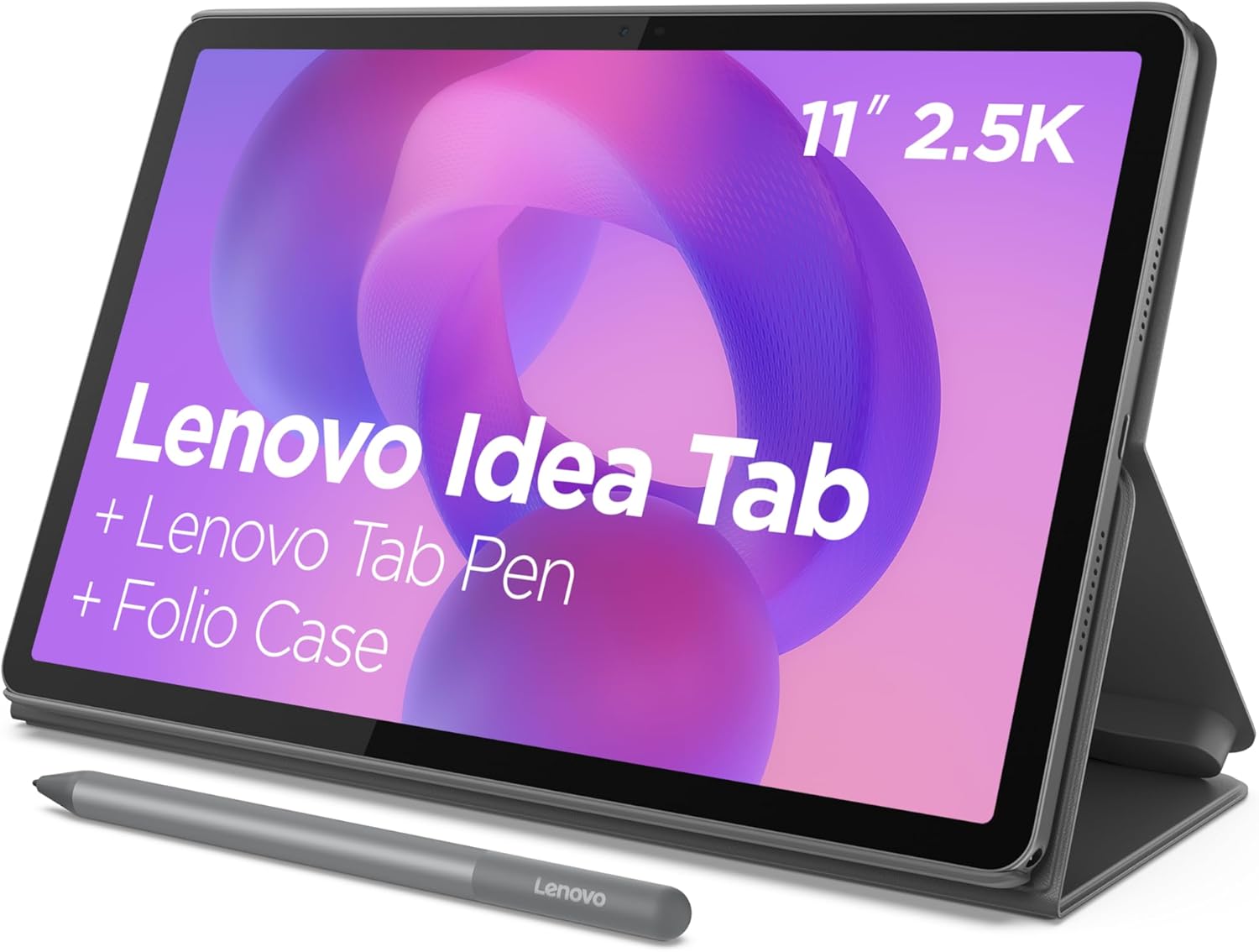
The Lenovo IdeaTab 11 isn't an iPad killer and doesn't even try. This is an affordable Android tablet with a genuinely solid 2.5K display and 90Hz refresh—it honestly delivers on being that "second monitor for lectures, notes, and late-night Netflix binges in the dorm." You get it if you need a tablet specifically for reading and note-taking at a reasonable price, not a mini-computer for heavy-duty work.
Picture a typical scenario: first semester, morning classes, your professor drops 40 slides worth of PDF in the chat, and you're stuck stretching text on your phone screen like taffy. Carrying a laptop every day is heavy and inconvenient—plus, not every class requires it anyway. That's exactly the use case the Lenovo designed the IdeaTab for: not a workstation, but a companion for lectures, note-taking, PDFs, and evening Netflix when you're too burned out to open textbooks.
The Screen Is Why You Should Look Here
The main feature here is an 11-inch IPS display at 2.5K resolution with 90Hz refresh rate. In the "up to three hundred dollars" tablet segment, this is genuinely rare: usually, you either get mediocre Full HD or stuck with 60Hz, period. But here, when you scroll through notes or your feed, the image doesn't stutter—text is crisp, tiny fonts in academic papers don't turn into mush. For someone spending hours reading PDFs or flipping through presentations, that's a noticeable difference, even if it seems minor at first glance.
Color accuracy doesn't claim to be professionally calibrated—photographers and designers will cringe. But for notes, books, YouTube lectures, and shows during study breaks, it's more than enough. The brightness handles even sun-facing classroom seats, though on direct sunlight, like any glossy display, it'll reflect glare.
Android 15 Instead of iPadOS—And That's a Compromise You Need to Understand Upfront
Here the tablet is honest: I'm not Apple. Android 15 on a tablet is always a slightly different story than on a phone: some apps still aren't optimized for the larger screen and look like stretched phone interfaces. Google is gradually improving the tablet ecosystem, many popular apps (Word, PDF readers, Zoom, note-taking apps like Notion) work fine, but if you depend on specific "iPad-only" niche software, better check before buying, not after.
That said, there's something budget iPad doesn't have: stylus compatibility and keyboard case support (Lenovo explicitly states accessory support), file system flexibility, and the ability to plug in a flash drive or external drive without gymnastics. For a student who wants to not just "browse" but actually work with files, this is a plus that isn't always obvious on paper but you feel every day.
The MediaTek Dimensity under the hood handles everyday tasks fine: notes, a browser with a dozen tabs, video, light games like Genshin Impact on medium settings. But this isn't the chip that'll pull heavy video editing or serious 3D rendering—and don't expect gaming laptop performance from it. If your main goal is studying and entertainment, not heavy computing, the performance has plenty of headroom.
Battery and What Annoys
The claimed 12 hours of battery life is a realistic figure for reading and video, though with maximum brightness enabled and heavy camera use, that number does drop, like any tablet. Should cover a full school day without hunting for outlets, and that's exactly why people buy these—not lugging chargers between classes.
What's annoying: the tablet weighs just over a kilogram (about 1.05 pounds without a case), and once you add the keyboard case and stylus (which sell separately), the whole kit stops feeling "light and compact" real quick. If you're planning on getting the full accessory bundle, calculate the total cost upfront—the base tablet price and the complete working setup are two very different numbers.
What to Compare It Against and Why Not iPad
This tablet usually gets compared to budget iPads and Samsung Galaxy Tab A, and that really depends on what ecosystem you already use. If you have an Android phone, files on Google Drive, and you're comfortable with that interface, the Lenovo IdeaTab will fit in naturally without friction. But if your family already has iPhone, MacBook, and AirPods, you'll have a smoother, longer experience staying in Apple's ecosystem, even if the base iPad costs a bit more.
On American Amazon, the tablet runs around $259, which for a display and refresh rate like this looks honest compared to competitors in that class. In the dede.sh catalog, you can immediately see the full price with shipping to your country and compare with other options in the laptops and tablets section before deciding.
Who Should Buy and Who Shouldn't
Get it if you're a student or teenager who needs a light screen for reading, note-taking, lectures, and video, and you're doing serious work on a desktop or laptop anyway. Get it if you value crisp text and smooth scrolling over the brand on the lid. Don't get it if you absolutely need the iPadOS ecosystem with specific apps, or if you're planning serious creative work on the tablet—editing, heavy design, 3D. Those need different kinds of hardware, and you should look there from the start rather than disappoint yourself later.
The main compromise here is honest and clear: a great display at a reasonable price in exchange for a mid-range processor and an Android ecosystem that isn't as polished everywhere as it could be. If you accept that, the tablet will earn its money with interest.
FAQ
For reading, note-taking, presentations, and online lectures—yes, plenty. If you need to write serious papers with tons of tabs, spreadsheets, and running multiple apps at once, you're better off having access to a laptop; the tablet is more of a supplement than a replacement.
If you're planning to handwrite notes or type long texts, yes—it transforms the tablet from a "viewing device" into a real work tool. If you just need a screen for reading and video, you can start without accessories and add them later if needed.
Depends on your ecosystem. This one has a better screen and refresh rate for the money on Android; iPad offers more stable software and longer update support. If you're already using iPhone, get the iPad; if not, Lenovo looks like the smarter choice for the screen-to-price ratio.
Light and medium games without issues; 90Hz even adds smoothness. Heavy 3D games on maximum settings—that's not its territory; gaming laptops are better for that.