Microsoft Surface Pro (2025) with Snapdragon: Review — Is the ARM version actually worth it?
The new Surface Pro with Snapdragon X Plus is a tablet that can actually function as a laptop, rather than the other way around. The battery life is impressive, and ARM is no longer a dealbreaker for most daily tasks. However, keep in mind that the keyboard and pen are sold separately, and you'll want to look elsewhere for heavy Photoshop work or gaming. If you need a lightweight machine for working on the go and you're comfortable with Windows on ARM, this is one of the best options in its class.
Picture this: you're on a long-haul flight, there isn't a power outlet in sight, and your workday has barely even begun. A traditional Intel-based laptop would likely be hitting 20% and panicking by now. That is exactly the scenario the new Surface Pro was built for.
Microsoft has been trying for years to prove that ARM processors in Windows aren't just a compromise for the sake of it. With the Snapdragon X Plus and its Copilot+ PC status, this Surface Pro represents their third or fourth attempt at this, and for the first time, it actually feels like they've nailed it. The octa-core Snapdragon handles everyday workloads—a browser with twenty tabs open, Office, Zoom, light photo editing—without those infuriating stutters that owners of the first ARM-based Surfaces remember so well. Plus, it doesn't run as hot as Intel's 12-inch tablets, and it won't start whirring its fans mid-call just when you're trying to look professional.
The real trump card here is battery life. Microsoft claims up to 16 hours, and while real-world use with high brightness and constant Wi-Fi will likely land you closer to 11–12 hours, it's a rare case where the marketing isn't total nonsense. Compared to, say, the Lenovo Yoga 7i on Intel Core Ultra—which is also a very capable 2-in-1—the Surface Pro wins the endurance battle hands down. The Yoga is more powerful and features a larger 16-inch screen, but you can't exactly wander far from a wall socket with it.
The 12-inch touchscreen is the dividing line: it will either win you over or drive you crazy. For text, reading, and stylus notes, it's perfect—compact and easy to hold with one hand while commuting. But if you're used to snapping two windows side-by-side on a 15-inch display, this will feel cramped. This is a device meant for one active window at a time, and frankly, that's fine for 80% of professional tasks—you just need to realize that before you buy it, not after.
Now, let's address the elephant in the room: Windows on ARM. Yes, compatibility with legacy x86 software is no longer the disaster it was five years ago. The Prism emulation layer works quite well; most popular software either has a native ARM version or runs via emulation without significant performance hits. However, there are exceptions. Niche enterprise software, specific peripheral drivers, heavy CAD programs, or games with kernel-level anti-cheat can still cause headaches. It's worth checking compatibility before you unbox it. If your workflow is standard Office and a browser, you have nothing to worry about. If you're editing complex video timelines or playing heavy AAA titles, this isn't your machine. Period.
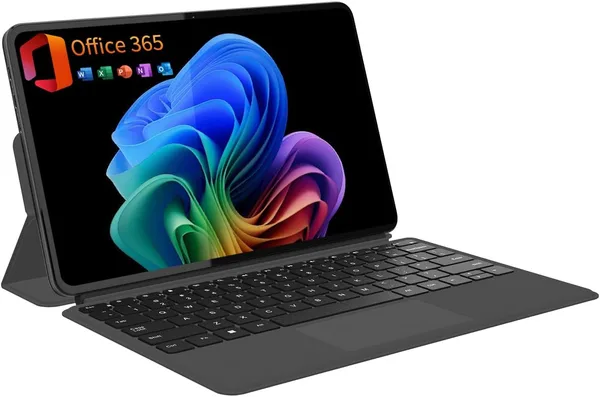
One thing that often trips up new buyers: the Type Cover keyboard and Slim Pen are separate accessories, not included in the box. Without the keyboard, the Surface Pro is just a very nice Windows tablet; if you're expecting a full laptop experience straight out of the box, be prepared to spend more. This isn't just Microsoft being greedy—it's how the entire Surface lineup has functioned for years—but it still catches people off guard.
Compared to more budget-friendly 2-in-1 hybrids like a 12-inch 2-in-1 with a magnetic keyboard, the Surface Pro wins on build quality, display, and that Copilot+ status with a dedicated NPU for local AI features. But it comes at a premium—see the full landed price to your country on dede.sh. The cheaper alternative often makes more sense for someone who just needs a tablet-laptop hybrid for note-taking and streaming movies on a plane, without needing a full-blown workstation.
Who is this for? People on the move—journalists, consultants, and students who take handwritten notes and need a device that lasts until the end of the day without hunting for a plug. It's also great for creatives who only need light photo and text editing. If you're already in the Microsoft ecosystem and want something ultra-portable, silent, and cool to the touch, this is it.
Who should skip it? Developers relying on specific x86 tooling, gamers, video editors, and anyone who finds 12 inches too small for a productive workspace. They are better off looking at traditional Intel or AMD laptops with larger screens—you'll sacrifice some battery life, but you won't have to worry about software compatibility.
FAQ
If your top priorities are battery life and silence, then absolutely. The ARM chip is significantly more efficient than any Intel alternative in this specific form factor. However, if you rely on niche x86 software that lacks an ARM version, check compatibility before you buy rather than hoping emulation will save you.
They are different tools for different jobs. The Surface Pro is more compact, lighter, has better battery life, and is much more natural as a tablet. The Yoga 7i is more powerful with a larger screen, making it better if you plan to use it primarily in laptop mode.
For a single active window—email, browsing, or writing—it's more than enough. For heavy multitasking or complex video editing, it gets cramped very quickly, and you'd be better off with a larger screen.
You almost certainly need the keyboard; otherwise, it's just a tablet, not a true 2-in-1. The pen is optional, depending on whether you actually plan to write or draw rather than just typing.