ASUS Chromebook Flip CX1 Review: Is It Worth Buying in 2026
The ASUS Chromebook Flip CX1 isn't a replacement for a full laptop — it's a second device: light, nearly indestructible, and immune to viruses because the whole operating system is essentially a browser. If your life already runs on Google Docs, Gmail, and YouTube, buy it without a second thought. If you need Photoshop, gaming, or offline Excel with heavy macros, walk on by.
Picture this: your kid heads off to school and needs a laptop for Google Classroom — something that can get tossed in a backpack without a second thought, survive a fall off a chair, and never leave you reinstalling Windows after another "antivirus" downloaded off a torrent. That's exactly what ChromeOS exists for, and it's where the ASUS Chromebook Flip CX1 does its job almost flawlessly.
What this thing is, and why "Flip"
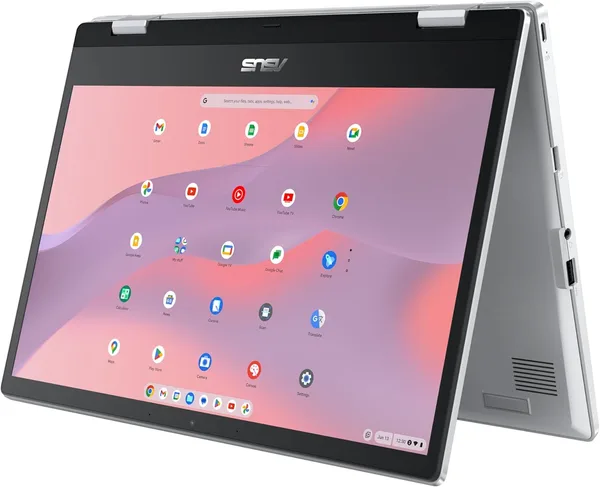
The name doesn't lie — the screen genuinely folds a full 360 degrees, turning a 14-inch laptop into a somewhat clunky but functional tablet. Clunky because this isn't an iPad; you feel the thickness and weight the moment you try holding it one-handed on the couch. But for showing grandkids photos or signing a document with your finger, it does the job just fine.
The FHD IPS panel isn't the brightest on the market, but it has decent viewing angles and an anti-glare NanoEdge coating that genuinely shrinks the bezels and makes the whole thing feel more compact than its 14 inches suggest. The touch layer is responsive with no noticeable lag — you'll notice that the second you tap into the settings menu.
Day to day: what living with it is actually like
This is where the real question with any Chromebook lives — how uncomfortable is it to go without Windows or macOS. The answer: annoying for the first two days, then you forget there's anything to get used to. Mail, docs, Zoom calls, streaming — everything opens in seconds because the system boots almost instantly, and crucially, it doesn't slow to a crawl after a year of use the way aging Windows laptops do once they're loaded down with background processes.
The keyboard has springy, short-travel keys that feel good under the fingers — typing long documents is comfortable, though it's missing backlighting for working in the dark, which is a real ding at this price point. The trackpad is solid, and gestures track reliably.
Where the CX1 shows real character is battery life. A genuine 9-10 hours on a single charge under normal browser-and-docs use, and that's not a marketing number off the box — it's what you actually get in practice. Compared to a typical Windows laptop at the same price, where the battery taps out after 4-5 hours of video calls, the difference is something you physically feel — no dragging a charger to class or the coffee shop.
Performance is where honesty matters most. Inside is an Intel N-series chip built for light web tasks and nothing more. Open 20 Chrome tabs with YouTube running in the background, and the system starts to stutter. ChromeOS was never built for heavy multitasking — it's designed for a linear "open it, do the thing, close it" rhythm.
The obvious rival
This laptop gets compared most often not to other Chromebooks, but to budget Windows laptops in the same price range — think a basic office laptop with a Celeron chip and 4GB of RAM. The gap is obvious immediately: Windows on that kind of hardware crawls at startup, while ChromeOS on comparable hardware feels far snappier because the architecture is simply lighter. But the Windows machine gives you offline Office, local games, and full Photoshop — things the CX1 simply can't do, not because of weak hardware, but because it's not built to.
Stack it up against other Chromebooks — the Acer Chromebook 315, say — and the CX1 wins on the touchscreen and tablet conversion, losing only slightly on storage in base configurations. For some buyers, cramming "laptop plus tablet" into one body is the argument that settles it.
Price and what it actually means for you
On the US marketplace this device runs a bit over the price of a nice dinner out, times a hundred — not the rock-bottom budget tier, but not premium either. The number that matters isn't the sticker price on some overseas listing anyway: check the full landed cost — device plus forwarding plus import duty, rolled into one figure — for your own country on dede.sh, since local retailers often mark up comparable Chromebooks well past that once import margins get added on.
The honest verdict
Buy it if: you're a parent of a school or university student who works mostly in browser-based tools; you want a second, "expendable" laptop for travel where you're nervous about bringing your main work machine; or you're just tired of Windows updates and want something that turns on and works.
Skip it if: you edit video, play anything more demanding than browser games, or rely on corporate software that only runs on Windows. And here's a detail that's easy to overlook — offline functionality in ChromeOS is limited, so if your internet connection is unreliable or you deal with frequent power outages, that's a real hit to daily comfort, not just a theoretical footnote.
The biggest trade-off here isn't performance — it's the ecosystem. Buy the CX1 and you're buying a ticket into Google's world, and there's barely a way back short of selling the device. The second trade-off is the missing keyboard backlight — a small thing, but exactly the kind of small thing that grates the most in daily use.
FAQ
For lectures, notes, Google Docs, and Zoom — absolutely. For engineering software like AutoCAD or heavyweight statistical tools — no, you'll need a regular Windows laptop for that.
Honestly, no — don't pay extra for a touchscreen you won't use. But on the CX1, the touch layer and tablet conversion are already baked into the base configuration rather than a separate upcharge, so the question kind of answers itself.
If all you need is a browser, email, and documents, the Chromebook wins on speed and battery life. If you need offline Office, gaming, or specific software, go Windows — even if it's a bit slower to boot.
The chassis is sturdier than the average budget laptop, and the hinge is built for constant folding. But it's not a tank — a drop from desk height onto tile flooring gives no laptop good odds.
Similar products worth a look before you buy: