Creality CR-Scan Ferret Pro Review: Is This 3D Scanner Worth Buying
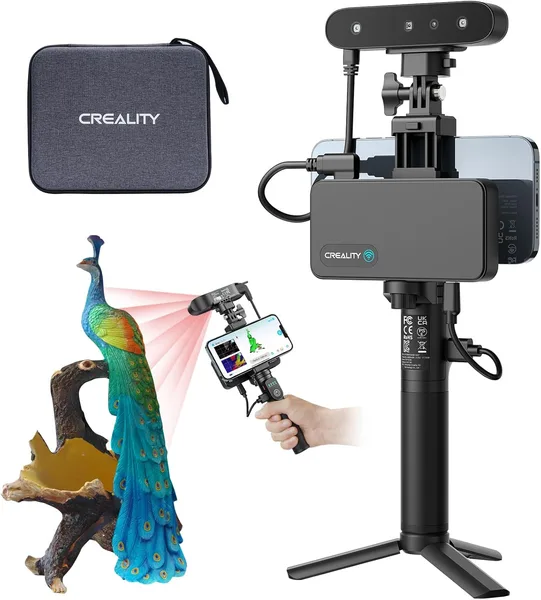
The Ferret Pro is a compact handheld 3D scanner that genuinely captures parts you can print from, not just an "approximate shape for a picture." It's more accurate and easier to use than the older Ferret, but the cable, the limited scanning area for large objects, and the learning curve make it a tool for people who digitize parts regularly — not a one-time novelty toy.
Picture this: a plastic clip on your food processor snaps off, and it's been out of production for years. Or you need to copy your kid's toy while it's still in one piece, because it definitely won't survive another week. In the past your options were either wrestling with calipers and CAD or just giving up. Now there's an easier route — trace the object with a handheld scanner and get a print-ready STL. That's exactly what Creality built the CR-Scan Ferret Pro for.
What this actually is
This isn't the kind of scanner that produces a pretty colorful model for Sketchfab — though it does capture texture decently too. The Ferret Pro is built for reverse engineering: parts, enclosures, mechanical pieces, everything destined for Fusion 360 or straight into a slicer. It has two capture modes — with markers (dot stickers placed on or around the object) and without, relying on the surface's own structure. For small parts with clean edges — boxes, brackets, handles — the marker-free mode works surprisingly well, and that's exactly the scenario people buy this thing for.
The main thing separating the Pro from the regular Ferret is higher accuracy (the manufacturer claims something around 0.1mm) and a wider field of view. In practice that translates to fewer "patches" when stitching a scan together and fewer repeat passes around the object to close holes in the model. With the original Ferret I personally spent twice as long catching all the angles of a small part — here it's noticeably faster.
How it works in your hands, not in a demo video
Here's where the honest conversation starts. In promo videos the scanner glides around the object smoothly like a drone and spits out a perfect model in 30 seconds. In real life, your first few scans will most likely be full of holes, jumpy tracking, and a nagging feeling of "am I even holding this thing right." That's normal — there's a learning curve, and it takes about two or three evenings of practice before your hand settles into the right speed and distance.
The cable deserves its own paragraph. The Ferret Pro connects to your phone or tablet by wire (there's also a USB-C laptop version), and that's both a plus and a minus. The plus: no worrying about the scanner's own battery or Wi-Fi lag. The minus: the cable keeps snagging on things as you walk around the object, especially if you're scanning something on a table rather than holding it in your hand. You get used to it, but the first few times it's genuinely a bit awkward, no way around that.
Lighting matters more than you'd expect. In a room with harsh side lighting or near a window on a sunny day, tracking wanders — the scanner reads shadows as changes in geometry. Even, diffuse light and everything becomes much more stable. This isn't unique to this particular scanner — nearly every structured-light scanner in this class behaves this way — but it's worth knowing upfront rather than learning it the hard way.
Compared to competitors on the market — the Revopoint POP or Einscan — the Ferret Pro wins mainly on software convenience. Creality Scan (available as both desktop and mobile apps) is more intuitive than the competition and gives you a mesh preview right away, not just a point cloud. For a beginner that's a big deal — you see the problem immediately, not after an hour of processing on your computer.
Who genuinely needs this
If you're someone who regularly restores parts for appliance repairs, builds custom brackets, or digitizes prototypes for further CAD editing — this is your tool, and it pays for itself pretty quickly compared to the hours you'd spend on manual measurements. Cosplayers and model makers get a lot out of it too — digitizing a helmet shape or a costume piece and then finishing the details in software beats sculpting from scratch by a wide margin.
But if you just want to "scan something for fun" once every six months, this is an expensive toy for that use case. And for very large objects — furniture, car parts — the Ferret Pro isn't the best pick either; look toward scanners with a wider capture field or straight-up photogrammetry instead.
For the full cost with shipping and import duty to your own country, check the landed price on the product page before ordering. Compared to the previous non-Pro Ferret, the price difference is noticeable, but so is the jump in accuracy — for work meant to be printed, not just admired as a picture, the premium is justified.
The main trade-off here is simple: this scanner demands time to learn and careful shooting conditions (lighting, a steady hand, object size). It doesn't work magic with one button press. But if you're willing to invest in the skill, the payoff genuinely elevates home 3D printing from "printing ready-made models off the internet" to "printing exactly what I need."
FAQ
If you're planning to scan small parts for precise printing (replacement broken parts, brackets, mechanisms) — yes, it's worth it. The accuracy difference shows up exactly on small objects where every millimeter counts. For large simple shapes, the premium is less justified.
Creality's software is friendlier and clearer right from the first launch, so as an entry point into the hobby, the Ferret Pro is more comfortable. But if a wider scanning field for medium-sized objects matters more to you, compare the specs of both before buying.
For most household repair jobs — yes, after a bit of mesh cleanup in CAD. For very tight fits (bearings, for example), it's still worth double-checking the scan with calipers; relying on the scan alone is risky.
The software isn't too demanding and runs even on mid-range smartphones, but for comfortable processing of large, textured scans a decent laptop helps — mesh processing eats resources.