Creality K2 SE Review: Is It Worth Buying Over the K2 Plus
The K2 SE is a "trimmed-down" K2 Plus: the same CoreXY frame, the same claimed 500mm/s, but a smaller chamber and multicolor only if you buy CFS separately. For the price of a basic Ender, you get a metal box that prints fast and without drama — but "Multi Color" in the name is a bit of a stretch. Worth buying if you genuinely plan to add CFS later, or if you print single-color and just want speed without a calibration nightmare.
Know that feeling when you start a six-hour print in the evening and wake up to a pile of spaghetti instead of a fan housing? That's exactly the feeling people are trying to avoid when they move from cheap bedslinger printers to CoreXY machines like the K2 SE. I tested this thing for about two weeks, printing everything from functional brackets to silly figurines, and I've got things to say — not all of them glowing.
What this printer actually is
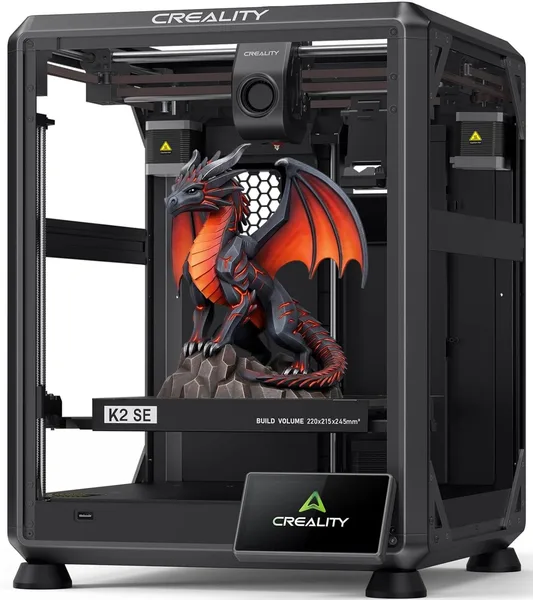
The Creality K2 SE is the little sibling of the flagship K2 Plus, and it shows. Same idea: an enclosed-to-semi-enclosed metal frame, CoreXY kinematics (not a cheap bedslinger where the bed flies back and forth shaking the whole machine), claimed speeds up to 500mm/s. In practice, as always happens with "up to" figures, the comfortable working speed sits somewhere around 200-300mm/s on PLA with decent surface quality; go higher and you're trading print quality for speed. But even that's several times faster than a typical Ender.
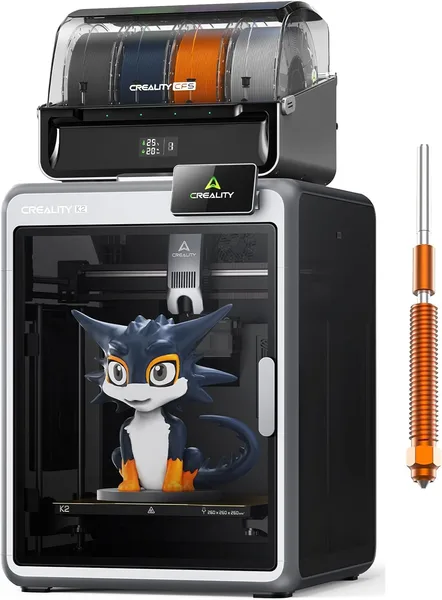
The main hook in the name is "Support Multi Color 3D Printing." Technically true, practically not. The K2 SE out of the box prints one color. To get multicolor, you need the CFS (Color Feeding System) — a separate filament feed unit, sold separately, that costs extra money and takes up extra desk space. This isn't false advertising — the manufacturer honestly notes "Needs CFS" in fine print — but at first glance, a lot of buyers don't read that far. If you're buying this specifically to print multicolor "out of the box," this isn't the printer for you — look at the combo bundles instead.
The metal frame is noticeable immediately: the printer doesn't ring or wobble at high speed the way plastic-framed builds do. Auto-leveling is done decently — in my first two weeks, not a single print failed from bad first-layer adhesion, and for me personally that's the biggest quality indicator, more than raw speed.
Where it shines, and where it's annoying
It shines on simple to medium-complexity parts where batch speed matters. Printing a run of brackets or enclosures for a project, the K2 SE handles it noticeably more briskly than a classic Ender 3, without the calibration dance you'd get from an older DIY CoreXY build. Noise is moderate — not silent like top-tier enclosed models, but not the kind of racket that wakes up your neighbor either.
What's annoying — the camera. On the K2 SE it's more basic than on the K2 Plus and doesn't always give you the same convenient monitoring view you'd get used to on the top-tier models. Also annoying: getting the full multicolor experience means buying CFS separately, meaning the real "entry ticket" into multicolor ends up costing more than the printer's own listed price. And one last thing: there's no active chamber heating here, so ABS or other temperature-demanding plastics aren't the best scenario — stick to PLA/PETG unless you're willing to work around it.
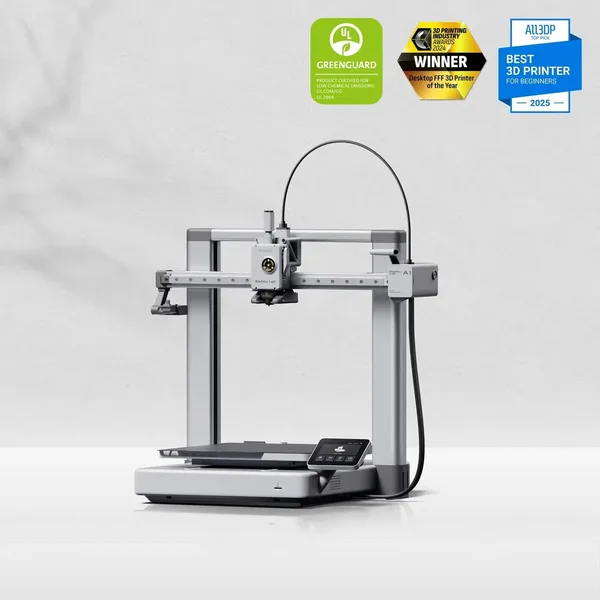
Compared to the Creality K2 SE, the main competitor in a buyer's mind is the Bambu Lab A1. The A1 also needs a separate unit for multicolor (AMS lite), but Bambu's app ecosystem has years of polish behind it and is usually friendlier for beginners. The K2 SE instead gives you more "hardware for the money": a stiffer frame, a higher claimed speed ceiling. If your priority is just pressing a button and not thinking about it, get the Bambu. If you like tweaking settings and don't mind fiddling with profiles a bit, the K2 SE won't disappoint.
How much it costs and who should buy it
The printer itself starts at around $218 — already a better deal than many direct CoreXY competitors in this speed class, and substantially cheaper than the flagship K2 Plus Combo. On top of that, factor in shipping and customs; for the full cost with shipping and import duty to your own country, check the landed price on the product page rather than the bare listing price.
Worth buying for anyone who prints mostly single-color and wants speed and a rigid frame for reasonable money — students, workshops, anyone doing prototypes or functional parts in batches. Not worth it if multicolor is the main reason for buying: either go straight for a combo bundle with CFS included, or budget for the add-on ahead of time, because otherwise you'll end up with a "single-color" printer priced as if it were built for multicolor. And one more honest trade-off — the camera and monitoring here are weaker than on the higher-end models in the lineup, so if you're used to watching your print through an app with a good picture, expect a more basic experience.
FAQ
No. Multicolor is advertised in the name, but it actually requires a separate CFS unit, purchased additionally. Without it, the K2 SE is a regular single-color printer, albeit a fast one.
If you want simplicity and a polished app, go Bambu Lab A1. If you're willing to fiddle with settings a bit in exchange for a stiffer frame and a higher claimed top speed, go K2 SE. Both require an extra purchase for the multicolor module.
Technically the nozzle handles high temperatures, but there's no active chamber heating, so tricky plastics like ABS will run into warping issues on larger parts. For PLA and PETG the printer works well; for demanding materials, not so much.
If you need multicolor regularly rather than as an occasional novelty — yes, the combo bundle works out cheaper and more convenient than buying CFS separately later.