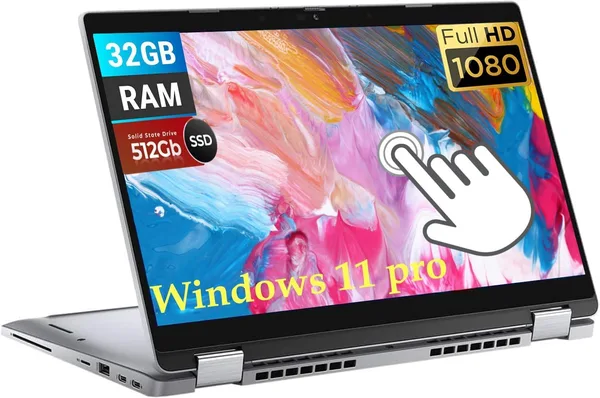
Dell Latitude 5320 2-in-1: is this convertible worth buying in 2026?
The Dell Latitude 5320 2-in-1 isn't about "wow" — it's about "it works, and works well." A touchscreen 13.3-inch display, an i7-1185G7, 32GB of RAM, and a metal chassis, at a price that would look laughable on the new market. Buy it if you need a machine that lasts for years, not one that photographs well for Instagram.
Picture the scene: a deadline's looming, the coffee's run out, and your laptop takes three seconds to think before opening a second Chrome tab. Sound familiar? That's exactly why people go looking for something like the Dell Latitude 5320 2-in-1 — not the newest, not the prettiest, but something that simply doesn't let you down.
I tested this model for a few weeks in "regular office day" mode: mail, a dozen tabs, Zoom calls, some Excel with heavy spreadsheets, and, I'll admit it, 200-page PDF reports. The first impression that stuck after that marathon: the Latitude 5320 is that rare case where Dell's business line genuinely lives up to its "workhorse" reputation, rather than it just being a sticker on the lid.
What this thing actually is
It's a 13.3-inch convertible with a touch FHD display (1920x1080) that folds into tablet mode — awkward, honestly, as a tablet given the weight, but useful when you need to quickly sign something with a finger or show a client something across the meeting table. The main selling point is the Intel Core i7-1185G7 processor (3.0-4.8GHz), the same 11th-gen chip that used to go into top-tier ultrabooks. Paired with 32GB of RAM and a 512GB SSD, that gives you years of headroom — even if a year or two from now you're keeping Teams, a 30-tab browser, and a hefty Photoshop file open at the same time.
Compared to what's usually on offer in this price range — think an Acer Aspire 3 or similar budget models with 8GB of RAM — the difference is immediate. 32GB of RAM on a business-class laptop isn't "just in case," it means you forget what system slowdown from insufficient RAM even feels like. On an Aspire 3 with its Ryzen 3 and 8GB, you'll hit a performance ceiling within half a year of active use, especially if you work with anything heavier than a browser and Word.
The keyboard, the build, and what you won't see in photos
Latitude is the line Dell builds for corporate procurement, and it shows in the details: keyboard backlighting that's genuinely even (not "glowing at the edges"), keys with a crisp, quiet action — you can work at night next to a sleeping child and not wake anyone. The chassis is metal, not the kind of plastic that flexes under your palm while typing. The trackpad is precise, without the cursor "jumps" that are so annoying on cheaper models.
What I didn't like: the touch tablet mode is more of a marketing feature than a daily tool. The thickness and weight make themselves known, and holding this "tablet" in one hand for long stretches is uncomfortable. If you're buying it specifically for the tablet transformation, look at lighter solutions instead. If you only need the touchscreen occasionally — for stylus notes or quick taps on the interface — it's fine as is.
What about gaming or heavy editing?
Honestly — no, not really. That's not its game. The Intel Iris Xe graphics handle 4K YouTube, light photo editing, even Photoshop in moderate doses, but serious gaming or 4K video editing is out. For that, look at something with discrete graphics, like the MSI gaming line. The Latitude 5320 is a tool for text, spreadsheets, presentations, and video calls, and in that role it genuinely has no equal in its price segment.
What it costs, and whether it's worth it
On the secondary market, where most configurations like this originate (32GB of RAM on a Latitude 5320 is already an upgrade rarely found new), the listing holds at around $449.99. For that sum you get more than just a laptop — you get a machine that was once built under a corporate contract with elevated reliability requirements, an entirely different tier of component quality than "consumer" models at similar money.
The main advice: don't chase the brand for its own sake. If your work is mostly office tasks, lots of tabs, and a craving for a laptop that simply "doesn't think" — the Latitude 5320 closes that question completely, and for a long time.
Who should buy it, and who shouldn't
Worth buying if: you work remotely or in an office with heavy multitasking, value build quality over trendy features, and need a machine for 4-5 years without upgrades. 32GB of RAM here is literally future-proofing that will pay off as browsers and corporate software inevitably keep getting heavier.
Not worth buying if: weight is critical for you (this isn't the lightest model in its class), you need discrete graphics for gaming or editing, or you're looking for a laptop purely for the tablet mode — here it's a secondary bonus, not the main feature.
The main compromise you'll have to accept: this isn't the thinnest or sexiest laptop on the market. The design is strict, corporate, without flourish. But that very "boringness" is exactly why machines like this last longer and break down less often.
FAQ
For office tasks, browsing, and even light photo editing — plenty, with room to spare. It's not the newest chip, but with 32GB of RAM the system won't feel strained for a long while yet. Just don't expect gaming-level performance from it.
If your budget is tight and your tasks are simple, the Aspire 3 will manage. But if you plan to keep the laptop for years and work with heavier applications, the Latitude 5320 with 32GB of RAM and a metal chassis wins on durability-per-dollar.
If you plan to actually use tablet mode regularly — yes. If it's a "just in case" feature, don't stress over it; the model's real value isn't in the transformation, it's in the hardware and build quality themselves.
Yes, with room to spare — 32GB of RAM and a 512GB SSD comfortably cover several years of study, including specialized software like AutoCAD in light modes. For heavy engineering calculations, look at models with discrete graphics instead.
If you're torn between a few options, take a look at the neighbors in the laptop catalog — there are both cheaper and more powerful choices there.